Well, it’s not overheating, so is it power or current limiting?… What’s your PL1/PL2 set to? Should be PL1=PL2=253W, I believe, for both the 14700k & 14900K… There have been issues with the 14700k and 14900k, where motherboard manufacturers are setting rediculous defaults for these CPUs (just like they did for the 7800X3D and were controversially blowing them up). Default Intel specs for current it 307A, I think.
Firstly, check that the Intel Specs have been set as defaults in the BIOS! PL1=PL2=253W, Current Limit = 300A, MCE=Disabled (multi-core enhancement = disabled), SVid Behaviour = Normal/Standard/Trained (I think trained is actually a slight undervolt, but try normal/standard first, then trained afterwards)…
If it is power throttling, and it’s at the correct 253W, then try undervolting to reduce power consumption…
Depending what you are actually doing with the chip, consider some advanced tuning; if you ONLY play games, then disable Hyperthreading, and half of the e-cores too, would be fine. Probably… Check the games you play before and after, because the majority of games will get slightly better average fps, and even more significantly better 1% low fps with HT disabled, however there a couple that actually do benefit slightly from HT enabled.
The reason is that Hyperthreading actually has a slight system overhead, so disabling reduces system latency induced by the extra scheduling of HT… Most games actually don’t use more than 8 cores (with most not even using 8, even!), so hyperthreading on an 8P-core CPU is kinda pointless for games. Sure, if you were running a 4core or 6core CPU, it would be useful to leave HT enabled, but since they introduced e-cores, you can let all 8 p-cores be assigned to a game, and the e-cores are still available for background tasks.
Also, whilst this doesn’t affect it’s speed, you will find that HT disabled will reduce the CPU power draw significantly in games, (well, right across the board but it’s games we’re talking about here), so it’ll run cooler and quieter too.
Regarding the e-cores, I’m sure I read somewhere that the second group of e-cores have a lower speed access to the cache, so they underperform the first group of e-cores. I may be completely wrong, misremembering this, or mis-quoting or mis-understanding, however, how many background processes are there in a system?!… If a six core CPU can run Windows at an idle desktop with zero strain, then surely 6E-cores can run Windows in the background to a game that is residing on all the P-cores?!… Again, don’t take my word, “trust me bro” style, test it for yourself, but I’d assume that there is zero gain in most situations from having all 12E-cores enabled…
With both HT & 6E-cores disbled, your CPU might actually suck a lot less power during gaming, run faster overall in gaming, run cooler, and run quieter. (and if I am correct about the cache/e-core relationship, then disabling HT and half the E-cores should actually reduce latency across the board, making Windows itself feel slightly more snappy.)
Please bare in mind that I don’t have, nor have I worked on 13th or 14th gen, however I do have a lot of live experience over decades of computer building, modding & tweaking… I am, to a degree, taking the knowledge that I’m sure of and extrapolating it forward onto the latest Intel CPU generation.
(I do have, and have worked on multiple 12th gen, but there are some architectural differences to 13th & 14th… I have been working on computers since before the PC was a thing. And I do have a degree in Electrical and Electronic Engineering specialising in Computer Electronics and Robotics… Point being, I am giving you advice based on a very well educated guess, rather than empirical fact, so please verify my suggestions by benchmarking before and after)
Mezitury
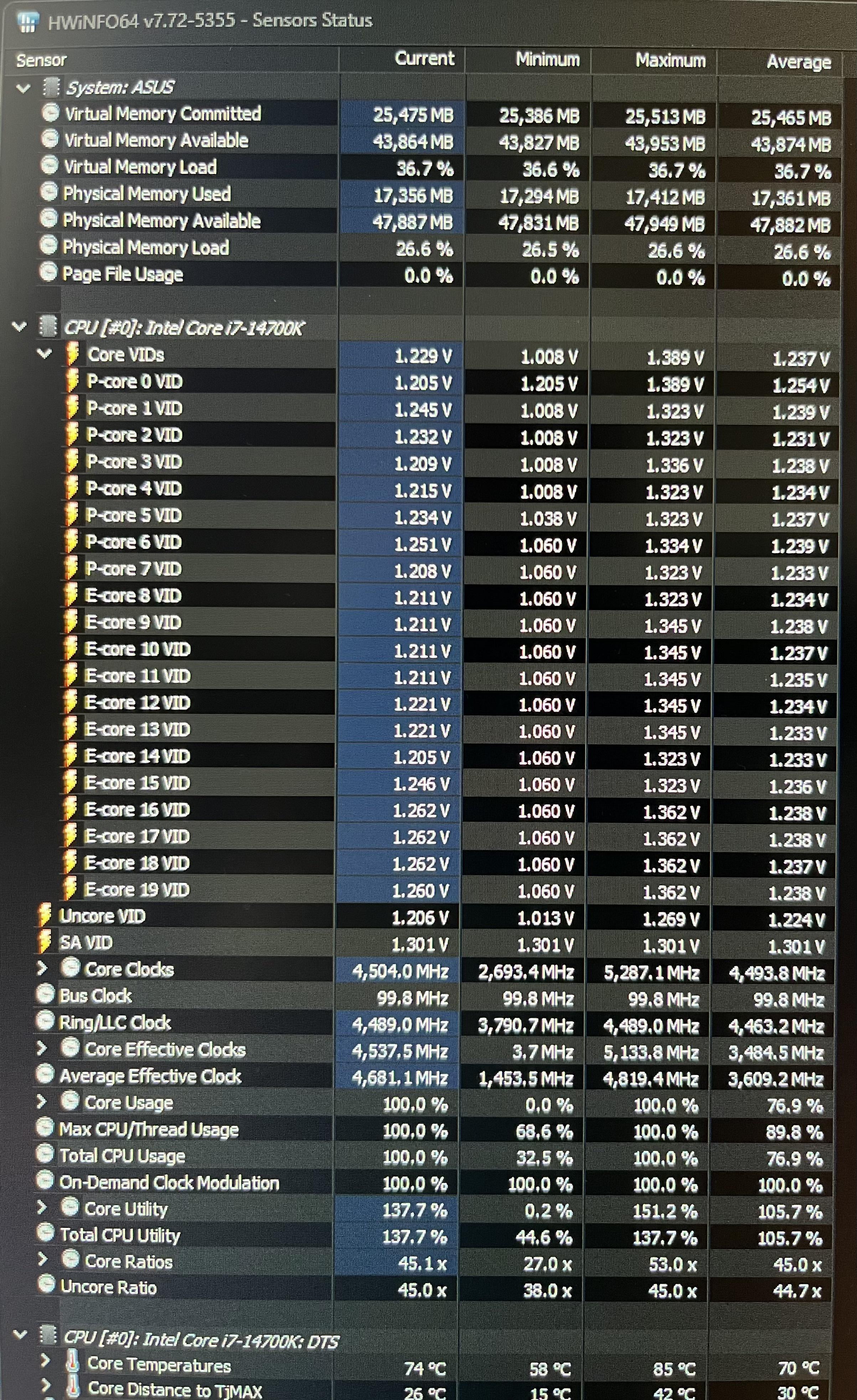
Average effective clocks going to be lower than your highest clock.
Go look into the individual cores speeds.
I believe there is also a setting that locks the cache speed to the core speed.
I know I have something like that off for my 13700k, running your voltage (honestly slightly lower) with a 5.7ghz p-core (4 cores or less) and 5ghz cache.
Vf curve voltage can be set as well for the overclock/undervolt and normal peak speeds. Mines down -225mv. Each varies though.
Personally I find it silly to disable any cores. People that recommend that should have gone to amd.
Instead. Be smarter and download quickcpu. It’ll allow Windows to park cores (I set mine at 50%) that are unused and also optimizes core selection better.

3 Comments
Is this under load?
The clock speeds seem really slow
Well, it’s not overheating, so is it power or current limiting?… What’s your PL1/PL2 set to? Should be PL1=PL2=253W, I believe, for both the 14700k & 14900K… There have been issues with the 14700k and 14900k, where motherboard manufacturers are setting rediculous defaults for these CPUs (just like they did for the 7800X3D and were controversially blowing them up). Default Intel specs for current it 307A, I think.
Firstly, check that the Intel Specs have been set as defaults in the BIOS! PL1=PL2=253W, Current Limit = 300A, MCE=Disabled (multi-core enhancement = disabled), SVid Behaviour = Normal/Standard/Trained (I think trained is actually a slight undervolt, but try normal/standard first, then trained afterwards)…
If it is power throttling, and it’s at the correct 253W, then try undervolting to reduce power consumption…
Depending what you are actually doing with the chip, consider some advanced tuning; if you ONLY play games, then disable Hyperthreading, and half of the e-cores too, would be fine. Probably… Check the games you play before and after, because the majority of games will get slightly better average fps, and even more significantly better 1% low fps with HT disabled, however there a couple that actually do benefit slightly from HT enabled.
The reason is that Hyperthreading actually has a slight system overhead, so disabling reduces system latency induced by the extra scheduling of HT… Most games actually don’t use more than 8 cores (with most not even using 8, even!), so hyperthreading on an 8P-core CPU is kinda pointless for games. Sure, if you were running a 4core or 6core CPU, it would be useful to leave HT enabled, but since they introduced e-cores, you can let all 8 p-cores be assigned to a game, and the e-cores are still available for background tasks.
Also, whilst this doesn’t affect it’s speed, you will find that HT disabled will reduce the CPU power draw significantly in games, (well, right across the board but it’s games we’re talking about here), so it’ll run cooler and quieter too.
Regarding the e-cores, I’m sure I read somewhere that the second group of e-cores have a lower speed access to the cache, so they underperform the first group of e-cores. I may be completely wrong, misremembering this, or mis-quoting or mis-understanding, however, how many background processes are there in a system?!… If a six core CPU can run Windows at an idle desktop with zero strain, then surely 6E-cores can run Windows in the background to a game that is residing on all the P-cores?!… Again, don’t take my word, “trust me bro” style, test it for yourself, but I’d assume that there is zero gain in most situations from having all 12E-cores enabled…
With both HT & 6E-cores disbled, your CPU might actually suck a lot less power during gaming, run faster overall in gaming, run cooler, and run quieter. (and if I am correct about the cache/e-core relationship, then disabling HT and half the E-cores should actually reduce latency across the board, making Windows itself feel slightly more snappy.)
Please bare in mind that I don’t have, nor have I worked on 13th or 14th gen, however I do have a lot of live experience over decades of computer building, modding & tweaking… I am, to a degree, taking the knowledge that I’m sure of and extrapolating it forward onto the latest Intel CPU generation.
(I do have, and have worked on multiple 12th gen, but there are some architectural differences to 13th & 14th… I have been working on computers since before the PC was a thing. And I do have a degree in Electrical and Electronic Engineering specialising in Computer Electronics and Robotics… Point being, I am giving you advice based on a very well educated guess, rather than empirical fact, so please verify my suggestions by benchmarking before and after)
Average effective clocks going to be lower than your highest clock.
Go look into the individual cores speeds.
I believe there is also a setting that locks the cache speed to the core speed.
I know I have something like that off for my 13700k, running your voltage (honestly slightly lower) with a 5.7ghz p-core (4 cores or less) and 5ghz cache.
Vf curve voltage can be set as well for the overclock/undervolt and normal peak speeds. Mines down -225mv. Each varies though.
Personally I find it silly to disable any cores. People that recommend that should have gone to amd.
Instead. Be smarter and download quickcpu. It’ll allow Windows to park cores (I set mine at 50%) that are unused and also optimizes core selection better.