
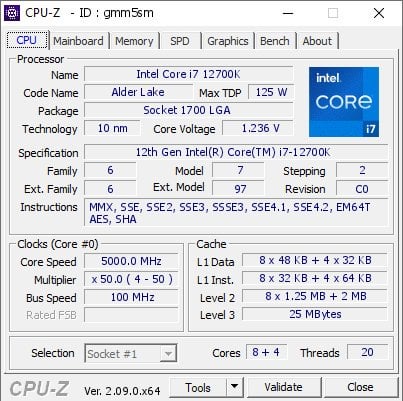
I seriously am losing my mind as to why my 12700K is performing so awfully. It's like up to 25% behind where it should be in every test, almost like it's a 12600K.
My memory is 3600Mhz DDR4, clocks are pegged at 5Ghz for every test, E cores at 4Ghz, no thermal throttling (360mm AIO), no background programs or tasks, and yet, the issue persists. Is there a way to like actually validate that this CPU is real? Are fake CPUs a thing? I've heard of them in GPUs.
Here's some scores for reference:
Cinebench R23: absolute max score I can pull was 21.7K, it's usually closer to 21 (19K when I wasn't running as admin, someone suggested that). Apparently this CPU does 22.8K at stock settings, and I see people citing 24-25k to be expected for my overclock.
3DMark Time Spy Extreme: CPU score of 6321. Average score appears to be in the high 7000s/low 8000s at same clocks.
Power draw is as expected, around 200-220w.
Wtf is happening.
Edit: well, here's a CPU-Z benchmark that appears to show my performance where it should be https://valid.x86.fr/gmm5sm, the first test of any kind I've ran that shows such. Dunno what this means in the grand scheme of things though
9 Comments
What does CPU-Z say?
Do you have a power or current limit in place? 220W in Cinebench R23 sounds a bit low for a 12700K at 5 GHz.
Are all 20 threads active in Windows?
Is thermal throttling posible?
For the RAM do you have XMP enabled?
Is the RAM 2x8gb and if a 4 slot motherboard is it installed in slots A2 & B2?
Do you have HWinfo installed? Use it to monitor your CPU next time you run a benchmark. You can see everything from per-core temperatures to clocks and voltage, and a whole lot of other useful information. Put up a screenshot if you don’t know what you’re looking at.
Cinebench runs low priority by default. Change to high priority for more accurate results.
Well u gain around 20% more performance for multicore when paired with ddr5 rams so thats ur issue right there.
Try turning off speed shift. Reset bios and reset oc if that doesn’t work
I can’t remember the name of the software right now, but you may be having the issue with your CPU cores being parked, which kills performance. So solving that may solve the issue.