
First I must say that I've never overclocked or tweaked RAM at all besides setting an XMP profile.
I recently bought a new kit of ram: G.Skill Trident Z5 RGB F5-6000J3040G32GX2-TZ5RK DDR5-6000 32GBX2 CL30-40-40-96 1.40V (Hynix). Motherboard Gigabyte Aorus Elite AX Z790 v1.1 (latest BIOS update).
Enabled XMP profile and noticed quite a lot of erros in memtest86 (around 20-30 per cycle), I then disabled High Bandwith and Low Latency options in Gigabyte BIOS, and it helped to reduce the number of errors to 2-3. W/O XMP 0 errors.
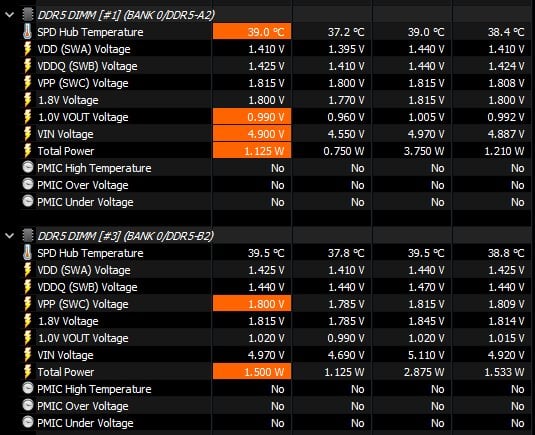
I then checked VDD/VDDQ voltages in HWinFO64 and saw, that A2 slot has lower voltages than required by XPM profile: VDD was sitting at 1.38 and constantly dropping to 1.0v… VDDQ was sitting at ~1.39 without huge drops (+-0.05 range). B2 was sitting at 1.395 for both VDD and VDDQ without any noticebale voltage drops (+-0.05).
I went to BIOS and manually set VDD A0 Voltage to 1.4V and VDDQ A0 Voltage to 1.4V as well. And nothing has changed, same 1.38 – 1.395 A2-B2 difference, I then set voltage to 1.43 V, voltages in HWinFO64 increased to 1.410 – 1.425 A2-B2, and I still had drops from 1.410 to 1.0V on A2 and overall small +-0.05 range voltage jumps.
Memtest showed 1 error, which is better but still not perfect, so I decided to manually set CPU VDD2 to 1.43V, CPU VDDQ to Auto (basically how it was by default). Aaaaand… the BIOS didn't boot, had to clear CMOS. After clearing the CMOS and restoring the settings (VDD A0 1.43V, VDDQ A0 1.43V, CPU VDD2 Auto, CPU VDDQ Auto) I launched the system and HWINFO no longer registers any voltage drops to 1.0v on A2 slot or small +-0.05v jumps, but A2-B2 slots still have a 0.15V difference as showed on the screen:
https://imgur.com/a/dbTUArT
So, is this stuff normal or motherboard is malfunctioning? Should I Try setting CPU VDD2 to 1.43V and CPU VDDQ to 1.43V and try to boot with these settings (I'm not sure if such high voltage is allowed for CPU VDDQ)? There are also settings in BIOS like VDD A1, VDD B0, VDD B1 Voltages, VDDQ A0, B0, B1 Voltages and VDD and VDDQ Mode is set to Sync. I suppose these are A1,A2,B1,B2 slots? Should I try to manually offset -0.15V on B2 (B1 in BIOS)?