
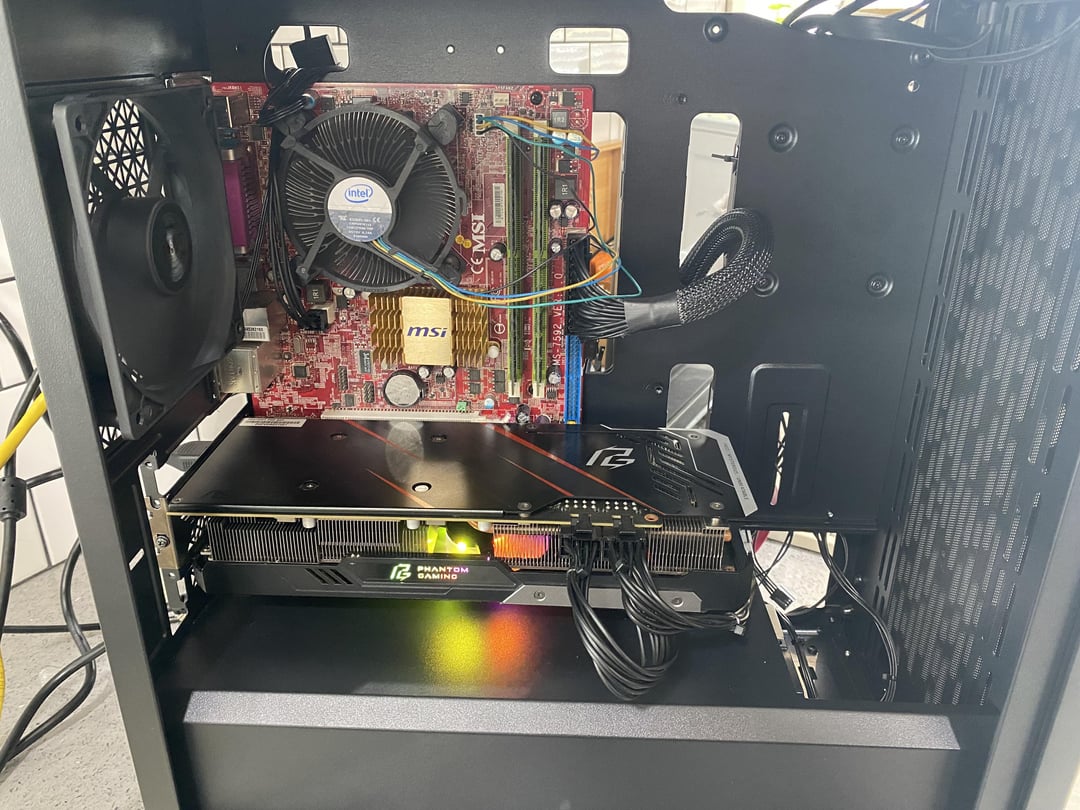
I got a new gpu today and I plugged it into my motherboard but it doesn’t boot into windows
It boots into the Bios just fine but when I leave the
Bios it’s just a black screen. as you can see in the
last picture the monitor recognizes a signal on hdmi 1. It doesn’t matter how long l leave it like
that it just stays on the black screen.
When I unplug the gpu and use integrated graphics it boots into windows with no problem.
The motherboard is the msi G41M4-f with a Intel pentium E6800
The gpu in a RX 5700XT
The bios is on the newest version I could find V1.14 5/18/2011
Any ideas on what I should do?
26 Comments
Um, Why are you trying to connect a 5700XT to a Core 2 Duo?
Edit: To answer your question it’s probably to do with legacy vs. UEFI boot modes.
Since that BIOS is so old, it may not even support an RX 5700 XT, which came out 8 years later… Also, what game were you planning on playing with a 14 year old, 2 core non-hyperthreaded CPU, DDR2 memory, and PCIe GEN 1, with a 5700 XT slapped in it?
Pcie gen 1 💀
Did you DDU before installing the new GPU?
cpu probably older than you
I think “newer” AMD-Cards simply just don’t run on very old motherboards. I seem to remember something like that. I think they need a board with UEFI, which socket 775 obviously doesn’t have. Someone correct me if I’m wrong.
e6800?
1366×768 display?
Did you fall asleep in 2011 and just wake up? That RGB probably tripping you out
Did you remove the old display driver before install? Boot into safe mode and uninstall if not.
Oh lord I had one of these CPU’s in 2011… it may just not be compatible with such an old system. However what happens if you try to boot a live Linux USB stick? / maybe try booting it with a live cd and see what happens.
good bait
Its interesting that when you unplug the GPU it boots with integrated, possibly your PSU can’t pull enough power for it? What PSU do you have in there?
Can’t you find a 286 board?
i legit thought this was an april fools joke until i saw the date
gonna have to put windows on a thumb drive and boot into the thumb drive to reinstall! this happened to me when i added more ram to my machine a few months ago.
LOL why isn’t this flaired as meme
You forgot “meme” flair
– New case
– Appearently a modern psu
– Probably a monitor used as a TV in kitchen
– A picture of old ass bios to amplify meme
– To amplify meme even more old ass IBM era looking keyboard
The likely answer is that your motherboard cannot initialize the GPU because it has no idea what it is; it’s also too old to do a BIOS update to be able to use the GPU.
Example: b450m motherboards needed a bios update to use a 4000 series nvidia gpu.
It’s something to do with the BIOS, my friends and I had the same problem while trying a 3080 on a 775 mobo just for the lulz.
Some modern cards expect UEFI and will not work with the legacy BIOS.
It would have been hilarious if it worked though.
Are you trolling?
That card isn’t going to do shit you are so cpu bottle necked
Does Windows recognize the graphics card? Look in the device manager snao-in or run “dxdiag” from the search box and look under the display tab. If it does, see if there is an option in UEFI to disable the integrated graphocs.
How old is that keyboard?
Just take out gpu and throw grenade inside that pc
Faulty gpu ?
No HDD connected to the IDE port. It won’t load anything but bios.
Have you tried unplugging and plugging it back in?