If you can’t get it to go away, there are tools that let you change the shortcut icon arrow, you can reset it with those. Usually a reboot will fix it, but I have had them get stuck before
ElectricalCharity610
It means he has a hidden porn folder
Icy_Course9045
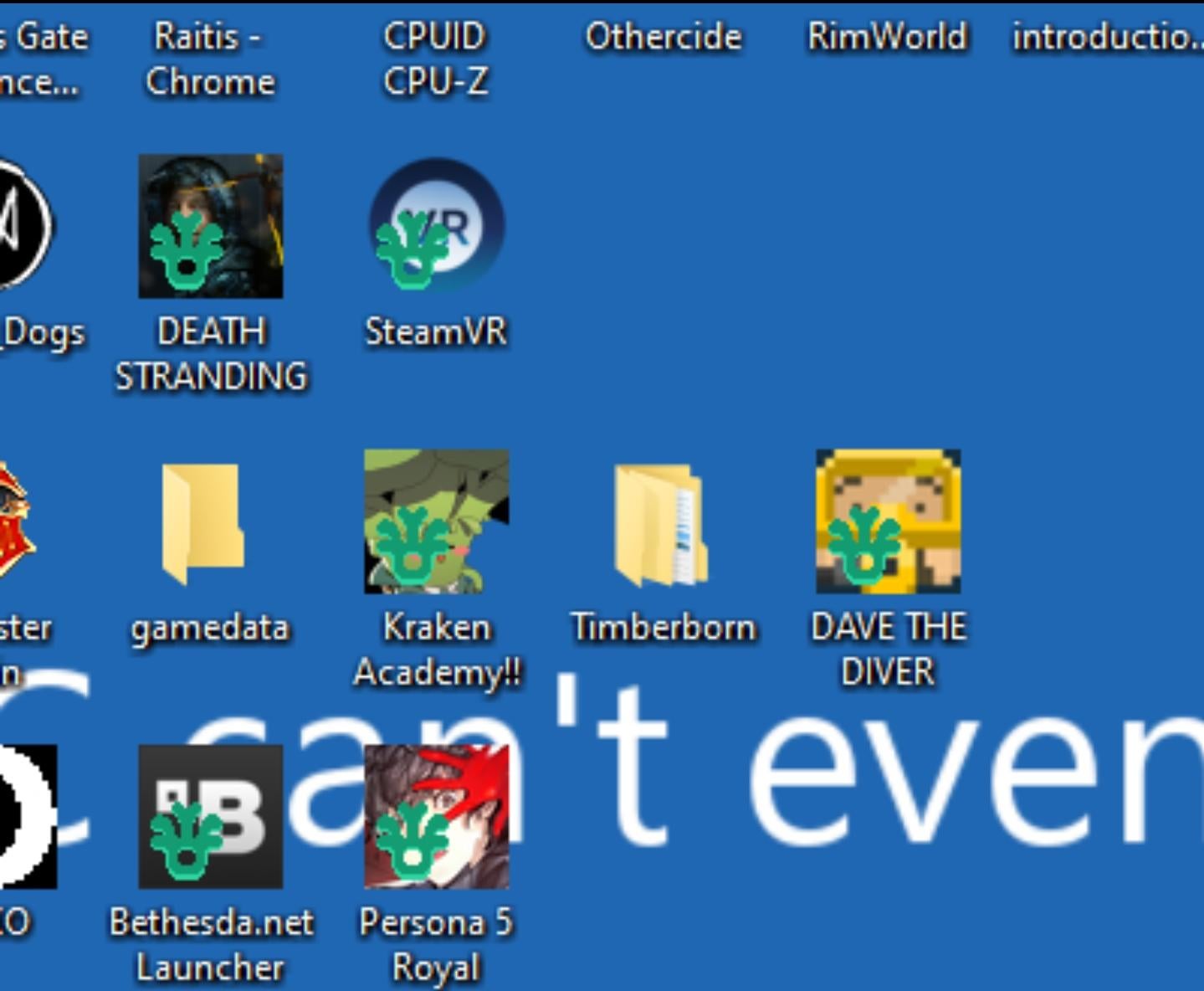
Its looking like that shortcut icon (arrow) is replaced by this blue octopus or whatever it is
De_Conducteur
Probably needs a new Gpu, CPU and mobo. And dont forget to update his bios. ‘Average Reddit comment’.
misssa_cz
ITS SPREADING
PolovinaKabacha
You need go to the dungeon and sell artifact in shop
Hattix
Click the desktop, press F5. It’ll vanish.
Windows 11… 10… 8.1… 8… 7… Vista…XP… and 2000 *all* have problems with shortcut icon overlays. It’s unreal how MSFT can’t fix it after two and half decades!
Tiavor
The “link” arrow icon that is usually overlayed got replaced somehow.
pivorock
What in the world could cause a Moonlighter symbol to pop up like that. I wonder if some has changed an icon in your icon library. Is that even possible? I must test.
th3nan0byt3
Why is your background BSOD blue?
Main_Resident_2797
Poke’rus
Rayusa
I had this problem too. My icons started to change every second or so and then just stopped at a random image. After refreshing it was gone but still very weird
mobeen1497
A similar thing happens sometimes when I turn on my university vpn but with red locks. I thought I was hacked but no, it just goes away after i restart the pc.
Riley_does_stuff
The corona is back
tanglee11
Don’t know what it is but what I know is that you’re based for having Persona 5 Royal there 🙂
darkelfbear
My question, why do they still have Bethesda.Net Launcher ??? That shits been dead for years now, and everything migrated to steam.
Jwn5k
Right-click on your desktop and click “refresh”.
Any icon that usually appears on your desktop shortcuts like this should go away after doing that, very very minor inconvenience, just sometimes apps just… do that… for some reason.
RoninOni
This is a bug with windows that started with win10… just hit F5 (while focused on desktop, not any other app) and it resolves

23 Comments
Looks like a icon from Moonlighter? No clue why it’s on the other icons tho?
https://preview.redd.it/8euk8uw6kgsc1.png?width=1080&format=pjpg&auto=webp&s=62611a2492838c6a78224f34c169fdbf4415849e
It’s a bug in windows. Just right click the desktop and hit refresh
definetely moonlighter
[windows – Refresh Icon Cache Without Rebooting – Super User](https://superuser.com/questions/499078/refresh-icon-cache-without-rebooting)
If you can’t get it to go away, there are tools that let you change the shortcut icon arrow, you can reset it with those. Usually a reboot will fix it, but I have had them get stuck before
It means he has a hidden porn folder
Its looking like that shortcut icon (arrow) is replaced by this blue octopus or whatever it is
Probably needs a new Gpu, CPU and mobo. And dont forget to update his bios. ‘Average Reddit comment’.
ITS SPREADING
You need go to the dungeon and sell artifact in shop
Click the desktop, press F5. It’ll vanish.
Windows 11… 10… 8.1… 8… 7… Vista…XP… and 2000 *all* have problems with shortcut icon overlays. It’s unreal how MSFT can’t fix it after two and half decades!
The “link” arrow icon that is usually overlayed got replaced somehow.
What in the world could cause a Moonlighter symbol to pop up like that. I wonder if some has changed an icon in your icon library. Is that even possible? I must test.
Why is your background BSOD blue?
Poke’rus
I had this problem too. My icons started to change every second or so and then just stopped at a random image. After refreshing it was gone but still very weird
A similar thing happens sometimes when I turn on my university vpn but with red locks. I thought I was hacked but no, it just goes away after i restart the pc.
The corona is back
Don’t know what it is but what I know is that you’re based for having Persona 5 Royal there 🙂
My question, why do they still have Bethesda.Net Launcher ??? That shits been dead for years now, and everything migrated to steam.
Right-click on your desktop and click “refresh”.
Any icon that usually appears on your desktop shortcuts like this should go away after doing that, very very minor inconvenience, just sometimes apps just… do that… for some reason.
This is a bug with windows that started with win10… just hit F5 (while focused on desktop, not any other app) and it resolves
He changed the shortcut icon for that icon.