
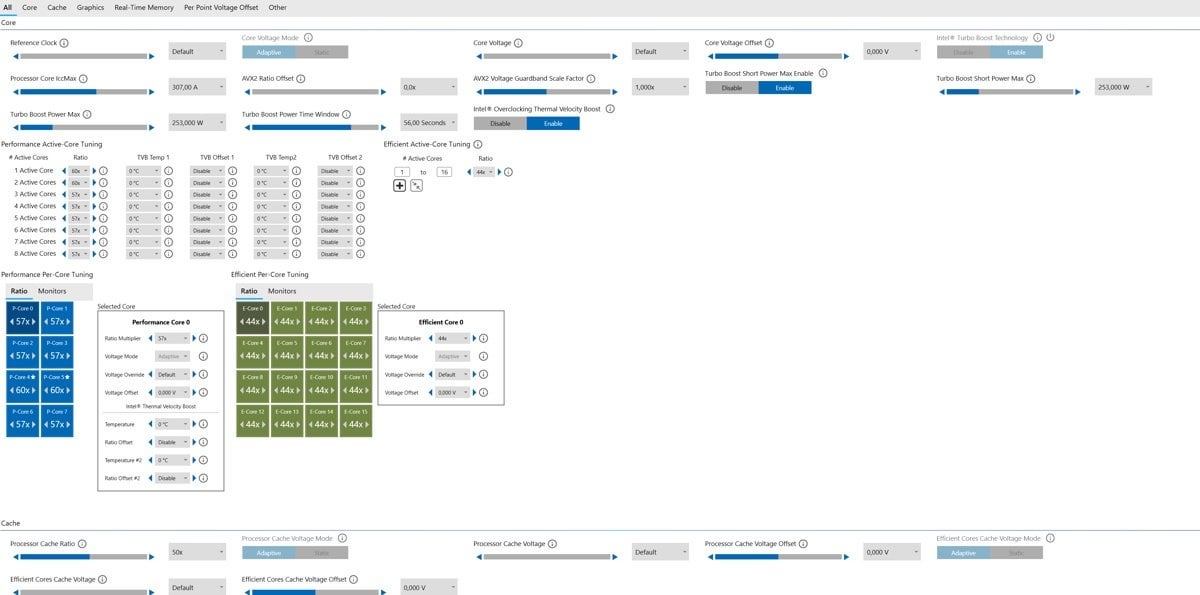
I experienced crashing in UE5 games especially (out of VRAM error on a 4080 super). I started troubleshooting and found a few articles stating it's most often caused by instability of intel 14th gen CPU's, especially the 14900k. Apparently the motherboard defaults push the chip to insane levels (no current limit, no power limit etc). The article stated that one could fix it by downclocking the CPU a bit via intel XTU. I downloaded intel XTU and noticed it had a preset profile named "Default". It applied the default intel limits. VOILA! No crashing.
I fear that booting up with the non-stable settings might harm my chip. Booting up the PC makes the fans spin a lot for a few seconds so my assumption is it'll also make the CPU work hard and therefore susceptible to the unlimited current limits and whatnot. Is this the case or am I safe off booting with the BIOS defaults and just opening XTU once booted to apply the limits?
I'd like to apply the intel defaults in my bios. I'm not savvy at ALL when it comes to messing around in the BIOS. I have looked at guides online but every BIOS seems to have a different name for the settings. I have an MSI Pro Z790-A WIFI DDR5 motherboard.
Here are the default XTU settings
https://gyazo.com/5773fd7d5213e7a7e4fae2fd69e0c2db
https://gyazo.com/9b4414febcadcfdf2b7571e26c246c7e
https://gyazo.com/b1e7a1a01a9cb62b036e628e69908b7e
If someone has my specific board and the spare time, could you please walk me through VIA screenshots or a video on exactly what settings to apply and where in the BIOS they are found
1 Comment
Set PL1 and PL2 to 253W in the BIOS. Alternatively, you can disable Multicore Enhancement (or whatever MSI calls it – Enhanced Turbo?) in the BIOS, and this enforces the 253W power limit for PL1 and PL2.