Get smaller GPU.
Get bigger motherboard.
Get USB version of whatever you holding.
Accomplished_Tip3597
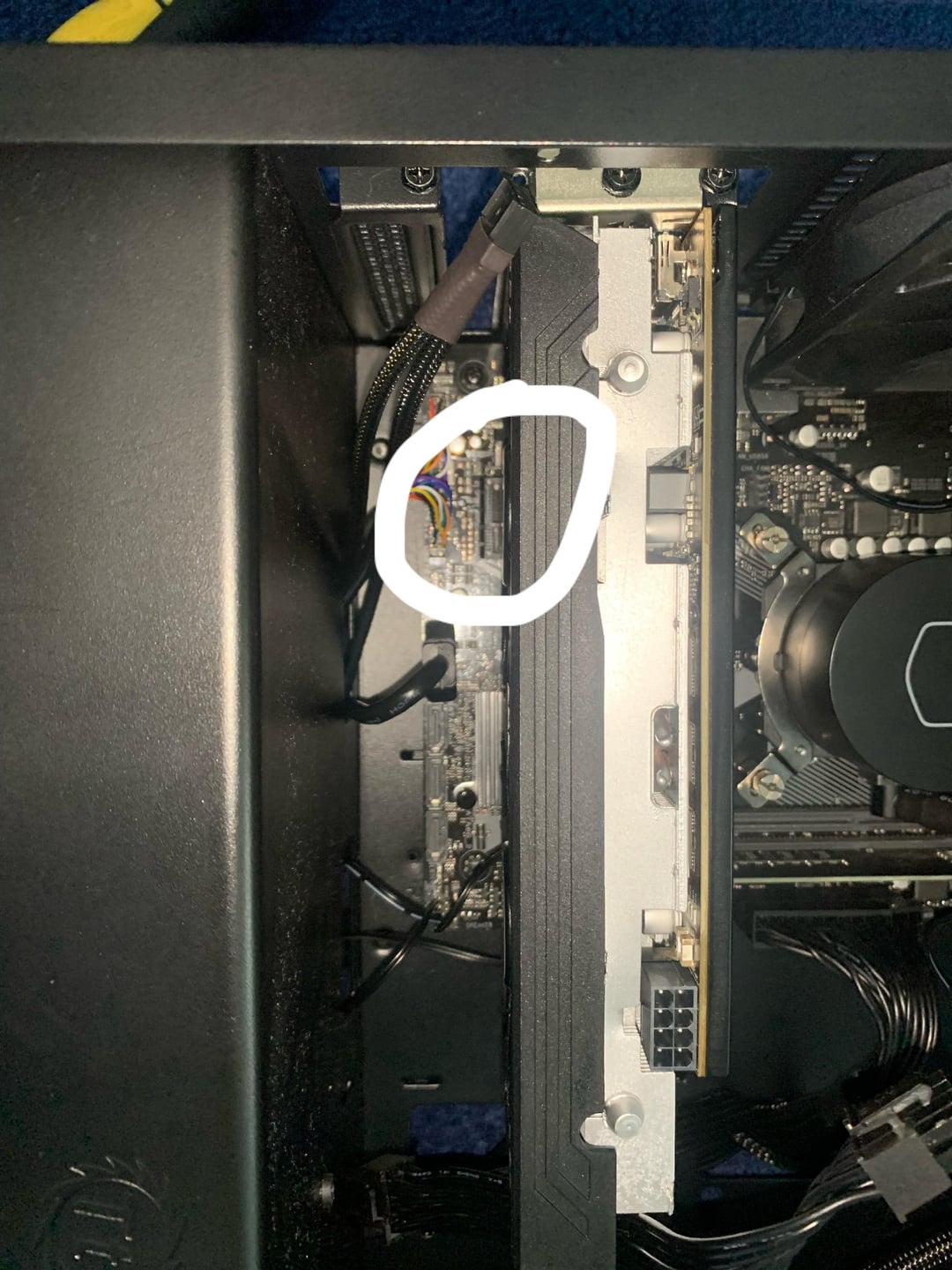
that’s the neat part, you don’t. your gpu is too thick, there is no space for it. get a mainboard with built in wifi, use a cable or an usb wifi dongle
JoliBeard
A cat 6 ethernet cable would fix that up good 👍 😉
Technical_Rip6323
You need a flexible cable riser. That should hopefully help.
Trungyaphets
Maybe a pcie x1 riser?
Narrow-Battle216
usb dongle 😉
kaschperli
A solution would be get a pice 1x riser and plug it into the slot that is blocked.
BrianScorcher
Get a wifi extender with ethernet out that plugs into your wall socket.
As other comments have mentioned a riser cable could do the trick. But failing that you could just use powerline ethernet if you’re unwilling to cable manage an ethernet cable around the house (should be better than wifi but I think not as good as a direct ethernet cable, someone can correct me on that if I’m wrong). A MoCA adapter can be another alternative if you’ve got coax around your house but they cost more than powerline adaptors.
worldrenownedballdr
You are not going to get that in there… sorry.. if you have a graphics card that big that motherboard / case may not have been the best choice.
your options as I see it?
usb dongle
new mb / case
get a dd-wrt capable router (or other router able to work as a wireless bridge or repeater bridge). and use cat 5 to router which then connects to the wireless network.
get a different smaller gpu (but airflow may still be a concern with a card that close to the gpu anyway.
carnaldisaster
If you have another M.2 slot on your motherboard, buy an M.2 WiFi card.
moxzot
Get a bigger mb duh
tamal4444
get a usb wifi adapter
blown03svt
It might fit, it’ll be a mm from the gpu, but if it fits it fits. And it’s so small it’s not going to affect the fans.
420headshotsniper69
This is one of those measure twice cut once moments
Huntermain23
Insert meme “that’s the near part, you don’t”
GTMoraes
lol it probably fits if you try. Chances are that the GPU is slightly sagged, and lifting it up a bit will give enough clearance. Or it might even fit as is.
In any case, there are a couple of 90° adapters for this. I use for the same reason, but mine actually goes over the PCI-Ex by a great amount. [It’s cheap as chips](https://aliexpress.com/item/1005006154568971.html)
Check if that works for you.
The manufactures recommendation is that you “go fuck yourself nerd. Lolz”
slappada-bass
You can’t unfortunately.
Buy an M.2 wifi card. Intel has a pretty decent WiFi 6 one that’s very inexpensive.
Goes into the one specific M.2 slot. Rtm to know which one on your mobo. It’s the size of a 2230 M.2 so it’s quite low profile.
Double-Network2840
just use ethernet
AspiringMurse96
mATX problems
Sampsa96
Try if a PCie extender fits there and plug it in that?
The_Hause
The “e” in PCIe stands for express.
SunoPics
Either take gpu out and install the wifi card first or go with a usb style instead.
Throwaythisacco
i have the same situation with dual GPU, only good thing to do is get a USB wifi dongle unless your board has wifi
0ryuuga
Buy a bigger Motherboard
No_Interaction_4925
Dude, get another RAM stick. Single channel RAM is TERRIBLE. Suffocating the cpu hardcore.
sco77001
Unless there is no other choice, a gaming desktop shouldn’t be connected through wifi at all.
Timely-Guest-7095
If you’re gaming then your best option is to go wired. It’s a much better connection in both speed and quality.
skrena
Gross. WiFi.
Educational_Duck3393
You don’t. You get a USB Wi-Fi dongle.
coffeejn
Tell your GPU to go on a diet, once it leaves you, get a slimmer one.
LastChime
Get a fatter wifi card and skinnier GPU
setpopa12
As everybody else says you cant plug it in.
I would recoment buying/finding 1gb router and use a wds bridging. That way xou will have extremally strong connection and no software bugs wich many wifi cards have.

44 Comments
Get smaller GPU.
Get bigger motherboard.
Get USB version of whatever you holding.
that’s the neat part, you don’t. your gpu is too thick, there is no space for it. get a mainboard with built in wifi, use a cable or an usb wifi dongle
A cat 6 ethernet cable would fix that up good 👍 😉
You need a flexible cable riser. That should hopefully help.
Maybe a pcie x1 riser?
usb dongle 😉
A solution would be get a pice 1x riser and plug it into the slot that is blocked.
Get a wifi extender with ethernet out that plugs into your wall socket.
pcie riser
https://preview.redd.it/2hk9xrn9qwrc1.jpeg?width=800&format=pjpg&auto=webp&s=e34844cb332ccfcf2a54976338a5c460a753e7ba
As other comments have mentioned a riser cable could do the trick. But failing that you could just use powerline ethernet if you’re unwilling to cable manage an ethernet cable around the house (should be better than wifi but I think not as good as a direct ethernet cable, someone can correct me on that if I’m wrong). A MoCA adapter can be another alternative if you’ve got coax around your house but they cost more than powerline adaptors.
You are not going to get that in there… sorry.. if you have a graphics card that big that motherboard / case may not have been the best choice.
your options as I see it?
usb dongle
new mb / case
get a dd-wrt capable router (or other router able to work as a wireless bridge or repeater bridge). and use cat 5 to router which then connects to the wireless network.
get a different smaller gpu (but airflow may still be a concern with a card that close to the gpu anyway.
If you have another M.2 slot on your motherboard, buy an M.2 WiFi card.
Get a bigger mb duh
get a usb wifi adapter
It might fit, it’ll be a mm from the gpu, but if it fits it fits. And it’s so small it’s not going to affect the fans.
This is one of those measure twice cut once moments
Insert meme “that’s the near part, you don’t”
lol it probably fits if you try. Chances are that the GPU is slightly sagged, and lifting it up a bit will give enough clearance. Or it might even fit as is.
In any case, there are a couple of 90° adapters for this. I use for the same reason, but mine actually goes over the PCI-Ex by a great amount. [It’s cheap as chips](https://aliexpress.com/item/1005006154568971.html)
Check if that works for you.
These are the most reddit answers Ive ever seen.
Simple. Get a 90° extension.
https://www.amazon.com/dp/B07TBL53NB
Take your GPU to the gym
Tell it to lose weight duh
Get a USB 3.2 adapter
Glhf
I mean that is a pretty terrible wifi adapter. Just grab one of these. It’ll be simpler to set up and uses technology from this decade.
https://www.bestbuy.com/site/sku/6522468.p?skuId=6522468
Don’t put WiFi in a desktop computer? 🙂
The manufactures recommendation is that you “go fuck yourself nerd. Lolz”
You can’t unfortunately.
Buy an M.2 wifi card. Intel has a pretty decent WiFi 6 one that’s very inexpensive.
Goes into the one specific M.2 slot. Rtm to know which one on your mobo. It’s the size of a 2230 M.2 so it’s quite low profile.
just use ethernet
mATX problems
Try if a PCie extender fits there and plug it in that?
The “e” in PCIe stands for express.
Either take gpu out and install the wifi card first or go with a usb style instead.
i have the same situation with dual GPU, only good thing to do is get a USB wifi dongle unless your board has wifi
Buy a bigger Motherboard
Dude, get another RAM stick. Single channel RAM is TERRIBLE. Suffocating the cpu hardcore.
Unless there is no other choice, a gaming desktop shouldn’t be connected through wifi at all.
If you’re gaming then your best option is to go wired. It’s a much better connection in both speed and quality.
Gross. WiFi.
You don’t. You get a USB Wi-Fi dongle.
Tell your GPU to go on a diet, once it leaves you, get a slimmer one.
Get a fatter wifi card and skinnier GPU
As everybody else says you cant plug it in.
I would recoment buying/finding 1gb router and use a wds bridging. That way xou will have extremally strong connection and no software bugs wich many wifi cards have.