If I were to get ultrawide, I would get 16:9 x 2 (as if 2 monitors connected together). However, that is expensive, and 2 separate monitors are completely fine.
Robsteady
They each have their own use-case. Since I’ve spent a lot less time focusing on gaming/streaming and more on school, I really want to go from 2 1080 displays to a single 3440×1440.
ippon1
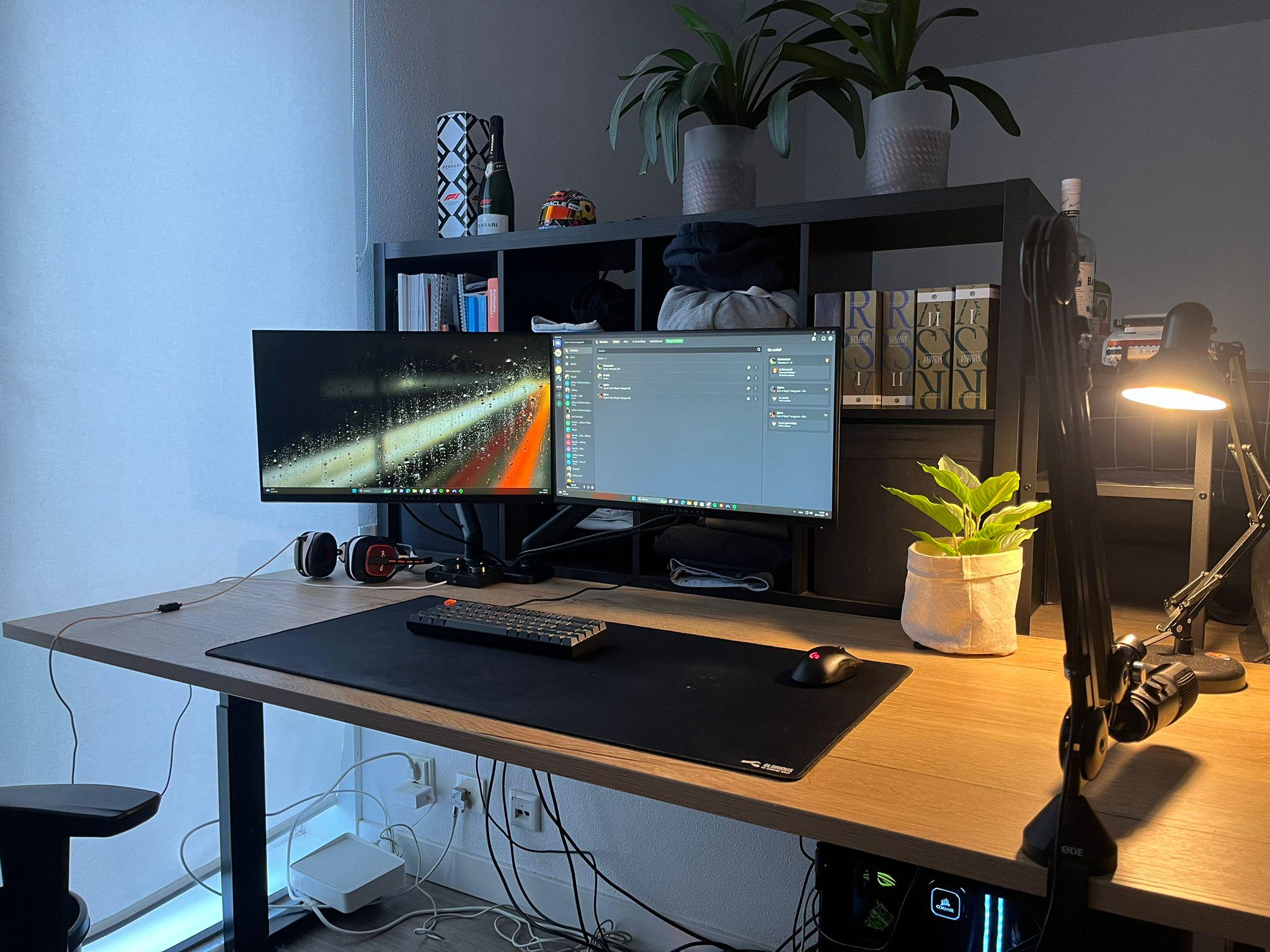
**Cable management**
FlatwormNew7340
DONT ROAST THE CABLE MANAGEMENT PLSSSSSS
garbles0808
I prefer two separate monitors, I like the separation.
chooch138
Both.
kite_redd
2 separate monitors. 1 monitor in portrait mode for long lines of code. Actually I’m considering buying LG dualup for my portrait mode monitor. 16:9 monitor is too thin in portrait mode. Too bad it’s just 28inch.
The Landscape monitor can be gaming monitor, the Portrait monitor can be just office level monitor.
StGenevieveEclipse
If a monitor craps out, or gets a bad port, you’re down to 50% real estate, rather than 0%. My vote is 2 monitors
AimlessWanderer
one ultrawide + 1 vertical monitor on the side is perfect
Sketaverse
Depends on the monitors. If 2x Studio Displays, then yes
csDarkyne
Is it only wfh/uni? Then ultrawide, if and only if these two dont suite your needs. If you also game then absolutely these two
Global_Ad_8096
two separate monitors, as you can get more resolution for less price
TFABAnon09
Both? Ultrawide up front and a flanking monitor or two works a treat for me.
renegadedigger
I use a ultrawide and a smaller wide screen stacked. Works great for gaming and work
CattyFishySoupy
I rock one ultra wide. Feels cleaner to me, but made my computer cost more.
Less_Party
Having tried basically every type of display setup over the years I strongly prefer one 30+inch regular 16:9 4K screen over a bunch of little ones or anything ultrawide. Less mess on your desk, every single game or program just displays perfectly on it without fiddling or awkwardness, no auxiliary screens just hanging out showing an empty desktop 80% of the time.
euforya
May I ask what desk you have?
Egreg2369
2 screens, the widescreen hype will die down soon enough.
mburke6
I have a 49″ 5120 x 1440 ultrawide that is set up as two separate 2560 x 1440 displays. I like the look of a single display, but functionally I really want two displays. Triple the cost for the same functionality as two monitors.
Shruums
2 separate tbh
xjustadeafguy
What is the desk?
knuckles2079
3, I suggest 3 monitors.
gregtpt
Depends on the task. Displaying a single game ouput, 1 UW. Displaying productivity programs, where you have data and workspaces using multiple windows, then 2 or 3 individual monitors.
nikanikabadze
2x 5k on top of each other and another 4k on the left in vertical position. having absolute blast
p.s. all of them are 27”
ArticLOL
Why not an ultrawide and two monitor on the side?
RemyGee
I have an ultrawide and two 27 inch 1080ps right now. I want to try out 2 27inch 4k monitors now.
LargeAd328
I really liked having an ultrawide + MacBook as my second monitor when I was in school for comp sci.
I was able to have 3 windows (Word, Browser, IDE) open on the ultrawide and Discord or Spotify open on the MacBook screen.
LowdGuhnz
I had an ultra wide, but couldn’t deal with the black bars when gaming on it. Eventually (and currently still) went with a pair of 27in 144hz. Haven’t looked back since.
vampyire
I have a 49in ultrawide… but I also have a 34in ultrawide next to it.. But I like about 5 1/2 feet of monitor 🙂
PracticalConjecture
I actually use an Ultrawide 34″ with a 27″ 16:9 beside it. Most of the money went into the 34″, and I bought a cheap 27″ on Craigslist as the second display. Just make sure that both are 1440p.
I’ve found that 16:9 displays work well for two things, where a 21:9 display works well for three. With my workflow, three seems to be the right number for what I’m working on most of the time, and there are always a few secondary tasks open that need regular attention (email, music).
I like being able to seamlessly multitask (with, say, a couple spreadsheets and a browser) on the primary display. The second one is used for stuff that isn’t my primary focus (e-mail, music, files, etc).
If you’re a student doing research more screen real estate is awesome – you can have a whole bunch of sources pulled up at the same time while you churn out a paper.

30 Comments
If I were to get ultrawide, I would get 16:9 x 2 (as if 2 monitors connected together). However, that is expensive, and 2 separate monitors are completely fine.
They each have their own use-case. Since I’ve spent a lot less time focusing on gaming/streaming and more on school, I really want to go from 2 1080 displays to a single 3440×1440.
**Cable management**
DONT ROAST THE CABLE MANAGEMENT PLSSSSSS
I prefer two separate monitors, I like the separation.
Both.
2 separate monitors. 1 monitor in portrait mode for long lines of code. Actually I’m considering buying LG dualup for my portrait mode monitor. 16:9 monitor is too thin in portrait mode. Too bad it’s just 28inch.
The Landscape monitor can be gaming monitor, the Portrait monitor can be just office level monitor.
If a monitor craps out, or gets a bad port, you’re down to 50% real estate, rather than 0%. My vote is 2 monitors
one ultrawide + 1 vertical monitor on the side is perfect
Depends on the monitors. If 2x Studio Displays, then yes
Is it only wfh/uni? Then ultrawide, if and only if these two dont suite your needs. If you also game then absolutely these two
two separate monitors, as you can get more resolution for less price
Both? Ultrawide up front and a flanking monitor or two works a treat for me.
I use a ultrawide and a smaller wide screen stacked. Works great for gaming and work
I rock one ultra wide. Feels cleaner to me, but made my computer cost more.
Having tried basically every type of display setup over the years I strongly prefer one 30+inch regular 16:9 4K screen over a bunch of little ones or anything ultrawide. Less mess on your desk, every single game or program just displays perfectly on it without fiddling or awkwardness, no auxiliary screens just hanging out showing an empty desktop 80% of the time.
May I ask what desk you have?
2 screens, the widescreen hype will die down soon enough.
I have a 49″ 5120 x 1440 ultrawide that is set up as two separate 2560 x 1440 displays. I like the look of a single display, but functionally I really want two displays. Triple the cost for the same functionality as two monitors.
2 separate tbh
What is the desk?
3, I suggest 3 monitors.
Depends on the task. Displaying a single game ouput, 1 UW. Displaying productivity programs, where you have data and workspaces using multiple windows, then 2 or 3 individual monitors.
2x 5k on top of each other and another 4k on the left in vertical position. having absolute blast
p.s. all of them are 27”
Why not an ultrawide and two monitor on the side?
I have an ultrawide and two 27 inch 1080ps right now. I want to try out 2 27inch 4k monitors now.
I really liked having an ultrawide + MacBook as my second monitor when I was in school for comp sci.
I was able to have 3 windows (Word, Browser, IDE) open on the ultrawide and Discord or Spotify open on the MacBook screen.
I had an ultra wide, but couldn’t deal with the black bars when gaming on it. Eventually (and currently still) went with a pair of 27in 144hz. Haven’t looked back since.
I have a 49in ultrawide… but I also have a 34in ultrawide next to it.. But I like about 5 1/2 feet of monitor 🙂
I actually use an Ultrawide 34″ with a 27″ 16:9 beside it. Most of the money went into the 34″, and I bought a cheap 27″ on Craigslist as the second display. Just make sure that both are 1440p.
I’ve found that 16:9 displays work well for two things, where a 21:9 display works well for three. With my workflow, three seems to be the right number for what I’m working on most of the time, and there are always a few secondary tasks open that need regular attention (email, music).
I like being able to seamlessly multitask (with, say, a couple spreadsheets and a browser) on the primary display. The second one is used for stuff that isn’t my primary focus (e-mail, music, files, etc).
If you’re a student doing research more screen real estate is awesome – you can have a whole bunch of sources pulled up at the same time while you churn out a paper.