
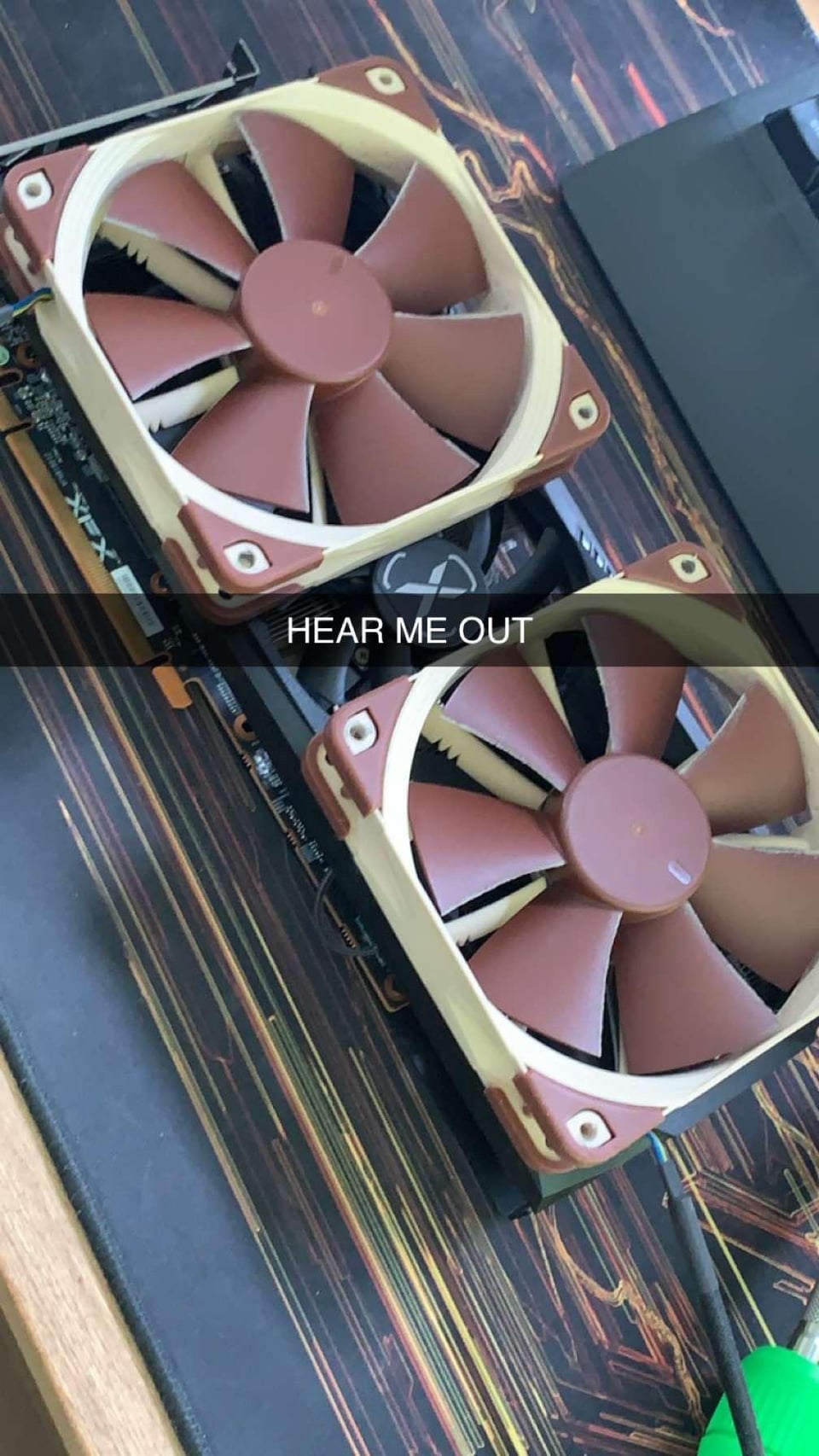
So, some backstory: I got my 6700XT about a year ago. It was a major upgrade from my 1060 6gb, but the coil whine and fan noises were unbearable
I reached out to XFX, who said I’d have to ship the card, pay for shipping, customs, potentially wait a month or two without a gpu to get a replacement, which would be a used card, to which I decided to say no.
So yesterday I took matters into my own hands, voided the warranty in 23 different ways, and swapped the fans for some Noctua ones. The temps haven’t gone above 80° on the hot spot, and it’s dead silent. Coil whine is of course still a thing, but the loudest part of my entire build has now been fixed.
Criticism more than welcome, this was my first time doing something like this
32 Comments
If it works it’s a great fix
It’s a lot of work to avoid setting up a proper fan profile, but you do you.
Were you using Y splitter on those fans?
https://preview.redd.it/bvpn6c5id9rc1.jpeg?width=1080&format=pjpg&auto=webp&s=a70f2d180ff3cbf8646d3df4f420f2adcb22898d
Check this out 🙂
https://preview.redd.it/43rvdcw0f9rc1.png?width=1929&format=png&auto=webp&s=9d0246fe391349b7ac3743c3501fb1a223e3f589
idle temps
>I reached out to XFX, who said I’d have to ship the card, pay for shipping, customs, potentially wait a month or two without a gpu to get a replacement, which would be a used card
with the very same issue yours had
You attended ltx expo 2023? Looks like you visited the custom screwdriver booth.
https://preview.redd.it/vadj379rl9rc1.jpeg?width=4000&format=pjpg&auto=webp&s=ca15ac8ecbdf18d3ac1313792a1f9e7096d5ec9a
Gang gang
Looks pretty great but with the black fan it would have look more neat the beige and brown will show off a lot while you would probably want it to be discreet
Hmmm, maybe I’ll do this with my 1080 TI. I have blower style gygabite card, so this could keep the noise down
Better than the $200 premium on Noctua edition cards
Is the vram covered too by the heat sink or just the air cooling it ?
How do you power those fans? From the motherboard or from the video card? I need to do something similar for an older card, but I keep postponing it because I need 1,75 mm thermal pads for the VRAM and I can’t really find good ones from a seller in Europe.
If I had the ability to do this, I’d also do this.
I dig it
Had to do this to my 1080ti when the fans died after years of use. This is a really great option and the temps were incredible!
I may have to do this one day 🤔💭
I did that on my 1060 with some arctic fans I had lying around. it wasn’t pretty, but it was WAY quieter, and had no temp issues at all.
Is that an LTT screwdriver?
As long as it works, that’s a really good fix. When I got my 1080 a couple months ago, it had coil whine but oddly enough when I transferred it to my new build the whine just went away lol
This is a pretty standard mod for modern GPUs. If you feel like it, look on etsy for mounting brackets for your Model to get rid of the cable ties. It’s not a functional upgrade, but makes replacing the fans much easier.
Welcome to properly cooled GPUs!
That’s called deshrouding
That’s great!
I absolutely love this, I’m not big on the RGB stuff but I love some noctua fans and customisation.
My 4070ti also lost a couple degrees with a deshroud and noctua mod
Idc how it looks, it works it works
I love these type of builds. So many gpus come with plastic shrouds not good for airflow, why do they all have to look like cars now?! This is the way, just heat sink and fans. I think already know but there are some kits on Etsy that help you fasten your fans to your card
I always thought of doing this but the warranty void alwahs scared me. You are a brave man brother 🫡.
Wish notcua made GPU fans for both AMD and Nvidia.
https://preview.redd.it/jbp2lj3yx9rc1.png?width=1080&format=pjpg&auto=webp&s=cee24bb3442c0bf02542108a14fe7b826b13bd67
This is not a fix. Its an upgrade.
I do this on every gpu i have now, less noise, better flow, MUCH MORE reliable than those flimsy pos of fans they provide us
I literally have the same gpu, same model with this mod only with Arctic fans
Not the first person to do this, not even the last. I think LTT did a video on it too at some point