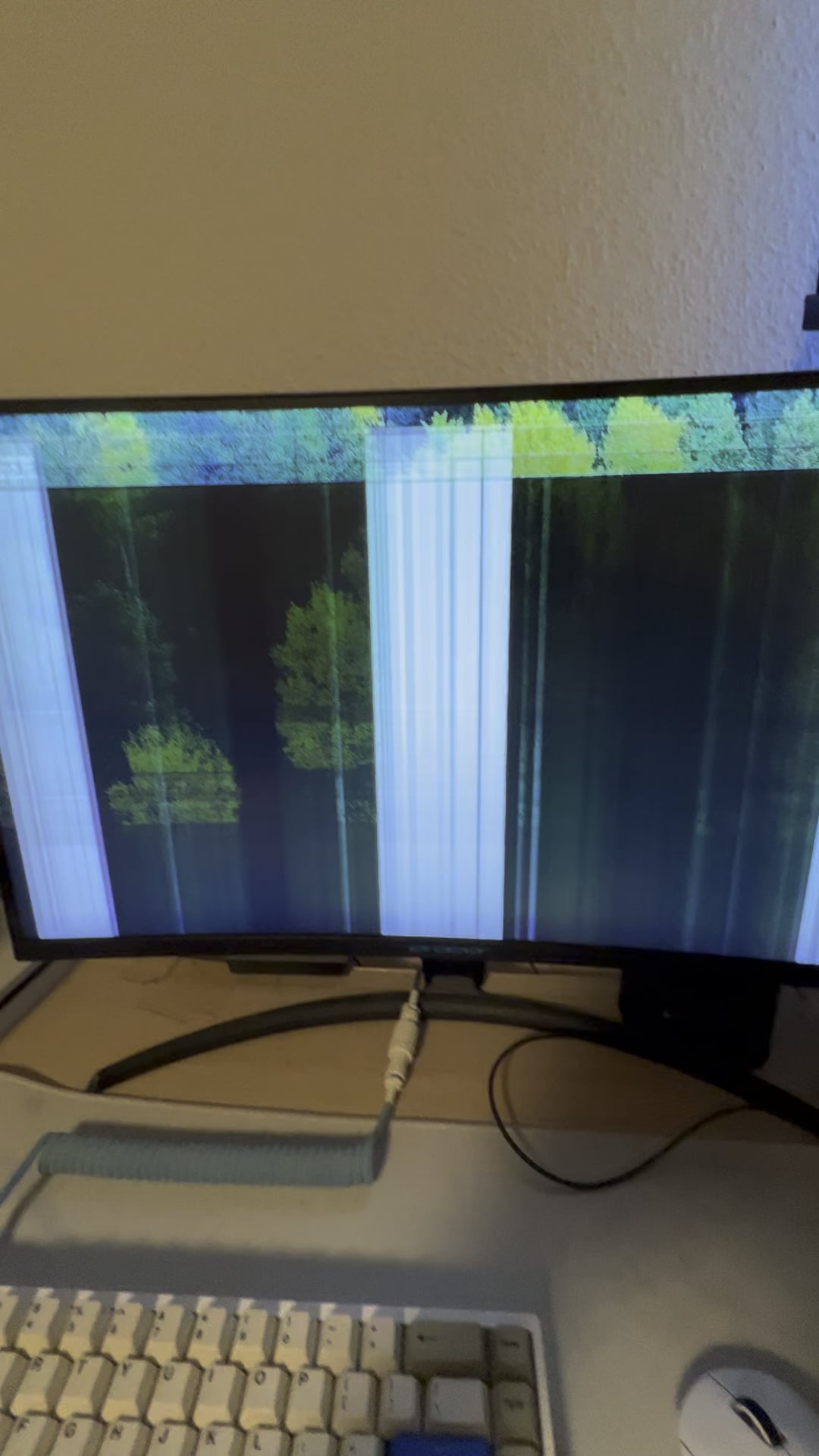
So the only think I can even possibly think of is just really shit solder joints. They’re not making a good connection, and heat causes expansion which improves contact. Other than that, did you get it in Jersey? I have an aunt there that can’t do anything without spending a good half hour with a hair dryer first.
Mannybce
My 6 yr old monitor did that as well. I would leave it on until I finally upgraded since I was afraid it’d give out any second.
Sad_Opinion_874
sounds like there is a connection somewhere on the monitors logic board that is lose. When it warms up, the connection expands, and the full connection is made closing the loop and your monitor will then function normally. This problem will only get worse.
Kreydo076
Almost all Samsung Display Port monitor does this, it’s infuriating.
MagicPistol
I have a 7 year old monitor that displays similar artifacts when I wake my PC from sleep. It usually goes away once I log into Windows but it’s pretty annoying. Sometimes those artifacts show when my PC goes to sleep, so I have to unplug the monitor.
I had an old tv that would show nothing but color lines for about 10 minutes until it warmed up the screen and then worked fine
GeneticSplatter
Cold aolder joints.
Real fucking cold solder joints it seems.
safety-squirrel
If it is extremely cold most monitors do this. But it has to be like -20C.
That_Cripple
samsung panel moment
Lowfatdairy
What I wanna know is how you figured out that this was the solution… What in the fuck
Rafael3110
Msi curved does that too.
BurgerKid
That’s a new one lmfao
FroHawk98
I had a subwoofer I used to have to warm up with a hairdryer for 12 minutes before the amp would switch on.
Come to think of it I haven’t the faintest idea how I figured that out..
StrikerX1360
My 4th gen iPod Touch from 12 years ago used to do this too when it got below freezing lmao
user3994999338383838
im guessing you have an oled
MetalGearHawk
L in LCD stands for liquid, and it can freeze up. It’s pretty normal.
joaovitorblabres
My 10yo does this, still going, we’ll not change it while it doesn’t die completely
wsippel
I had an MSI monitor that started showing the exact same behaviour after about two years. It gradually worsened over the next few months. When it reached the point that it would take more than half an hour to stabilise during in summer, I gave up and replaced it. Probably a bad solder connection or something.
Roars_C
I had this with a monitor before, I returned it with 1 week left of the 3 year warranty. Got it replaced. Not sure what causes it but as it warmed up by itself it fixed itself. Mine were horizontal lines starting from the bottom heading upwards.
XxOmegaMaxX
My MSI monitor does the exact same thing. Give it a minute to warm up and it goes away.
Leatherwolf2220
I have the same issue with my monitor. My bet is it is due to moisture.
Essyer
I have the same problem with a Samsung monitor. The only thing that made it better was to reduce refresh rate. I’m using it now at 100hz (144hz is max) and didn’t get those lines for a year or so.
BriskPandora35
This is a classic case of having a curved monitor. I experience the same thing, along with many other people. I don’t know the exact science behind it but I think it has something to do with connection of the screen or something. It’s for sure not supposed to do that (obviously) but the only solution is to get a flat monitor
JDismyfriend
How did you even figure this out lol
tha_vampyr
I have a monitor that does the same thing
suarezian
u/Baldory This happened with my Samsung monitor. I had to disable Freesync and change the refresh rate to 120hz from 144hz (both in the monitor settings and not windows)
tiramisucks
Cold blooded monitor aka Monitor lizard. Native of Asia, Africa and Oceania.
Owlasaur
This happens to me I just lower the refresh rate and it goes away and once the monitor heats up I can bump it back up
SolitaryMassacre
“You wanna game?”
OP: “Yeah hold up gotta warm up my screen” lolol
Ok_Energy_9947
I would look into remote start
MyMicGoBoom
Give me second I gotta warm my monitor up.
soulless_ape
As others mentioned, bad solder joints. I wouldn’t keep using the heater on the front since that will end up damaging the panel.
For those crying that it is too cold, the majority of electronic consumer goods are rated for normal operation between 0 C to 60 C.
Puzzleheaded_Bus_716
Has everything to do with the curve. Curved monitors are shit
VeraFacta
Bad inverter. Had identical issues with a Samsung curved 32” and an Apple 27” display. I was able to find and replace the Apple inverter and it still works a decade later.
IOwnMods
Just buy a new one
Alternative_Carob682
You can put a 4090 beside that to fix the issue
puckmugger
When you realize he has to give it a blow job to get some action… 😂😂

40 Comments
Can’t say I’ve ever seen that before 😳
how cold is the room?
So the only think I can even possibly think of is just really shit solder joints. They’re not making a good connection, and heat causes expansion which improves contact. Other than that, did you get it in Jersey? I have an aunt there that can’t do anything without spending a good half hour with a hair dryer first.
My 6 yr old monitor did that as well. I would leave it on until I finally upgraded since I was afraid it’d give out any second.
sounds like there is a connection somewhere on the monitors logic board that is lose. When it warms up, the connection expands, and the full connection is made closing the loop and your monitor will then function normally. This problem will only get worse.
Almost all Samsung Display Port monitor does this, it’s infuriating.
I have a 7 year old monitor that displays similar artifacts when I wake my PC from sleep. It usually goes away once I log into Windows but it’s pretty annoying. Sometimes those artifacts show when my PC goes to sleep, so I have to unplug the monitor.
Tried to do a bit of a research for ya, came up with [this](https://www.reddit.com/r/pcmasterrace/comments/deqdam/winter_problems_require_modern_solutions/), apparently something has to do with Liquid crystal display, post wasn’t able to find any good remedy for this except the same as yours, getting blower lol.
I had an old tv that would show nothing but color lines for about 10 minutes until it warmed up the screen and then worked fine
Cold aolder joints.
Real fucking cold solder joints it seems.
If it is extremely cold most monitors do this. But it has to be like -20C.
samsung panel moment
What I wanna know is how you figured out that this was the solution… What in the fuck
Msi curved does that too.
That’s a new one lmfao
I had a subwoofer I used to have to warm up with a hairdryer for 12 minutes before the amp would switch on.
Come to think of it I haven’t the faintest idea how I figured that out..
My 4th gen iPod Touch from 12 years ago used to do this too when it got below freezing lmao
im guessing you have an oled
L in LCD stands for liquid, and it can freeze up. It’s pretty normal.
My 10yo does this, still going, we’ll not change it while it doesn’t die completely
I had an MSI monitor that started showing the exact same behaviour after about two years. It gradually worsened over the next few months. When it reached the point that it would take more than half an hour to stabilise during in summer, I gave up and replaced it. Probably a bad solder connection or something.
I had this with a monitor before, I returned it with 1 week left of the 3 year warranty. Got it replaced. Not sure what causes it but as it warmed up by itself it fixed itself. Mine were horizontal lines starting from the bottom heading upwards.
My MSI monitor does the exact same thing. Give it a minute to warm up and it goes away.
I have the same issue with my monitor. My bet is it is due to moisture.
I have the same problem with a Samsung monitor. The only thing that made it better was to reduce refresh rate. I’m using it now at 100hz (144hz is max) and didn’t get those lines for a year or so.
This is a classic case of having a curved monitor. I experience the same thing, along with many other people. I don’t know the exact science behind it but I think it has something to do with connection of the screen or something. It’s for sure not supposed to do that (obviously) but the only solution is to get a flat monitor
How did you even figure this out lol
I have a monitor that does the same thing
u/Baldory This happened with my Samsung monitor. I had to disable Freesync and change the refresh rate to 120hz from 144hz (both in the monitor settings and not windows)
Cold blooded monitor aka Monitor lizard. Native of Asia, Africa and Oceania.
This happens to me I just lower the refresh rate and it goes away and once the monitor heats up I can bump it back up
“You wanna game?”
OP: “Yeah hold up gotta warm up my screen” lolol
I would look into remote start
Give me second I gotta warm my monitor up.
As others mentioned, bad solder joints. I wouldn’t keep using the heater on the front since that will end up damaging the panel.
For those crying that it is too cold, the majority of electronic consumer goods are rated for normal operation between 0 C to 60 C.
Has everything to do with the curve. Curved monitors are shit
Bad inverter. Had identical issues with a Samsung curved 32” and an Apple 27” display. I was able to find and replace the Apple inverter and it still works a decade later.
Just buy a new one
You can put a 4090 beside that to fix the issue
When you realize he has to give it a blow job to get some action… 😂😂