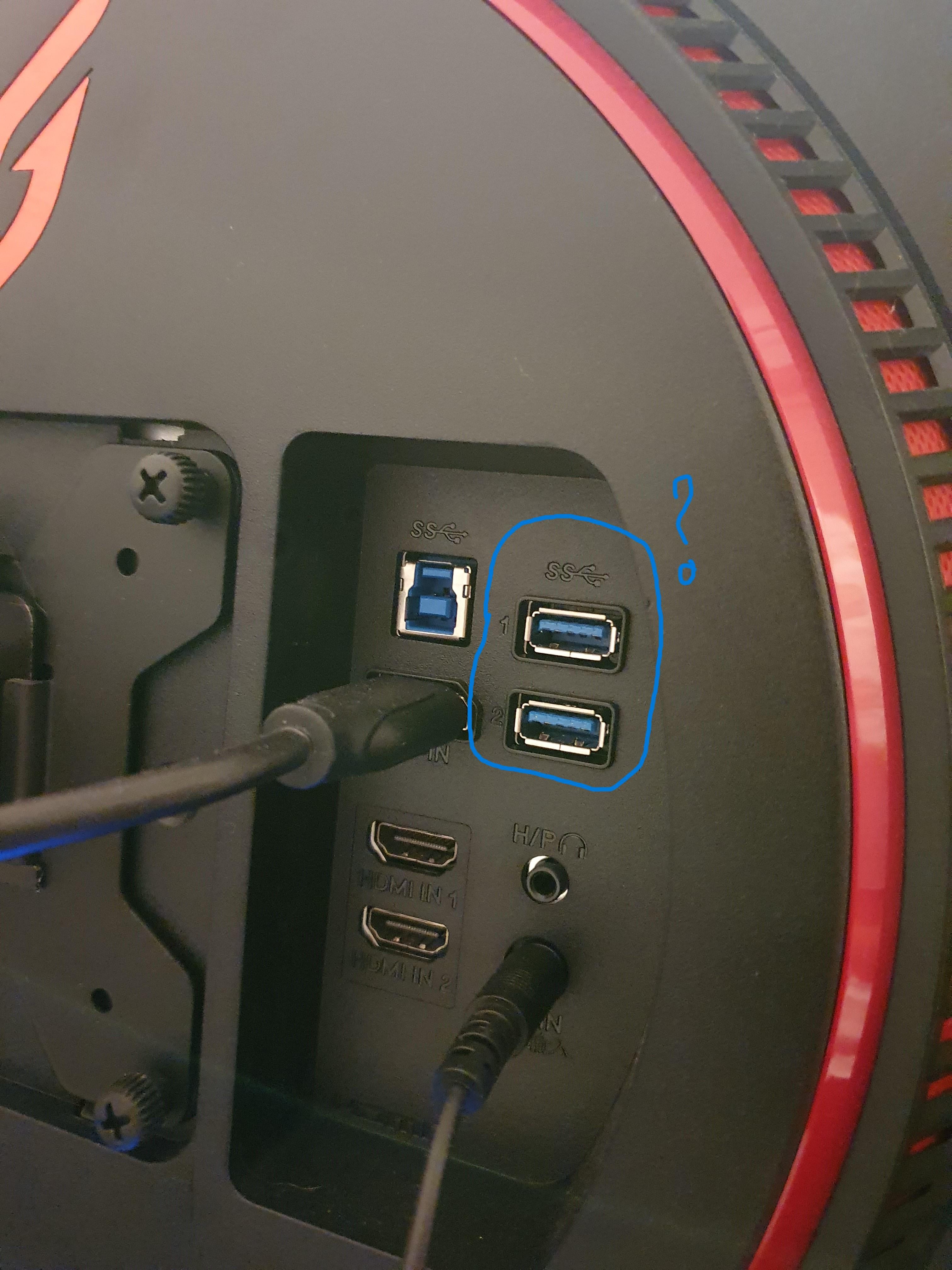
What are these USB ports for? I got this new monitor and it has USB ports. Can I use them as regular USB ports like the ones I have in my cpu cabinet, do I have to do something to use them? Apologies for the dumb question.

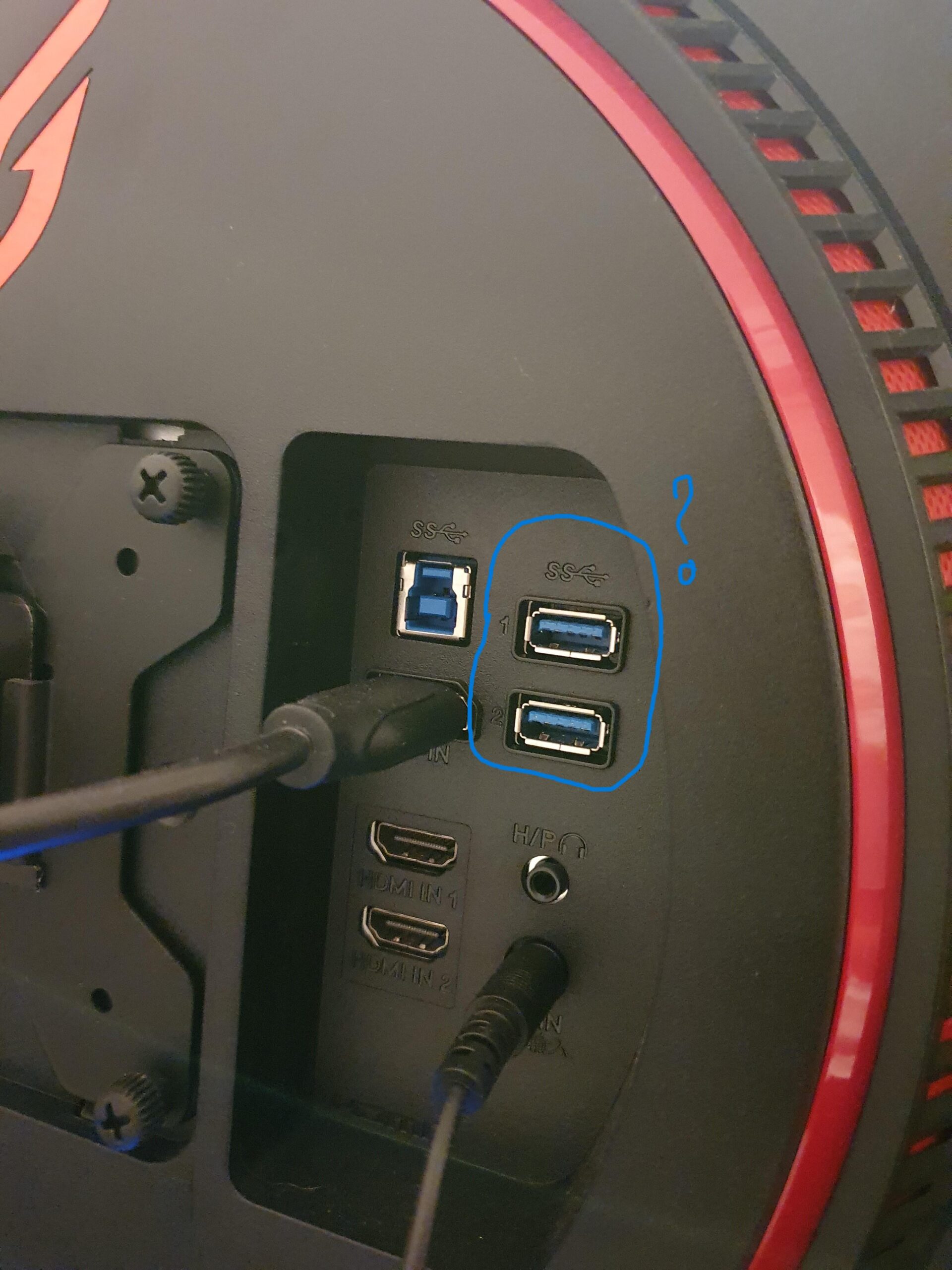
What are these USB ports for? I got this new monitor and it has USB ports. Can I use them as regular USB ports like the ones I have in my cpu cabinet, do I have to do something to use them? Apologies for the dumb question.
48 Comments
Your monitor has a USB hub. You most likely have to connect the more square one to the left of them to a USB on your computer to use them.
Without knowing the model of the monitor, which you conveniently left out, is not uncommon for modern monitors nowadays to have built-in peripheral (USB) ports.
The more square one is a usb B uplink if you plug a cable into it it will allow your monitor to act as a hub
Connect your monitor to your PC using a USB 3.0 cable plugged into a normal blue USB port on your PC to the square-ish blue port on your monitor (labeled “SS” for SuperSpeed), using a USB 3.0 cable; then you’ll be able to use those as normal USB ports
Connect the USB B 3.0 to your PC, and now you can connect stuff like a webcam & mic to the built in USB 3 hub in your monitor. Helps save on a few ports for less-latency sensitive things.
RTFM
Helps keep cables tidy, should have come with the bigger square one to the left
I have 3 monitors at work and I have all of the USB 3.0 hubs on each one connected to a USB port on my docking station. Works great and gives me 12 USB ports.
RTFM
In sorry to be an asshole but does no one ever read manual? Or even Google ¡ is that not faster than waiting for reddit
I use the normal USBs for charging stuff like headphones or powering led strips
I plug my chargers in them for ease of access
Since i have the “same” LG monitor and its HUB you definitely did get the USB cable which came with the monitor together. Use it and plug it in your PC blue USB port and your 2x USB 3.0 will work. Nothing special actions needed.
Lmao “CPU cabinet”
Connect the type B (the squared one) to your pc and you can use those 2 usbs. Also you can update the firmware of the monitor if there is new one.
yes
Does anyone read manuals anymore?
CPU cabinet lol Google translate at its finest
“My monitor came with a manual, but can you take the time to just tell me what it says?”
They are a USB hub. That square connector to the left is a USB-B connector, you will need a USB-B to USB-A cord, and connect that to a usb port on your computer before you can use them though. They are useful for stuff like webcams or microphones that sit on the opposite side of your desk as your computer.
CPU cabinet?
Is that LG? Gotta love these monitors ❤️
when in doubt, read the user manual
What did you plug into that 3.5mm? Is that for the built in speakers?
If you connect a cable to that big blue one and your computer then yeah, you can use those. Else, they’ll probably just provide just a little bit of power for things, no data.
Your monitor may have come with a cable for it.
You see that USB (B) port to the left of them? There should be a cable that came with it that you can port to a USB port on your computer. Now you can plug in peripherals (like a mouse or keyboard or whatever and use it.
Just a suggestion, but to make the most out of your setup you should really use a display port 1.4 cable and not an HDMI. It’s much better
Did your new monitor come with a manual by chance?
I’m sure you’ve already got great answers but just in case… Your monitor has a USB hub built into it, nice to have when you want a couple more USB ports that are easy to access. For them to work you will need to ensure you have an USB-B 3.0 to USB-A cable and plug this between your computers USB port and that squarish port you have in your picture. Most usually refer to the port as a printer port, as that connector is commonly used on USB printers.
Just a note, emphasis on the “**3.0**” in the cable type, there is an older version of this port (2.0) that is a slightly different shape and won’t work.
USB B to your pc will allow usage of those 2 USB A ports, personally PCs have plenty these days and back when it was handy the ports would be more accessible on the side of the monitor for easy plug in.
Plug square plug into pc, the rest of them become active and used as a hub. Just more options that’s all.
Back in my day my monitor had a USB-A port and it allowed me to playback video files directly from flash storage.
I just figured they didn’t connect to pc or anything, used for lighting or to charge stuff
Someone has definitely already mentioned this but there is probably a usb B 3.0 (Google it) cable in your monitor box, it’ll connect to the usb 3.0 connector on your computer (it’s the blue usb ports) and then you can use the usb ports on your monitor to connect mice and keyboards! I use my monitors usb ports as a phone charger/transfer cable if I need it
I wouldn’t use them use them for other stuff that you need usb ports for
See the blue usb-b connector? Connect the monitor to your PC via a USB 3 a-b cable then you can use the two USB 3 ports on your monitor for peripherals. Usb-b cables are like what your printer has on it.
Do not stick your dick in it. Thats for sure.
I also have an lg monitor but I noticed that my display port cable doesn’t fit completely into the monitor port, it remains a little unstable when I move it.
Does this happen to you too?
Usually that top square usb3 is what plugs into the computer to transmit power and data to the others
You attach a special USB extender/hub cable to the oddly shaped blue port to the left (above the monitor cable) and the other end to a USB port on your PC, and then you can attach any USB devices to the ports you have highlit and they get routed to the PC.
Anything. Mouse, keyboard. Anything you want if it makes more sense than the back of the PC
I’d say check if any of them are input or output usb then that will pre much tell u everything, input means u can prob load things like emus on a usb and switch inputs to play and output u can prob link usb to usb for dual monitor
Do you have a KVM? The idea is you can plug your webcam, mouse, keyboard etc into the monitor and then if you change inputs on the monitor you can move all the peripherals over. I have one and it’s great for when I’m using my work laptop at home.
Connect the USB B to your computer and your display usb A port will act as pc usb port
It’s just a USB hub. Sometimes it’s used to update monitor firmware. It can be convenient for Webcams or short peripherals. I have a $1,000 monitor and never used it.
If you got it new, check the box it came in. You may find a bunch of papers or even a booklet inside.
Those are known as instruction manuals and have all the information you need 😉
They are a built-in 2 port USB hub. There should be a cable that connects to the other blue port there and you can connect that to your computer and then use the USB ports like any of the ports on your computer.
You can also use the as a power up for a chromecast so you can use it without a pc. Just Check if they are always powered on