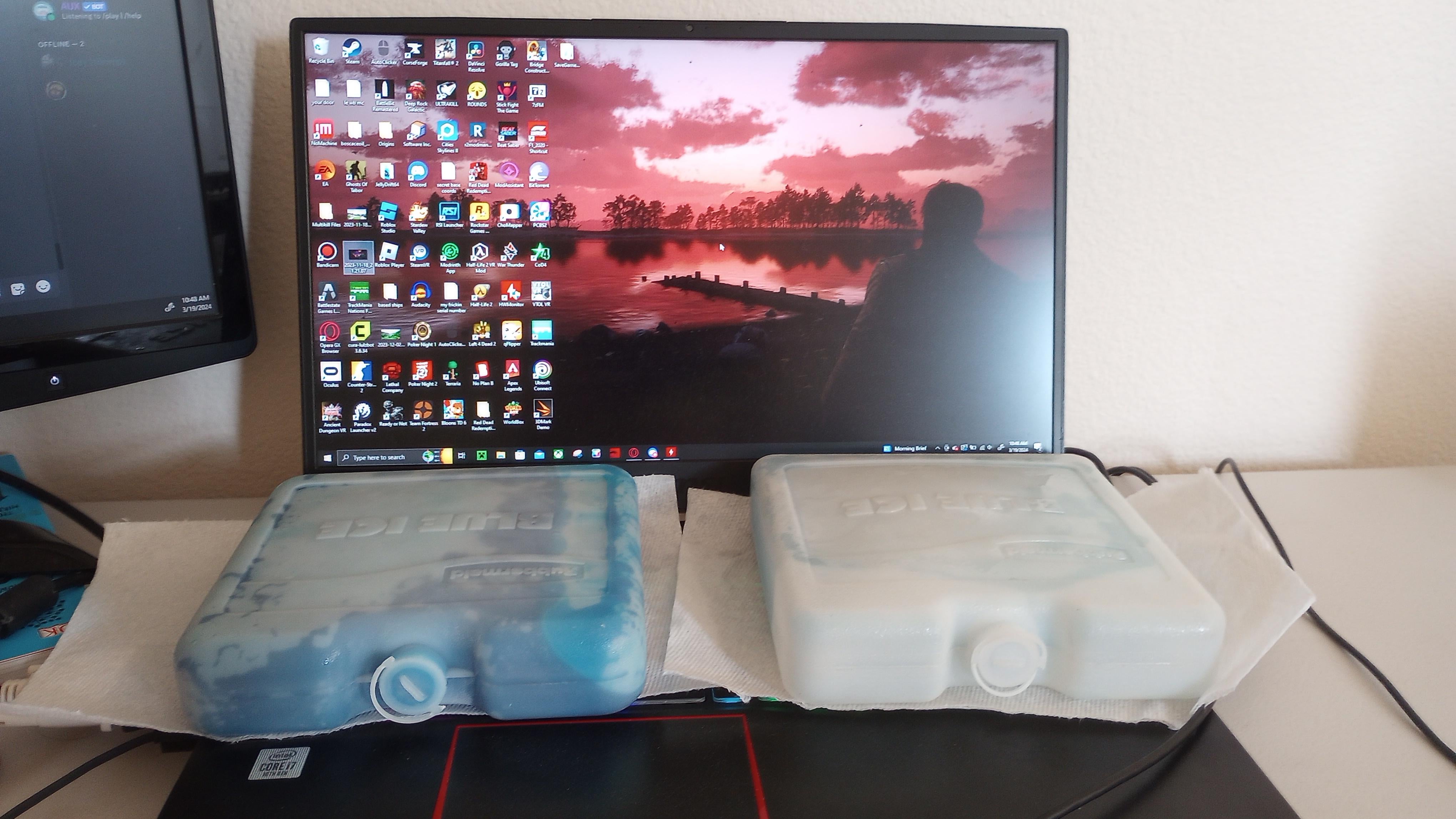
the tissue or paper towel will soak the condensed water droplets and eventually damage your laptop.
figure out something else.
ScarletApex
Get a cooling pad, and if you still need cooling put the ice bricks between the cooling fan and the laptop to cool the air being pushed through
Elixterminator_F
You are killing your laptop.
FloridaMan001v3
🗿
Rii__
This reminds me when I was younger, I put my laptop in the freezer for a few minutes because it ran very hot in the summer. I still can’t believe how stupid I was thinking that was a good idea. DO NOT DO THAT. It will create condensation and also make every soldering more likely to crack because of the abrupt temperature change.
Harde_Kassei
a human puts out more heat then a laptop :/
magezt
RIP laptop. condensation my friend…
Jodelbert
Go get yourself a cooling fan/pad that raises the intakes on the bottom. If that doesn’t work, clean the fans inside your laptop and reapply thermal paste. If that doesn’t work, play games with a lower strain on your system or buy a proper desktop PC.
This is a much better idea than cleaning and repasteing the cpu! Said no one ever.
BaTTxTheFurry
I’d do this but it would fry the laptop.
Windows 10 gets it to 70 degrees idle.
Windows 7 gets it to 40 degrees idle.
I know it’s the thermal paste I’m planning on replacing it very soon.
Emergency_eyewash
I just watched a yt video of how to change a setting in the registry that enables you the option to switch of turbo boost for your CPU in the edit power plan settings. I’ve been able to do it easier with Intel laptops but it was my first all AMD gaming laptop and this thing was cooking. It’s significantly cooler now with hardly any impact to fps.
mohgeroth
It’s not even running any games yet either. No way it’ll cool it if you start one up if you already need this level of cooling.

24 Comments
that is such a bad idea, you will cause condensation and cause it to burn out
“He was successful in stopping the fire because he bricked his system with moisture instead!”
Of its been 2 plus years you’ll want to clean out the fans.
Clean, repaste, undervolt and buy a laptop cooler. That’s how I maintain below 70c temps while gaming on my laptop.
Based on time of post – you live in Australia.
Go to officeworks or umart and buy a laptop cooling pad with a big fan. What you are doing now is a great way to kill your laptop.
Sincerely, a concerned fellow Aussie.
I keep mine cool and silent with:
– disabled cpu boost (yes i did that)
– laptop stand
– vacuum the fans
Thats it. No ice. No noice. No heat.
https://youtube.com/shorts/KMb5Nb3euTM?si=zKLQHzwmANZzz6qL
Hmm but are Laptops considered PCMR? 😲
Are you 12? Cause thats dumb af
Is it me or is the keyboard bulging?
the tissue or paper towel will soak the condensed water droplets and eventually damage your laptop.
figure out something else.
Get a cooling pad, and if you still need cooling put the ice bricks between the cooling fan and the laptop to cool the air being pushed through
You are killing your laptop.
🗿
This reminds me when I was younger, I put my laptop in the freezer for a few minutes because it ran very hot in the summer. I still can’t believe how stupid I was thinking that was a good idea. DO NOT DO THAT. It will create condensation and also make every soldering more likely to crack because of the abrupt temperature change.
a human puts out more heat then a laptop :/
RIP laptop. condensation my friend…
Go get yourself a cooling fan/pad that raises the intakes on the bottom. If that doesn’t work, clean the fans inside your laptop and reapply thermal paste. If that doesn’t work, play games with a lower strain on your system or buy a proper desktop PC.
RIP laptop. Also reminds me of this.
https://preview.redd.it/mq7v9kcjz2qc1.png?width=666&format=png&auto=webp&s=5753341e2373fbf1e735b1299216464580eb4e98
I know it’s a meme but that’s a silly idea.
This is a much better idea than cleaning and repasteing the cpu! Said no one ever.
I’d do this but it would fry the laptop.
Windows 10 gets it to 70 degrees idle.
Windows 7 gets it to 40 degrees idle.
I know it’s the thermal paste I’m planning on replacing it very soon.
I just watched a yt video of how to change a setting in the registry that enables you the option to switch of turbo boost for your CPU in the edit power plan settings. I’ve been able to do it easier with Intel laptops but it was my first all AMD gaming laptop and this thing was cooking. It’s significantly cooler now with hardly any impact to fps.
It’s not even running any games yet either. No way it’ll cool it if you start one up if you already need this level of cooling.