
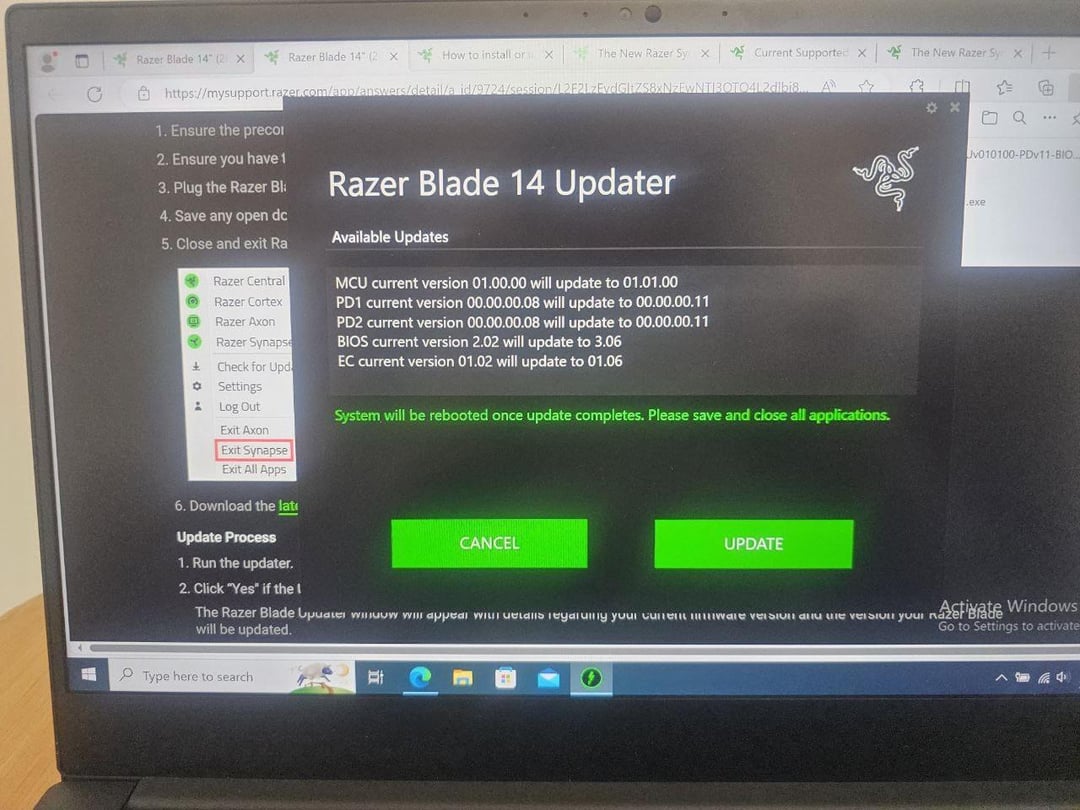
Hello, pcmasterrace.
I recently purchased a razer blade 14 (2022)
RZ09-0427. I wanted to update the firmware so went to razer's official website and downloaded the latest firmware updater.
I installed it alongside synapse and proceeded with the update. It said that the update was successful but after the restart the second attached image appeared saying new CPU is installed and that fTPM is corrupted. I hit N but the system restarted and gave me the same screen so l hit Y and it boot windows but my windows hello was gone.
I then went on to the support page and read this before updating pdf and realized I didn't do the steps that were mentioned. Now I am freaking out and wondering what other parts of my laptop have I broken?
Have I damaged my laptop?
11 Comments
[firmware updater link](https://mysupport.razer.com/app/answers/detail/a_id/6135/~/razer-blade-14-%282022%29-%7C-rz09-0427-drivers-%26-downloads) and [the update manual](https://dl.razerzone.com/drivers/Razer%20Blade%2014%20%282022%29%20%E2%80%93%20RZ09-0427/9724%20-%20Razer%20Blade%2014%20Mercury%20%282022%29%20RZ09-0427x%20-%20Update%20Guide-en.pdf?_ga=2.141864370.1820881964.1710860173-5986444.1710860172)
This is the biggest turn off to using razor mice, the nagging updates, mouse software should update once every 17 years.
[deleted]
When you updated your laptop’s firmware the fTPM changed so the fTPM needs to be reset to generate a new TPM key. You need to press “Y” to reset the key otherwise it’ll keep complaining about it and stuff that relies on the TPM key won’t work.
Security features that rely on the TPM key like BitLocker will stop working because they were set up with the old key and you’ll have a new key now. Since you made it to the Windows login screen it doesn’t seem like you have BitLocker enabled so you don’t need to worry about that part.
It looks like the Windows PIN is also affected by the TPM. You’ll need to sign in with your password and reset the PIN. Before you do that make sure that you have pressed “Y” during that warning screen in the second picture to reset the TPM key, otherwise, you might have trouble resetting the PIN.
thats on you for buying razer. everyone collectively agreed it was shit a decade ago
No, that’s perfectly normal. It’s just how the TPM works and Windows works in general. Just hit Y to let it reset the TPM, then set up the PIN for Windows all over again. I have to go through that everytime I update the BIOS on my windows desktop.
Just don’t use razer software, I stopped when they rolled out the update which disabled razers’ 7.1 spatial sound drivers on headsets that were marketed to support them
I rarely had positive experiences with anything Razer related.
Idk why this has me laughing my ass off but this is actually tragic, sorry op
If it aint broke
ive never experienced this but shout out to this community and the internet for helping you so quickly. this looked way worse than it is, but it looked reaalllly insanely bad.