
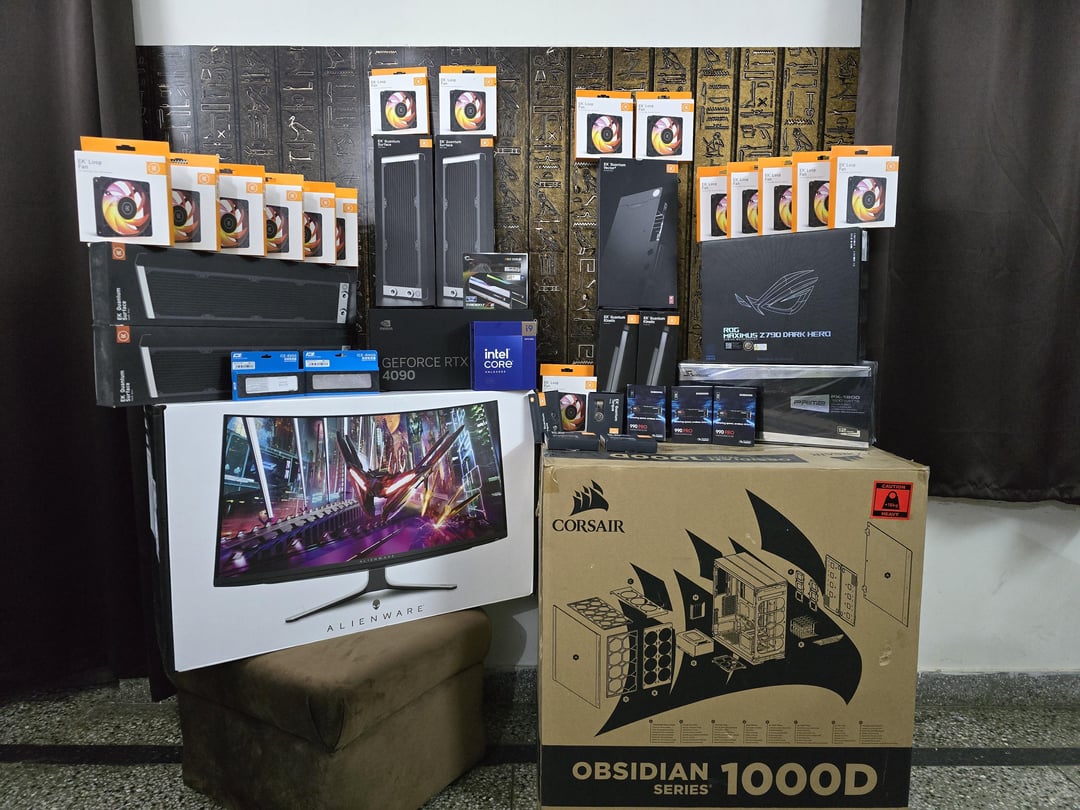
Full configuration –
Case – Corsair 1000D
CPU- Intel 14900KS
CPU cooling – EKWB Velocity 2 Direct Die waterblock
CPU secondary cooling (if I'm unhappy with the EKWB) – ICEMAN Direct die waterblock
CPU Thermal Paste – Thermal Grizzly Conductonaut
GPU- Nvidia 4090 FE
GPU cooling – EKWB Velocity 2 waterblock
GPU paste- Either Conductonaut or ARCTIC MX-6 (Haven't decided yet)
GPU Pads – ARCTIC / GELID (haven't finalized)
RAM – 2×32 G.Skill 6400 kit (Hynix A-Die)
RAM cooling – ICEMAN direct touch RAM waterblock
RAM will run @ 7200 with this cooling
Motherboard – Asus ROG Z790 Dark Hero
PSU – Seasonic Prime PX-1600 ATX 3.0
Primary Monitor – Alienware AW3225QF 32" QD-OLED
Secondary Monitor – AOC 27" 1080p IPS (don't remember the model, it's from my previous PC, very old).
Liquid cooling loop Parts –
2x 480 EK Quantum Surface P480M (45mm)
2x 360 EK Quantum Surface S360 (30mm)
18x EK FPT Loop Fan RGB
EK Acrylic Hard Line Tubing 16mm OD
EK HDC 16mm connectors
2x EK Quantum Kinetic TBE 300 D5 PWM D-RGB
Aqua Computer High Flow Next Monitor for Temp/ Flow/ Quality monitoring of the Coolant
Aqua Computer OCTO controller for controlling fan curves / pump.
EK Cryofuel Clear Coolant
Aqua Computer Pressure Compensation Membrane Fitting
Aqua Computer Temp Sensors (others)
EK Quantum Drain Valve
Bitspower Loop Inline Filter
Storage –
1TB 990 Pro for C drive (system)
2TB 990 Pro for Games Installation
4TB 990 Pro for recording and editing gaming videos / other work.
Favorite Peripheral- Tobii Eye Tracker 5
Keyboard – RAZER Huntsman V3 Pro
Mouse – RAZER Basilisk V3
Please let me know if I've missed something, tomorrow this will be the fastest PC in India (at least for a few days/ months lol). 🍻
4 Comments
Hello hksbindra, and thank you for your submission to Gaming PC! If you are new please check out our rules over at the wiki [here](https://www.reddit.com/r/gamingpc/wiki/rules)!
We have recently added the useful feature of Title Flair! You can set this manually by clicking Flair under your post once you have submitted your post, but if you missed it in the rules there is a much better way that will automatically flair your post!
To do this simply add what your post is about in brackets before your title. For example for a Build Log you can type [Build Log] before your post so that it looks like this; [Build Log]My new awesome build!, and the bot will automatically set your flair to Build Log! This works for Build Log, Build Showcase, News, Hardware News, Hardware Release, Discussion, and Miscellaneous!
Also remember that this is a place for discussing and sharing our love of Gaming Computers! This is NOT the place for help building or determining what parts you should buy, that is better suited for /r/buildapc. Troubleshooting questions should be directed to /r/techsupport. Thank you again!
*I am a bot, and this action was performed automatically. Please [contact the moderators of this subreddit](/message/compose/?to=/r/gamingpc) if you have any questions or concerns.*
😬
Single GPU? Only 64gb of ram? No Sabrent 8tb drives?
(just kidding this is awesome)
Nice! post again when you are finished!