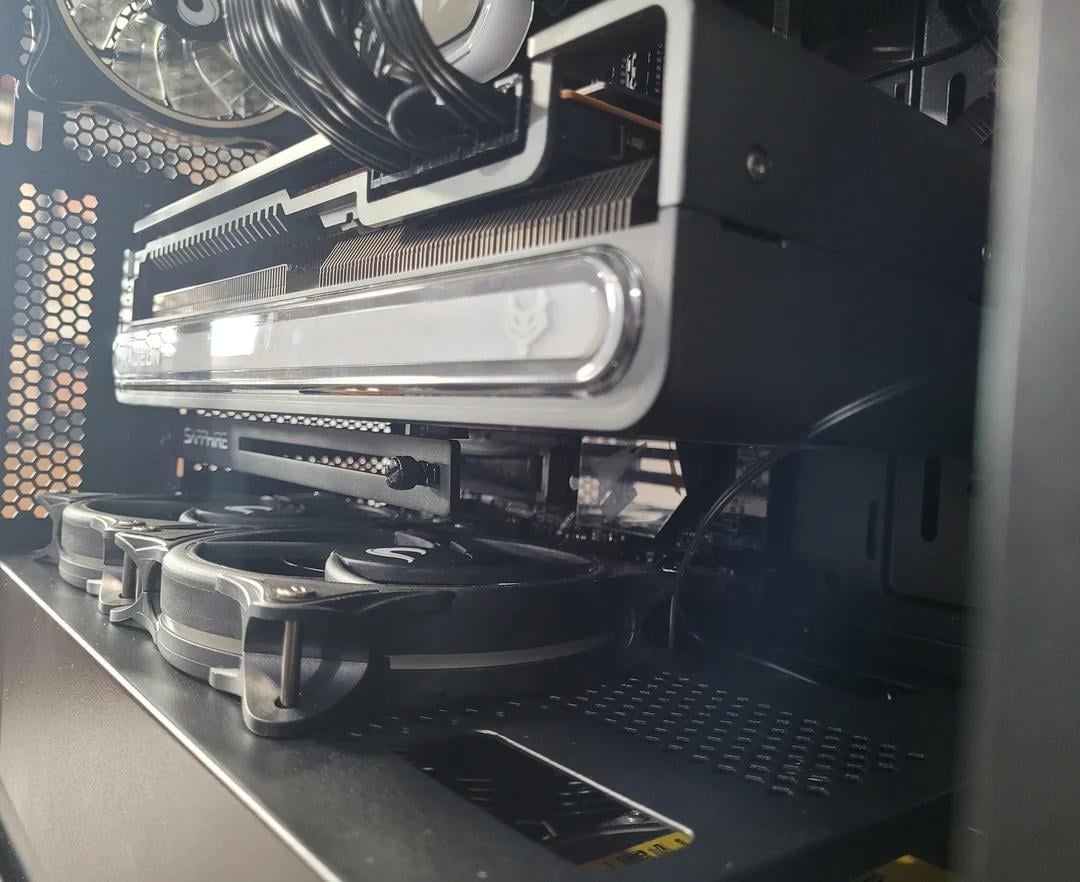
Remove. At the moment they’re sucking away fresh air from your GPU into the PSU compartment for no reason. It’s literally worse than having no fans there at all.
Smashy680
Check gpu temps with them and then without
dirac0sea
Remove em, they may be sucking the pixels from GPU, you will have lower resolution all the time.
SoDrunkRightNow2
Are the fans fighting the GPU’s fans?
Mastergawd
I mean it depends. is this taking air in or out? If its blowing air to the GPU then get rid of it or make sure its taking air out.
Kinda hard to diagnose air flow with just one pic 🙁
I have the exact same gpu and noctua fans just as far apart. If the fans are blowing into the GPU fans, keep them. If they’re exhausting out of the case, flip them over. Helps my GPU at 71c max load with +15% power. Also I can’t tell, if you daisy chained your GPU cables, don’t, those PCIe cable connections are only good for 150 watts MAX. That’s if they’re seated perfectly too, still seen some of them deform at 160watts.
menacingmoron97
I had a similar build with bottom fans right under the GPU.
I see your fans are blowing air towards the GPU – which is the way to go.
For me it was a Strix R9-390X overclocked (quite a hot card), the two bottom intakes helped by 3-4 celsius. I used a fan controller app to sync the speed of those fans to the GPU temp.
MrUltraOnReddit
Where are they getting air from? Under there is the PSU, so the left fan shouldn’t do anything really. Does your back pannel have airvents so air gets into the compartment? No? Remove them. The 3 front fans should be giving you all the air you need. Also, it looks bad imo.
FunFact5000
Check with and without. Personally I don’t care, my pc sits in a closet because I don’t like noise or rgb crap in my face.
Diy_Papi
Keep
KnightofAshley
If they are going the same way its fine, but likely won’t do anything for temps
Awoo81
Man, is that Gpu anti sag thing working? Ihad one similar to that, it was garbage. Ended up using a tube like one that gives it way more support.
Issax28
Think you installed the fans the wrong way. Bottom fans need to be intake, same as direction as GPU
Dragon_211
A wise man once said. “You can never have too many sucks or blows.”

16 Comments
Remove. At the moment they’re sucking away fresh air from your GPU into the PSU compartment for no reason. It’s literally worse than having no fans there at all.
Check gpu temps with them and then without
Remove em, they may be sucking the pixels from GPU, you will have lower resolution all the time.
Are the fans fighting the GPU’s fans?
I mean it depends. is this taking air in or out? If its blowing air to the GPU then get rid of it or make sure its taking air out.
Kinda hard to diagnose air flow with just one pic 🙁
My boy there is no such thing as too many fans
Why would you get rid of them?
Keep them. The rest of these are assholes.
https://preview.redd.it/dmltad69n5nc1.jpeg?width=2184&format=pjpg&auto=webp&s=4605602f4166e0a5d4dba6f24b589c1fcd296f38
I have the exact same gpu and noctua fans just as far apart. If the fans are blowing into the GPU fans, keep them. If they’re exhausting out of the case, flip them over. Helps my GPU at 71c max load with +15% power. Also I can’t tell, if you daisy chained your GPU cables, don’t, those PCIe cable connections are only good for 150 watts MAX. That’s if they’re seated perfectly too, still seen some of them deform at 160watts.
I had a similar build with bottom fans right under the GPU.
I see your fans are blowing air towards the GPU – which is the way to go.
For me it was a Strix R9-390X overclocked (quite a hot card), the two bottom intakes helped by 3-4 celsius. I used a fan controller app to sync the speed of those fans to the GPU temp.
Where are they getting air from? Under there is the PSU, so the left fan shouldn’t do anything really. Does your back pannel have airvents so air gets into the compartment? No? Remove them. The 3 front fans should be giving you all the air you need. Also, it looks bad imo.
Check with and without. Personally I don’t care, my pc sits in a closet because I don’t like noise or rgb crap in my face.
Keep
If they are going the same way its fine, but likely won’t do anything for temps
Man, is that Gpu anti sag thing working? Ihad one similar to that, it was garbage. Ended up using a tube like one that gives it way more support.
Think you installed the fans the wrong way. Bottom fans need to be intake, same as direction as GPU
A wise man once said. “You can never have too many sucks or blows.”