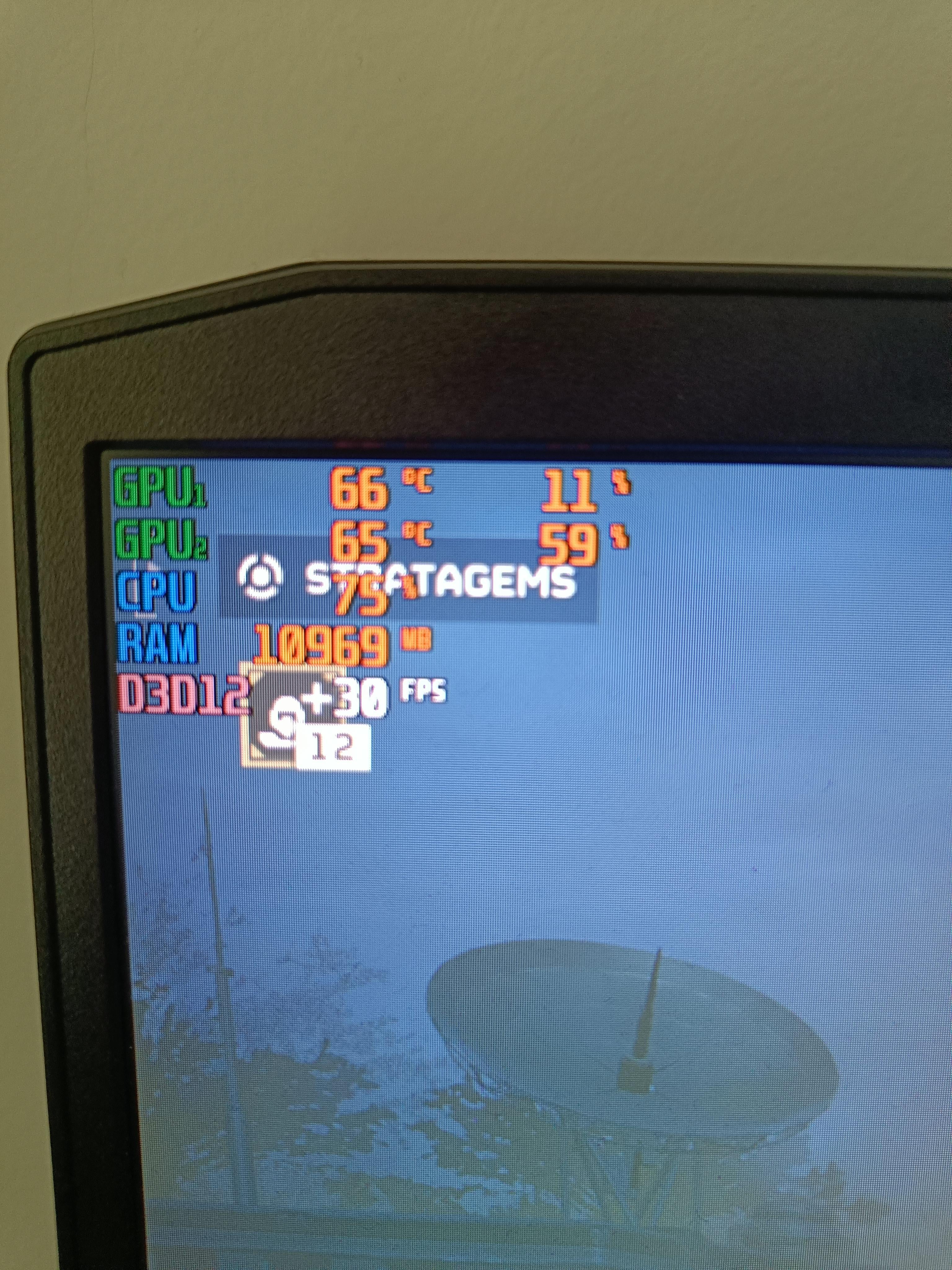
It’s a Lenovo IdeaPad gaming with RTX 3060, the last few months it’s struggling with every game, even in League of Legends I used to have 200+ fps, now I barely get 100. I’ve updated the drivers and I have no apps running in the background.

It’s a Lenovo IdeaPad gaming with RTX 3060, the last few months it’s struggling with every game, even in League of Legends I used to have 200+ fps, now I barely get 100. I’ve updated the drivers and I have no apps running in the background.
38 Comments
At 75% CPU when something as weak as a mobile 3060 is only at 59%, you *do* have stuff in the background.
Ctrl+alt+del> task manager > click cpu see what’s eating all your power.
Pull up task manager and look at what processes are running
When was the last time you rebooted your system? Do you have fast boot enabled? Try disabling it and doing a cold reboot
Looks somewhat normal.
Laptops operate at far higher temps during normal GPU usage.
I will say I recently discovered the epic launcher using up to 28% GPU during spikes! See if anything is eating it, if not then your laptop may need a cooling pad if it’s not a high end model with additional fans.
But generally these numbers are in norm.
I’d entertain the idea of resetting Windows.
Windows can just get gunked up with trash over time, and it can be challenging to keep track of everything that loads on startup and is installed.
Personally, I just buy another drive and reinstall windows on that so I can start fresh and access my files on the old drive if I need to. In a laptop, that could be challenging, though, especially if you have limited drive slots.
What laptop are you using, and what are its specs?
Have you made sure its not using the integrated gpu? If not i would DDU, reinstall drivers and check settings.
Riva is saying GPU1 and GPU2, could you be using the integrated graphics instead of the discrete GPU?
Edit: Typo
This happens when its longtime running? or exactly when u execute the game?, it might be due to thermal throttling.
It is a laptop
It’s a laptop, that’s what’s wrong. There is no such thing as a “gaming” laptop.
Use dGPU only mode and the best thermal profile
Maybe you somehow ended up switching to integrated graphics? Or something did it for you? Worth checking just in case
Intel, never use intel processors for a laptop. Next time you buy one, use AMD.
you say that you bring your laptop to shop to get repasted did the problem started after that? btw are you running single stick of ram or dual? or maybe the shop pull out your ram and forgot to reinstall both back, just one stick in there.
another thing to check is your windows power profile and current cpu clock, the last few windows update is a bit buggy and made my 10875H run at 0.8ghz at times even when plugged in.
The problem is that it’s a laptop
Stop using integrated graphics. Use Nvidia Optimus to swap to only 3060
Looks like low energy usage or power saving instruction from windows.
Frame locked? V-Sync?
Nothing wrong can’t you see you getting +30 fps
The + means you get more then 30 fps
But it won’t display on msi afterburner
it’s a laptop
If it’s constantly at 30 fps then maybe it’s not plugged in and works on low battery mode. Idk tho
Check if V-Sync is on. If yes, then check screen refresh rate.
You can see witch GPU is being used on the proformance section in task manager as it sounds like iGPU proformance. I had to do something similar with a friend’s laptop when it suddenly started using iGPU instead of the dedicated GPU.
Single thread at 100%, rest of the cpu more lightly used?
Run the command ‘dxdiag’ and post the output here
Go to GeForce experience, click settings and disable battery saving mod, it sounds like that might be able even when your laptop is plugged in.
What is your CPU and RAM config? Can you check?
Gpu 1 and gpu 2? I’d make sure the 3060 is priority in case game is only using a potential integrated graphics within cpu
Is it dirty? A lot of lint/dust will contribute to poor airflow and cause high temps as a result.
Check power consumption. Control panel > Hardware and sound > Power Options > Change plan settings > additional. Find processor power management, check minimum. If it is below 100% plugged in, it will underperform. So check maximum as well, but usually it is 100%
Did you do into the nvidia control panel and select the dedicated video card for the game.
Helldivers 2 is pretty new and hungry
Try disabling the iGPU in your BIOS. I think its called “discreet mode”
I only enable it when I am travelling around or something.
Did you check your energy settings?
check your power settings on your laptop it might of switched them to power saving when you updated drivers or something.
It appears that the print screen button is no longer working.
https://preview.redd.it/okcq26mj85mc1.jpeg?width=1170&format=pjpg&auto=webp&s=eff546128ea0bdaa01778581fb91869674e1c4d9
Repaste/Clean vents, standard procedure.
Clean windows install, grab laptop specific drivers from manufacturer website, if desperate.
Could maybe also be some power profile shenanigans? Like a custom power profile or something, I know some laptop manufacturers have those. Could also be hidden in their bloat/software.
Try running some benchmarks/stress tests, see if you can also find someone else like a reviewer who ran the tests on the same model.