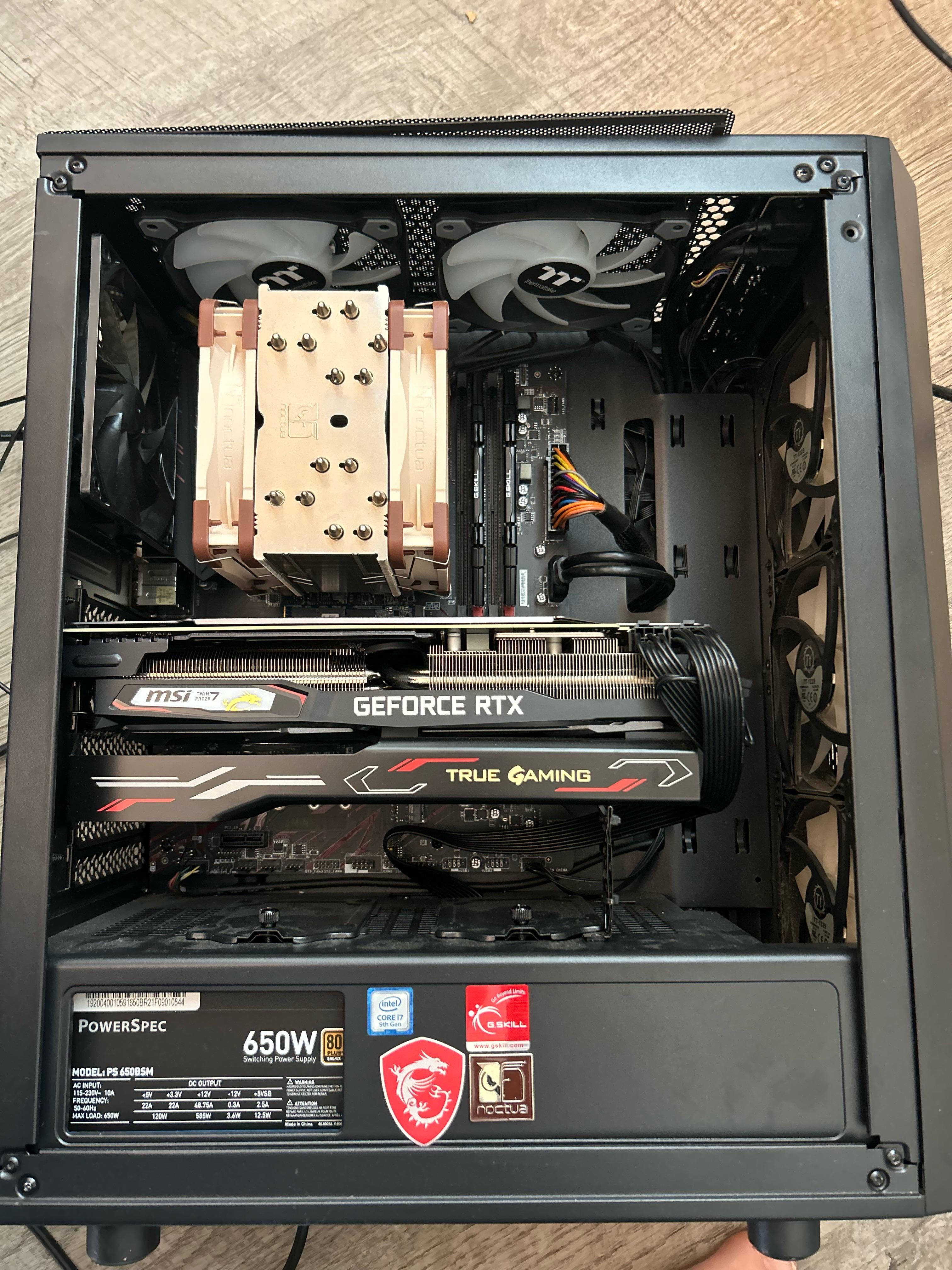
Might be a M.2 thats on the mobo itself behind gpu
HMS_Hexapuma
Modern PCs often use hard drives that look like a big stick of gum and clip into the motherboard, held in by a single screw. Yours looks new enough for that to be the case so I’d suggest booting it up and looking in the BIOS to see if it says there’s a drive attached.
HomeBoySlurp
Sorry for your loss. Congrats on the new PC.
Creative_Worker37
He left you a sick rig!
Artistic-Economy6732
Pretty sure I see a m.2 sticking out from behind the GPU in the photo you posted.
Vammainen69
If he/her who passed built this god bless the soul coz this is well put together.
Perfect in every way, thermaltake fans = quality rgb for half the price even less compared to triple aaa brands.
Noctua air cooler for that sexy brick.
What i can see from mobo and ram he didnt spend on bs but got what was needed.
Psu thats enough and bit more.
And MSI card with a bracket for negating future bending!
The sleek cablework
Not even afraid of using the stickers aka lived to fullest, motherfucker clearly was a cool fella.
Mindless-Feature7817
Could be an m.2 in the motherboard or Sata on the other side of the case, if it boots to windows it has a drive to check if it’s an ssd or hard drive check the bios
ChickenDenders
If you truly aren’t comfortable messing with the intervals, may be worth taking it into a PC repair shop and just paying them like $100 to clean it, wipe it, get it working for you, and explain to you in simple terms what they’re doing. Maybe in a written summary to refer back to 😉
dexterlab97
Can you take the picture behind the PC? Where all the cables are supposed to be connected to?
redgroupclan
We need two more pictures. One that gets the space above the big GeForce card, and one of the other side of the computer with the panel taken off.
With the current angle, we can’t see the space where the small storage drive might be, above the GeForce card. It’s also possible there is a drive on the other side, towards the bottom of the case in a drive cage, hence the need for more pictures.
Eazy12345678
there is an ssd above the gpu can barely see it in pic. below the tan cpu cooler.
RazerRogue
Best way to tell is by plugging it in and turning it on. If it boots to windows then you’re all good, if not then you might be missing storage
CuddleFishHero
Sorry for your loss, I recommend you watch one of those 30 min how to build a pc videos that was you can get all the basic jargon and know where everything is. Also will help with wiping the tower (as you should) and installing windows again
SnooCookies6443
To check for sure, Boot it up an spam the delete key to enter the Bios of the motherboard, or look up a yt video in how to look at your “Boot Drive” pretty straight forward from there.
Comfortable-Treat-50
rip gamer buddy.
Arch3m
We’re down a brother, but at least you can fill in his shoes.
Mythicguy
He had good taste 👍
That GPU looks to be a 2070 Super or 2080 with the type of power connectors it has. Great for gaming.
Great chance for you to carry on that legacy and learn 🙂
xxTheMagicBulleT
Hard drives are probably on the other side. As you see the cables going true the slot. Mostly in more neat cases. It has the hard drives on the other side.
But can also have small slots hard drives on the motherboard too like a boot drive.
But probably look on the other side. You probably find a hard drive there. Is most likely my geass
ZookeepergameUsual71
It has an M.2 SSD but if you want to know where the hard drives go they usually go beside the psu which is in the bottom of the case.
nbtester
Could be an older SSD mounted on other side, back with cable management…
Any_Weird_8686
I’d say there’s a good chance of having an NVME SSD installed on that.
Astrali3
i think i can just barely make out an NVMe drive behind the gpu, so it (probably?) has a drive.
ir88ed
Many of us old PC gamers had pretty decent rigs in the 2011-2012 era. Maybe just give all the rigs a once-over for any bitcoin/crypto wallets. Probably not, but I certainly would check. A quick google will tell you what to look for.
Popular_Dream_4189
I see a NVMe drive behind the GPU. Can’t tell if there is anything plugged into the SATA ports. Unless it has been changed, apparently you have a 9th gen i7. Have no idea what GPU that is but since the CPU is 9th gen and they used the Twin Frozer 7 on 16 series GPUs, that is a Turing (20 series GPU). It is a ‘Gaming X’ model so it could be anything from a 2060 to a 2070 Super.
TidalLion
I’m sorry to hear of your loss, my condolences to you and your family.
It’s possible that the hard drive is either stored next to the Power supply at the very bottom (in the shroud/ metal compartment at the very bottom) OR is a newer type SSD that screws into the motherboard. It may be hidden by the Graphics card.
Tears_of_Destiny
I’ve built almost an identical computer to that, take off the back plate and check next to your PSU on the bottom, there should be a hard drive rack down there with one or three drives
avitia24
Im sorry for your loss. Let me know if you’d like me to take away such burden from your hands.

29 Comments
Might be a M.2 thats on the mobo itself behind gpu
Modern PCs often use hard drives that look like a big stick of gum and clip into the motherboard, held in by a single screw. Yours looks new enough for that to be the case so I’d suggest booting it up and looking in the BIOS to see if it says there’s a drive attached.
Sorry for your loss. Congrats on the new PC.
He left you a sick rig!
Pretty sure I see a m.2 sticking out from behind the GPU in the photo you posted.
If he/her who passed built this god bless the soul coz this is well put together.
Perfect in every way, thermaltake fans = quality rgb for half the price even less compared to triple aaa brands.
Noctua air cooler for that sexy brick.
What i can see from mobo and ram he didnt spend on bs but got what was needed.
Psu thats enough and bit more.
And MSI card with a bracket for negating future bending!
The sleek cablework
Not even afraid of using the stickers aka lived to fullest, motherfucker clearly was a cool fella.
Could be an m.2 in the motherboard or Sata on the other side of the case, if it boots to windows it has a drive to check if it’s an ssd or hard drive check the bios
If you truly aren’t comfortable messing with the intervals, may be worth taking it into a PC repair shop and just paying them like $100 to clean it, wipe it, get it working for you, and explain to you in simple terms what they’re doing. Maybe in a written summary to refer back to 😉
Can you take the picture behind the PC? Where all the cables are supposed to be connected to?
We need two more pictures. One that gets the space above the big GeForce card, and one of the other side of the computer with the panel taken off.
With the current angle, we can’t see the space where the small storage drive might be, above the GeForce card. It’s also possible there is a drive on the other side, towards the bottom of the case in a drive cage, hence the need for more pictures.
there is an ssd above the gpu can barely see it in pic. below the tan cpu cooler.
Best way to tell is by plugging it in and turning it on. If it boots to windows then you’re all good, if not then you might be missing storage
Sorry for your loss, I recommend you watch one of those 30 min how to build a pc videos that was you can get all the basic jargon and know where everything is. Also will help with wiping the tower (as you should) and installing windows again
To check for sure, Boot it up an spam the delete key to enter the Bios of the motherboard, or look up a yt video in how to look at your “Boot Drive” pretty straight forward from there.
rip gamer buddy.
We’re down a brother, but at least you can fill in his shoes.
He had good taste 👍
That GPU looks to be a 2070 Super or 2080 with the type of power connectors it has. Great for gaming.
Great chance for you to carry on that legacy and learn 🙂
Hard drives are probably on the other side. As you see the cables going true the slot. Mostly in more neat cases. It has the hard drives on the other side.
But can also have small slots hard drives on the motherboard too like a boot drive.
But probably look on the other side. You probably find a hard drive there. Is most likely my geass
It has an M.2 SSD but if you want to know where the hard drives go they usually go beside the psu which is in the bottom of the case.
Could be an older SSD mounted on other side, back with cable management…
I’d say there’s a good chance of having an NVME SSD installed on that.
i think i can just barely make out an NVMe drive behind the gpu, so it (probably?) has a drive.
Many of us old PC gamers had pretty decent rigs in the 2011-2012 era. Maybe just give all the rigs a once-over for any bitcoin/crypto wallets. Probably not, but I certainly would check. A quick google will tell you what to look for.
I see a NVMe drive behind the GPU. Can’t tell if there is anything plugged into the SATA ports. Unless it has been changed, apparently you have a 9th gen i7. Have no idea what GPU that is but since the CPU is 9th gen and they used the Twin Frozer 7 on 16 series GPUs, that is a Turing (20 series GPU). It is a ‘Gaming X’ model so it could be anything from a 2060 to a 2070 Super.
I’m sorry to hear of your loss, my condolences to you and your family.
It’s possible that the hard drive is either stored next to the Power supply at the very bottom (in the shroud/ metal compartment at the very bottom) OR is a newer type SSD that screws into the motherboard. It may be hidden by the Graphics card.
I’ve built almost an identical computer to that, take off the back plate and check next to your PSU on the bottom, there should be a hard drive rack down there with one or three drives
Im sorry for your loss. Let me know if you’d like me to take away such burden from your hands.
That’s sexc!
M.2 is probably hidden under the graphics card.