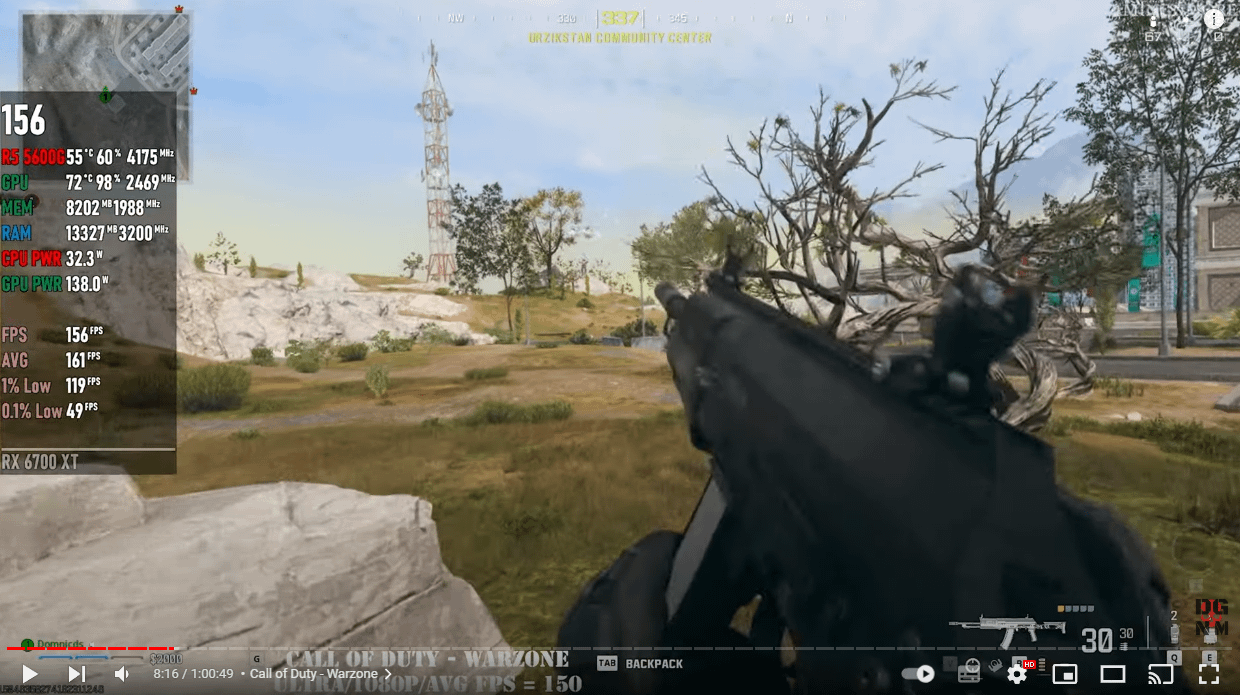
Why is he getting 150+ FPS with graphics on Ultra with the exact same specs as me and I’m getting 50-60 fps?? Help!?

Why is he getting 150+ FPS with graphics on Ultra with the exact same specs as me and I’m getting 50-60 fps?? Help!?
21 Comments
My CPU is the same and with me it keeps on 99% usage, with him is like 60%
My GPU is the same and with me it keeps on 50% usage, with him is like 99%
WTF!!!
There is literally no way for us to know anything based off this image alone. You need to list your specs, settings, config file, etc.
There’s no way this screen is from someone playing on ultra
Maybe he uses fsr 3.0 frame gen. Since frame gen doubles your fps,his base performance is around 75 fps.
you cant trust those youtube videos ALL the time
Any chance of Rivatuner not showing the fps correctly?
I honestly see very little quality difference from low and normal settings vs ultra
Difference in resolution?
you cant trust these videos lol
5600G is limiting you…..I’d recommend a 5700x3d for Warzone
I just watched the video that you linked and that guys preset may be set to Ultra but when he scrolls down those aren’t Ultra settings. Shadows and Textures are set to normal etc. Also, I would go into the configuration file and change the render worker count to 6 and see if it gives more fps. If not try 5 then 4.
delete your players folder in documents>callofduty>players
Load up the game let shaders install etc.
close call of duty.
open up your players folder config file and check what your renderer worker count is set to.
for amd set the renderer worker count ( = to the number of cores your cpu has. I believe that is a 6 core so 6) or try ( -1 of your cpu cores, so 5) and see if that begins to help.
I could get alot more detailed with you in nvidia control panel but that would be up to you.
main thing set the worker count! load up cod. go to graphics settings and find your vram target slider. I assume your bar will be set on 90? I’d suggest drop to 80 and see if that feels better, then 70 … once you find the spot your game feels good then go back to graphics and set your low latency mode to “On”
Are you using a hdmi 2.1 ?
Hi , I was running a Ryzen 5600x @ 4800mhz
With Nvidia 2060 super And max FPS I could achieve was about 130 FPS 1080p with ups and downs depending were was on map WZ I doubt you could get more FPS out of that CPU you got 5600g how that guy on video has got 150 FPS on ultra I don’t no doesn’t seem right unless fsr 3 maybe I tried lots of settings etc
I upgraded to a rx 7800xt and that made no difference still stuck at 130 ISH fps just was able.to play on higher settings ,
The only thing that made a difference was upgrading to Ryzen 7 5800x3d
Now FPS is megga and can run solid 144fps sync with monitor no drops
Mw3 WZ is very CPU heavy
Don’t forget to set your RendererWorkerCoumt:1.0 = “6”
In your cfg file
Important !
Think it’s
Documentscall of dutyoptions.4.cod23.cst (Open with notepad)
Hope this helps 🙂
Is your GPU in the correct PCIe slot?
Try this guide:
[https://www.youtube.com/watch?v=RbkXFdFEqxg](https://www.youtube.com/watch?v=RbkXFdFEqxg)
it made my game go from 80-100 fps to 130-150
Config file.
That video is crap, the AVERAGE for 6700 XT maxes out around 125 fps on ultra with the best cpu (which 5600g definitely isn’t).
You are definitely severely CPU capped (can double check by dropping graphics to minimum and seeing what kind of increase you get). 60 fps is way too low, something is going on with your CPU bios or windows settings and/or memory XMP.
Most that I can recommend is to search for a graphics settings video I personally like foureyes there was something that I had to change in my config files which literally got me 20 fps I was hovering around 150is now I don’t drop below 170. 13700kf and a 4080. But you can’t have your cake and eat it too aka run ultra settings and expect very high frame rates
What fps do you get?
My brother has a 5600x and 3080 and gets around 140 @ 1080p low.
I was getting better frames than that with a 4790k,z97,and rtx2070oc on some old ddr3 in 1440p. Avg 80ish in wz. 100-120 in MP
Something seems strange, I’d try reinstalling and deleting your player folders… start from scratch.
1080p and 60hz though is time for an upgrade though my friend if you can find it in your budget. I gamed on that same setup for over a decade. 1440p is a breath of fresh air. At the very least you want to upgrade refresh rate. 1080p 60hz with higher frames may be prone to vertical screen tear.