Send the GPU over, i can see through the box that it has some outside damage, I will test it for you.
This will have nothing to do, with this reddit account being deleted shortly after receiving the GPU in the mail.
Taikunman
Put the IO shield in first.
Stolen_Sky
First build?
My first build took 10 hours, because I was super carful with everything.
Go slow, look at videos if you get stuck with anything.
And just have fun. Building a machine you’ve worked hard to get is a great feeling 🙂
CrustyCake2344
The only thing having to have force in is the ram. It will feel bad, like you’re damaging something. Graphic takes a little bit, but not like ram does.
Remove the sticker on the cpu cooler.
Pre-applied paste is usually fine. If using non conductive thermal paste, more is better. A pea in the middle or an x is the most common ways. Doesn’t matter at the end of the day as long as you have enough to cover the whole cpu.
Test that it is working before making the wires look pretty.
almostmidnitee
Assess your components before you just start screwing things in. Know what cable goes into what outlet, know how you are going to run those cables.
Read your case manual and take it apart appropriately. You might need access to the non-windowed side, the top and possibly the front.
Know how you are going to mount your CPU brackets/aio cooler.
Read your cooler instruction manual so you know how to mount the fans on it.
Basically just know what you are doing. Know how you are going to put it together before you even start your first screw.
You’ll be done in about 4-8 hours. Take your time, watch build guide videos if you feel uncertain about something specific. 👍
LuckyInstance
Only big issue I had was with the wires with my PSU my first real build I did. Make sure everything is already wired to your modular PSU and loop it in last with everything like the mobo in the case
foreshard
Touch any other piece of metal before handling your components so a static charge doesn’t ruin your whole experience.
Raignelol
Fun lil cable management tip that i use to help reduce waste.
While I’m routing/placing cables, if I like the location and think it should stay, but not everything is in yet, I put a zip tie on it *backwards*, so the zip tie doesn’t lock on to itself.
This way your zip tie will still hold everything youve done so far in place, and when all cables are in you can reverse the zip ties to lock.
Helps so you don’t waste a bunch of ties, and also prevents you from having to snip one or add a second one if you need to place another cable along the same line 🙂
whitemagicseal
Drink your cooler
agmrpink
Don’t forget to clear desk space for that chonker.
Soggy_Mountain_3975
make sure all the connectors from PSU are inserted well, especially the 24 pin of the mobo, it’s damn hard to insert well… I cursed for 2 hours before I realized that I hadn’t hooked that connector up properly 😅
I’ve the same case (itek dark cave white) and if you don’t have a lot of peripherals, it’s easy to hide cables…check your mobo’s guide to know which slots for ram you have to use. Last thing, make sure the CPU heatsink is lower than the pipes/radiator (avoid placing the radiator on the bottom of the case) and be sure there will be a balanced in/out air flow
nilarips
Post pics when done!
etfvidal

& 1st thing I like to do is check the case for sharp edges. I sliced my hand pretty good one time and almost bleed all over them motherboard but was lucky that it was all caught by some THICC psu meshed cables!
AncientPCGuy
Take your time and double check everything.
your-mama648
do it with a build video playing
Novel_Yam_1034
Righty tighty Lefty loosey
Edit: don’t under estimate how long the build would take to finish, ypu think it will be only an hour but it will take way more, good luck and enjoy it!
Kyle_67890
Good luck
0bsidian
Plan your cable routing before you put all the parts.
Natonelife
It’ll be a breeze building things in that case and those are some great components. No penny wasted.(I would’ve gone for an AMD build tho)
One piece of advice is just check if the motherboard covers any spaces you’d like to run any cables through and make sure you have all the standoffs places where they should be before screwing the motherboard on.
I’m gonna assume you know how to deal with the rest of you got enough sense to pick such good parts.
Mercinator-87
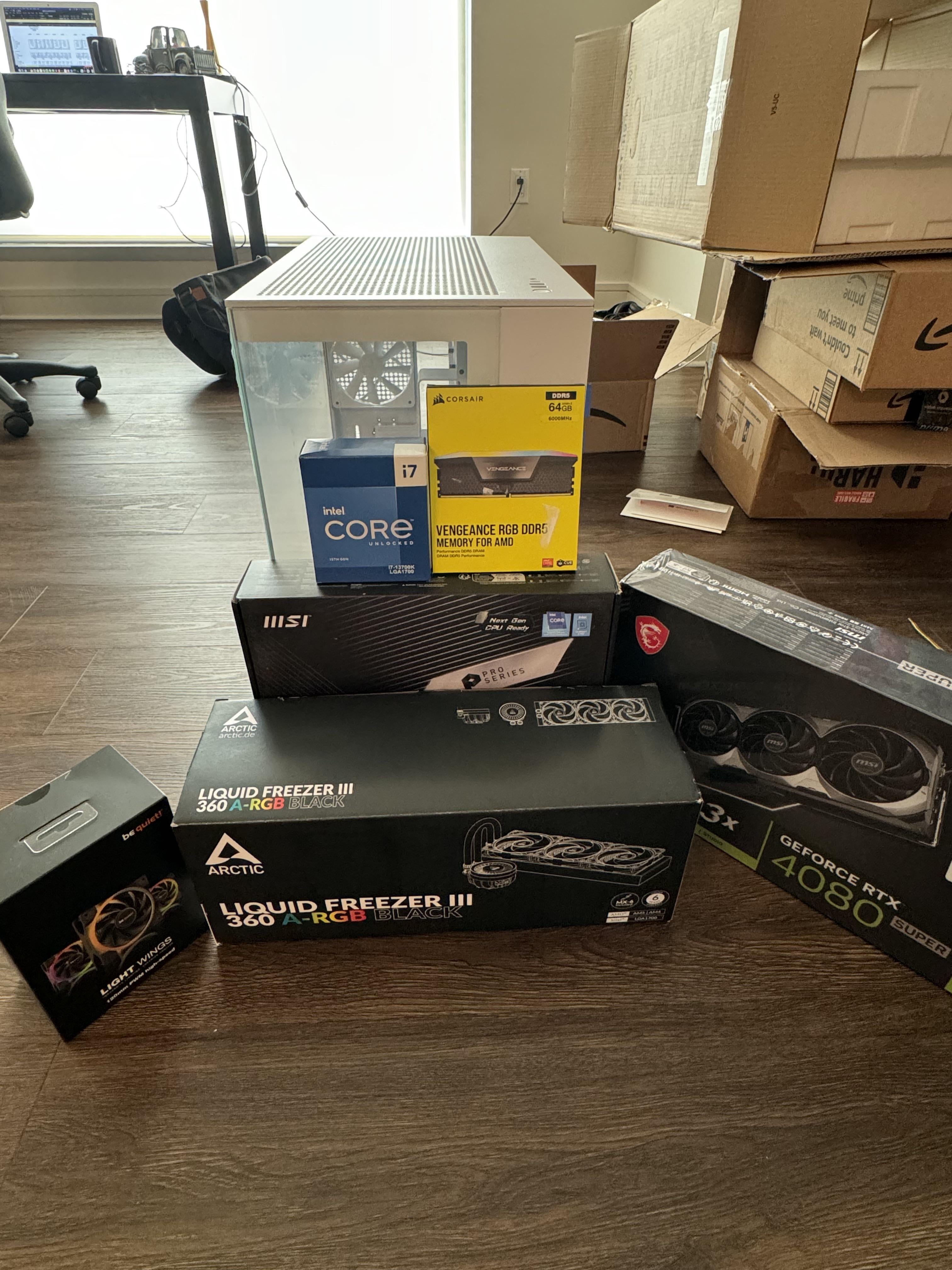
I don’t know but some else might. The ram says for AMD and you have an intel cpu. I’m guessing it will be fine but I noticed.
Big_Hornet_1823
I have the same case in black, its really nice to build in it and has lots of space.
Also dont stress yourself, once you are done you will realize that it wasnt even that difficult. You cant make that many mistakes in modern parts if you are careful.
Good luck
Main3iakz
Not really, but good luck, take your time, and enjoy.
No_Print77
Slow and steady wins the race when building
Yolo_Lewis
Enjoy the moment!
Golem_of_Anarchy
See if your PSU has a wire that plugs directly into your GPU so you don’t have to use that 3 way adapter.
ZhangtheGreat
You’re likely to make a mistake somewhere. Make sure you can backtrack before you permanently tie everything in place.
Mortihana
Take it slow, don’t forget to update bios and do some stress tests and check temperatures.
Be extremely careful with the new ALF as they use a contact frame instead of the intel ILM, great for temps but requires removal of the ILM first (obvs)
ermaneng
– do not put the mobo in case unless you see bios. work on a desk. add minimum components to start.
– you have 13700k means you have igpu. test with the igpu first if you get a screen or boot.
– always unplug power physically when adding/removing a component.
– do not plan anything rest of the day.
TurdFerguson614
In the comments I skimmed through, I didn’t see anyone say to install SSD, the AIO socket bracket and CPU before putting the mobo into the case. Look for the thermal pad/paste plastic sticker on CPU & SSD heatsinks. Incrementally tighten coolers down in alternating pattern.
UmbrellaCorpCEO
I’ve got the liquid freezer 2 and love how quiet it is while doing a phenomenal job keeping temps down, don’t forget to mount the radiator port side up to reduce air bubbles in the system if you have to go vertical.
ZMcCrocklin
Cable management is easier with zip & velcro ties.
ZMcCrocklin
My build last year took me a good hour, if that. The more you do it, the easier it gets. The biggest time waster for me is cable routing. Everything else is quick & easy.
Prestigious-Sea2523
Yeah put on some Oz does hw build and chill man, it’s easy just follow the steps init. Good luck bro
Boba65
If you haven’t done it before, watch a how to video on youtube as well as what to be careful not to do.

36 Comments
Be careful.
Send the GPU over, i can see through the box that it has some outside damage, I will test it for you.
This will have nothing to do, with this reddit account being deleted shortly after receiving the GPU in the mail.
Put the IO shield in first.
First build?
My first build took 10 hours, because I was super carful with everything.
Go slow, look at videos if you get stuck with anything.
And just have fun. Building a machine you’ve worked hard to get is a great feeling 🙂
The only thing having to have force in is the ram. It will feel bad, like you’re damaging something. Graphic takes a little bit, but not like ram does.
Remove the sticker on the cpu cooler.
Pre-applied paste is usually fine. If using non conductive thermal paste, more is better. A pea in the middle or an x is the most common ways. Doesn’t matter at the end of the day as long as you have enough to cover the whole cpu.
Test that it is working before making the wires look pretty.
Assess your components before you just start screwing things in. Know what cable goes into what outlet, know how you are going to run those cables.
Read your case manual and take it apart appropriately. You might need access to the non-windowed side, the top and possibly the front.
Know how you are going to mount your CPU brackets/aio cooler.
Read your cooler instruction manual so you know how to mount the fans on it.
Basically just know what you are doing. Know how you are going to put it together before you even start your first screw.
You’ll be done in about 4-8 hours. Take your time, watch build guide videos if you feel uncertain about something specific. 👍
Only big issue I had was with the wires with my PSU my first real build I did. Make sure everything is already wired to your modular PSU and loop it in last with everything like the mobo in the case
Touch any other piece of metal before handling your components so a static charge doesn’t ruin your whole experience.
Fun lil cable management tip that i use to help reduce waste.
While I’m routing/placing cables, if I like the location and think it should stay, but not everything is in yet, I put a zip tie on it *backwards*, so the zip tie doesn’t lock on to itself.
This way your zip tie will still hold everything youve done so far in place, and when all cables are in you can reverse the zip ties to lock.
Helps so you don’t waste a bunch of ties, and also prevents you from having to snip one or add a second one if you need to place another cable along the same line 🙂
Drink your cooler
Don’t forget to clear desk space for that chonker.
make sure all the connectors from PSU are inserted well, especially the 24 pin of the mobo, it’s damn hard to insert well… I cursed for 2 hours before I realized that I hadn’t hooked that connector up properly 😅
I’ve the same case (itek dark cave white) and if you don’t have a lot of peripherals, it’s easy to hide cables…check your mobo’s guide to know which slots for ram you have to use. Last thing, make sure the CPU heatsink is lower than the pipes/radiator (avoid placing the radiator on the bottom of the case) and be sure there will be a balanced in/out air flow
Post pics when done!

& 1st thing I like to do is check the case for sharp edges. I sliced my hand pretty good one time and almost bleed all over them motherboard but was lucky that it was all caught by some THICC psu meshed cables!
Take your time and double check everything.
do it with a build video playing
Righty tighty Lefty loosey
Edit: don’t under estimate how long the build would take to finish, ypu think it will be only an hour but it will take way more, good luck and enjoy it!
Good luck
Plan your cable routing before you put all the parts.
It’ll be a breeze building things in that case and those are some great components. No penny wasted.(I would’ve gone for an AMD build tho)
One piece of advice is just check if the motherboard covers any spaces you’d like to run any cables through and make sure you have all the standoffs places where they should be before screwing the motherboard on.
I’m gonna assume you know how to deal with the rest of you got enough sense to pick such good parts.
I don’t know but some else might. The ram says for AMD and you have an intel cpu. I’m guessing it will be fine but I noticed.
I have the same case in black, its really nice to build in it and has lots of space.
Also dont stress yourself, once you are done you will realize that it wasnt even that difficult. You cant make that many mistakes in modern parts if you are careful.
Good luck
Not really, but good luck, take your time, and enjoy.
Slow and steady wins the race when building
Enjoy the moment!
See if your PSU has a wire that plugs directly into your GPU so you don’t have to use that 3 way adapter.
You’re likely to make a mistake somewhere. Make sure you can backtrack before you permanently tie everything in place.
Take it slow, don’t forget to update bios and do some stress tests and check temperatures.
Be extremely careful with the new ALF as they use a contact frame instead of the intel ILM, great for temps but requires removal of the ILM first (obvs)
– do not put the mobo in case unless you see bios. work on a desk. add minimum components to start.
– you have 13700k means you have igpu. test with the igpu first if you get a screen or boot.
– always unplug power physically when adding/removing a component.
– do not plan anything rest of the day.
In the comments I skimmed through, I didn’t see anyone say to install SSD, the AIO socket bracket and CPU before putting the mobo into the case. Look for the thermal pad/paste plastic sticker on CPU & SSD heatsinks. Incrementally tighten coolers down in alternating pattern.
I’ve got the liquid freezer 2 and love how quiet it is while doing a phenomenal job keeping temps down, don’t forget to mount the radiator port side up to reduce air bubbles in the system if you have to go vertical.
Cable management is easier with zip & velcro ties.
My build last year took me a good hour, if that. The more you do it, the easier it gets. The biggest time waster for me is cable routing. Everything else is quick & easy.
Yeah put on some Oz does hw build and chill man, it’s easy just follow the steps init. Good luck bro
If you haven’t done it before, watch a how to video on youtube as well as what to be careful not to do.
do not overtighten