
BUILD –
MOBO: ASRock B760M PRO RS LGA 1700 Intel B760 SATA 6Gb/s Micro ATX Motherboard
CPU: Intel Core i7-14700K
GPU: MSI Ventus GeForce RTX 4080 16GB GDDR6X PCI Express 4.0 Video Card RTX 4080 16GB VENTUS 3X OC
RAM: Team Group T-CREATE EXPERT 32GB (2 x 16GB) 288-Pin PC RAM DDR5 6000 (PC5 48000)
STORAGE: Team Group T-FORCE CARDEA ZERO Z440 M.2 2280 2TB PCIe
PSU: Corsair RM1000x Shift Fully Modular ATX Power Supply
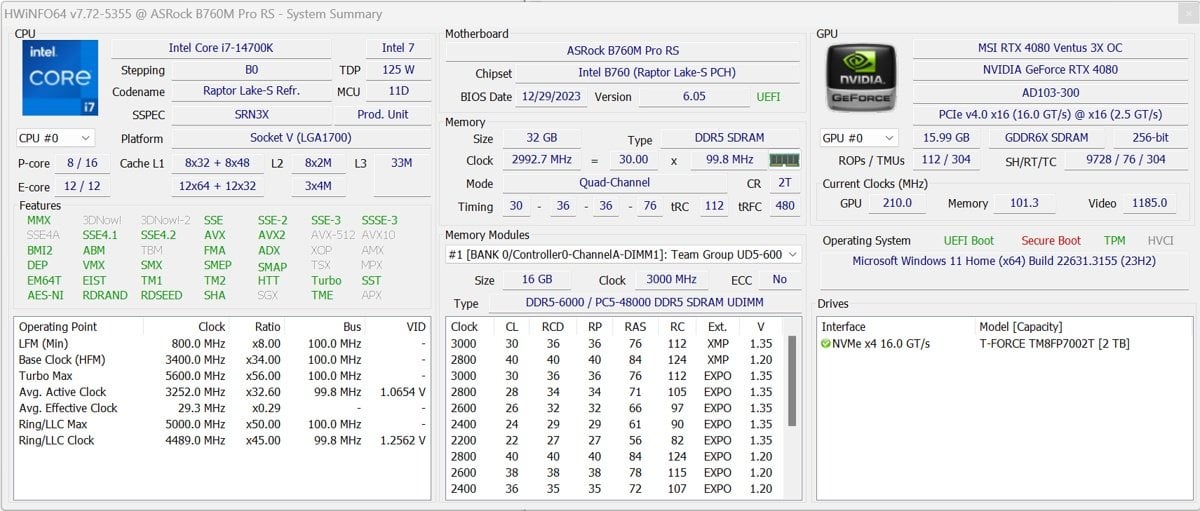
HW Info: [https://gyazo.com/7d2cb2a0e11663c61c4cfe14814c70d5](https://gyazo.com/7d2cb2a0e11663c61c4cfe14814c70d5)
Good evening everyone,
I built my PC back in Nov. with everything working fine. But in the past month and a half or so I’ve noticed that games have been closing to desktop with no error messages. I’m not a big computer person and not sure if I have some kind of overclock setting enabled so I thought I’d ask here for any insight.
Recently the crashes to desktop have become a lot more frequent and happen with pretty much every game I play, Overwatch 2, Black Desert Online, FFXIV, Classic WoW.
Also getting “STATUS\_ACCESS\_VIOLATION” error when watching videos on Google Chrome.
It wasn’t until very recently that I’ve began to receive error messages when the games crash.
FFXIV Errors:
[https://gyazo.com/15e133938d4c8feeb692315881a135d9](https://gyazo.com/15e133938d4c8feeb692315881a135d9)
[https://gyazo.com/7e887044e37696a2096e09b63133c43b](https://gyazo.com/7e887044e37696a2096e09b63133c43b)
Classic WoW Errors:
[https://gyazo.com/89aeace79a39bb6695f44ac5b8539a43](https://gyazo.com/89aeace79a39bb6695f44ac5b8539a43)
Overwatch 2 Errors:
[https://us.battle.net/support/en/article/47859](https://us.battle.net/support/en/article/47859)
[https://us.battle.net/support/en/article/48487](https://us.battle.net/support/en/article/48487)
Sometimes games will crash and give errors, but sometimes it still crashes to desktop.
I have:
Ran Memtest86 with 4 passes with 0 errors
DDU uninstall of my Nvidia drivers and reinstalled current ones
Upgraded to Win11 with current updates
Flashed BIOS to most recent version
Ran Intel Diagnostic Tool with no errors and passing
Ran Prime95 with Worker #3 failing almost immediately twice in a row, but the third time it did not fail instantly but I have not let it completely run yet
Task manager also seems to show CPU speeds of 3 – 5.4 GHz when playing Classic WoW, but again I’m not sure what’s normal.
CPU temps seem to never break 100c.
I’ve tried to look in Event Viewer to find timestamps that correlate with crashes but it seems to be inconsistent with an array of different error messages given.
Event 37 kernel power errors
/////////////////
The speed of processor 26 in group 0 is being limited by system firmware. The processor has been in this reduced performance state for 86400 seconds since the last report.
////////////////
Faulting application name: bad\_module\_info, version: [0.0.0.0](https://0.0.0.0), time stamp: 0x00000000
Faulting module name: unknown, version: [0.0.0.0](https://0.0.0.0), time stamp: 0x00000000
Exception code: 0x00000000
Fault offset: 0x0000000000000000
Faulting process id: 0x34f0
Faulting application start time: 0x01da66f80e8eac52
Faulting application path: bad\_module\_info
Faulting module path: unknown
Report Id: 682f999e-765b-404f-9070-e0527063e461
Faulting package full name:
Faulting package-relative application ID:
///////////
Fault bucket 2215223153577691636, type 4
Event Name: APPCRASH
Response: Not available
Cab Id: 0
​
Problem signature:
P1: BlackDesert64.exe
P2: [0.0.0.0](https://0.0.0.0)
P3: 00000000
P4: StackHash\_0000
P5: [0.0.0.0](https://0.0.0.0)
P6: 00000000
P7: 00000000
P8: PCH\_84
P9:
P10:
​
Attached files:
\\\\?\\C:\\Users\\harle\\AppData\\Local\\Temp\\WER.8d782fc1-5594-499e-ab23-a664d876c116.tmp.WERDataCollectionStatus.txt
\\\\?\\C:\\ProgramData\\Microsoft\\Windows\\WER\\Temp\\WER.dd7a3301-d054-48cc-8860-38f22ca92df2.tmp.WERInternalMetadata.xml
\\\\?\\C:\\ProgramData\\Microsoft\\Windows\\WER\\Temp\\WER.04c4355f-bb74-403c-9eb8-af604310d557.tmp.csv
\\\\?\\C:\\ProgramData\\Microsoft\\Windows\\WER\\Temp\\WER.675a9ee9-e28d-474f-bc48-4d072b5193d8.tmp.txt
\\\\?\\C:\\ProgramData\\Microsoft\\Windows\\WER\\Temp\\WER.24939e5f-26b2-4ad9-b0b9-4a89241b1c9f.tmp.xml
​
These files may be available here:
\\\\?\\C:\\ProgramData\\Microsoft\\Windows\\WER\\ReportArchive\\AppCrash\_BlackDesert64.ex\_9c3095fbf68c282254e3eceaa21f6b4a89df430\_be990b8e\_6214bddd-f37f-4208-929b-69ac7898795d
​
Analysis symbol:
Rechecking for solution: 0
Report Id: 87e9bbb2-da1e-4a5e-8862-9f6143365833
Report Status: 268435456
Hashed bucket: dad58b61e3b8f6b8cebe0db8af3809f4
Cab Guid: 0
Event ID: 1001
/////////////////
Any help of direction would be greatly appreciated!