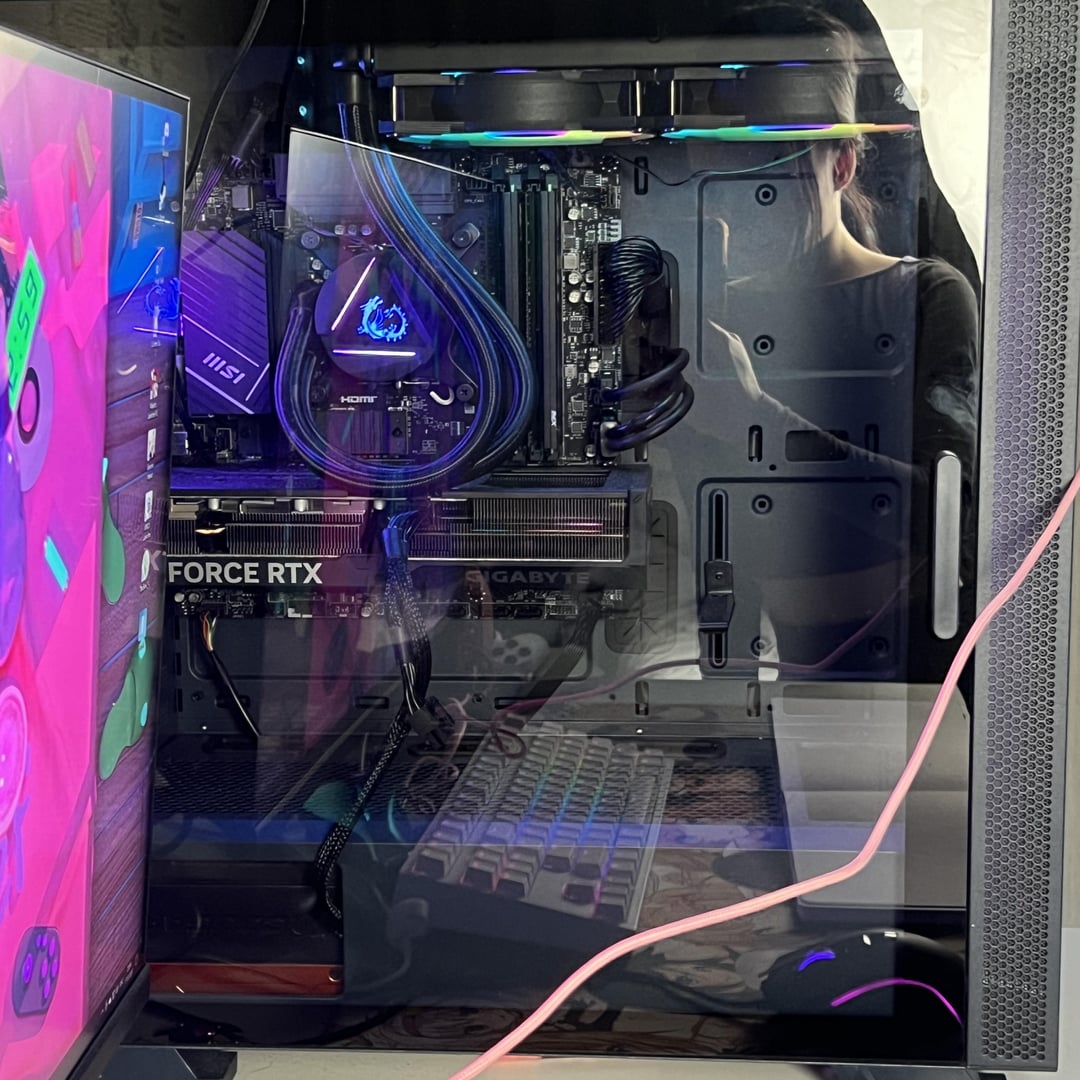
My old 4070 turned out to be defective. After getting an RMA replacement, my games are still crashing daily. Solution?

My old 4070 turned out to be defective. After getting an RMA replacement, my games are still crashing daily. Solution?
35 Comments
Check your antivirus or reinstall Windows
I’ll take shit consoles never do for 500 Alex
I doubt it would help but have you tried removing the drivers and freshly installing them?
Have you been able to rule out other issues yet, like RAM? Are your systems temps ok?
Did you update bios?
If the crashes are random try downclocking ram. It is possible the ram you bought isnt on the qvl (or what ever that list is called)
Start with hardware, make sure all connections are good. Everything seated properly. Temps(not just GPU) are good, and that the PSU is up to the task.
Then move on to the tedious chore of the software side. If you do not store anything(of importance) you could start with the nuclear route of just fresh installing windows, and drivers, see if that fixes things.
Try putting the graphics card in a different PCI-E port. My top one is defective on my MOBO and would randomly crash/freeze.
I had game crash issues which ended up being a slightly too high clock speed set on my expo profile. Knocked it down a touch and has been rock solid since.
Worth checking your speeds and align things properly
Have you tested each individual RAM stick?
Have you ran a memtest for an extended amount of time?
Are the crashes game specific? Or are you getting a sequence of random crashes? Might work reporting the crashes to Nvidia it could be just the drivers.
My pc would crash or reboot when I was using a 750w psu, if I uses the power plan ultimate performance it would pull a lot of power and then cause it to randomly turn off then back on. I eventually got a new psu that was 1200w and that seemed to fix my issue.
Check your PSU. Could be failing to provide stable power which would cause crashes when your GPU usage goes up.
if you are crashing to desktop, most probably cpu clock speed
had an i9 13th gen on an asus board , AI overclock was pushing it way beyond it’s limit
in this case, manually set perf/eff cores clock speed
if you’re having bluescreens, run memtest to check the rams
Here are solutions that might work as me and my friend had a similar experience
* Are RAMs damaged/defective?
* Are there any damages to slots of GPU or RAM?
* Do you have enough Wattage going to the GPU when playing?
* Is your PC overheating? If so, check cooling, put it on the table, and/or remove the side panel for better airflow
* Try all driver updates, including Motherboard bios update as well (cuz why not at this point)
In my case, RAM was defective, and had to replace one of them. In my friend’s case it was overheating, he also thought it was the GPU being defective.
What power supply are you running? What CPU? I’m wondering if it’s power draw issues.
is that a mag 240r? those have the pump in the radiator, so top mounting fucks with the pump. not sure if it has been mitigated in the v2, but ive had a handful of people who killed their pump by top mounting it (due to its unconventional location, and also just kinda shit in general)
Gigabyte RMA, good luck.
Had to wait 6 months to get an 80% credit back on a 2080 super.
This might be a very far shot but…
Is your GPU sagging? Try to support it.
My 7800XT would sag like crazy and do a bunch of weird stuff unsupported. After I added in a GPU bracket everything has been fine.
to check semi-exactly whats the root of your problem: download bluescreenviewer, read latest crash report, search for the error code online
how to uninstall drivers for gpu: get DDU and follow an online tutorial
Whats your system specs?
Did you test your system? If you did which tests
Did you update your bios?
Did you install clean windows 11 with drivers?
Did you check your event viewer or minidumb file?
Did you overclock any hardware in your system?
Maybe your parts damaged or faulty
If you have an undervolt or any oc on anything turn it off and test. It could be a psu issue too
Had a similar issue recently. Ended up being my motherboard.
Could be a power supply issue or ram those are the trickiest to troubleshoot if you don’t have an extra or another system to test
Had the exact same issue with my AMD Radeon 7900xtx that was driving me crazy. At the end it was ressolved by replacing my power supply from 850w (which was sufficient on paper) to 1000w which in theory is a bit to much.
Keep in mind that if using a lot of SATA devices and overclocking can cause watt spikes that cause the system to crash like in my setup.
Also I often read that amd expo / intel xmp can cause such issues if activated in Bios.
Sounds like a power supply issue. Either your power supply needs upgrading/replacement or you are not using the right connectors to the GPU.
I had a similar issue with a siblings PC. I had a bunch of spare parts and one by one I would change the PSU for example test it for a few hours and depending on what happened I’d change it back to his original part. Eventually I RMAd his GPU, issue went away for a few days and returned, I went back to the swap and test route. Found 2 of 4 ram sticks were no good and unfortunately this somehow caused the mobo to also fail. Idk which issue caused the other but basically it was a MoBo and removing 2 sticks of ram.
I think you’re squeezing the gpu power cable
Your post does not really include enough info.
Entire system specs, what are the “crashes”- like an actual screenshot of what’s happening or a log.
its mystic lights my friend had the same aio and board and it crashed on him all the time until he reset his system and it came back when he reinstalled ML hope that helps
More information would be nice. What are your temps, driver version, what does event viewer show, what does your vd card logs show?
I did IT support for over 30 years and even my lowest IQ’ed customer knew to at least give basic fucking information.
Maybe removing the tubing with coolant liquid from the hottest part of the GPU could help.
My issue was RAM and I had upgraded literally everything else before that cause I’m dumb.
Power supply. If you have done a clean install, PS is the first place I would go, assuming your heat is within spec on everything. I would use a PS calculator but a rough guess is 850w. Brand matters. Get a Corsair or some other top brand. Do not mess around with cheap power.
Check error codes in event viewer and Google them. That should point you in a direction of what is wrong