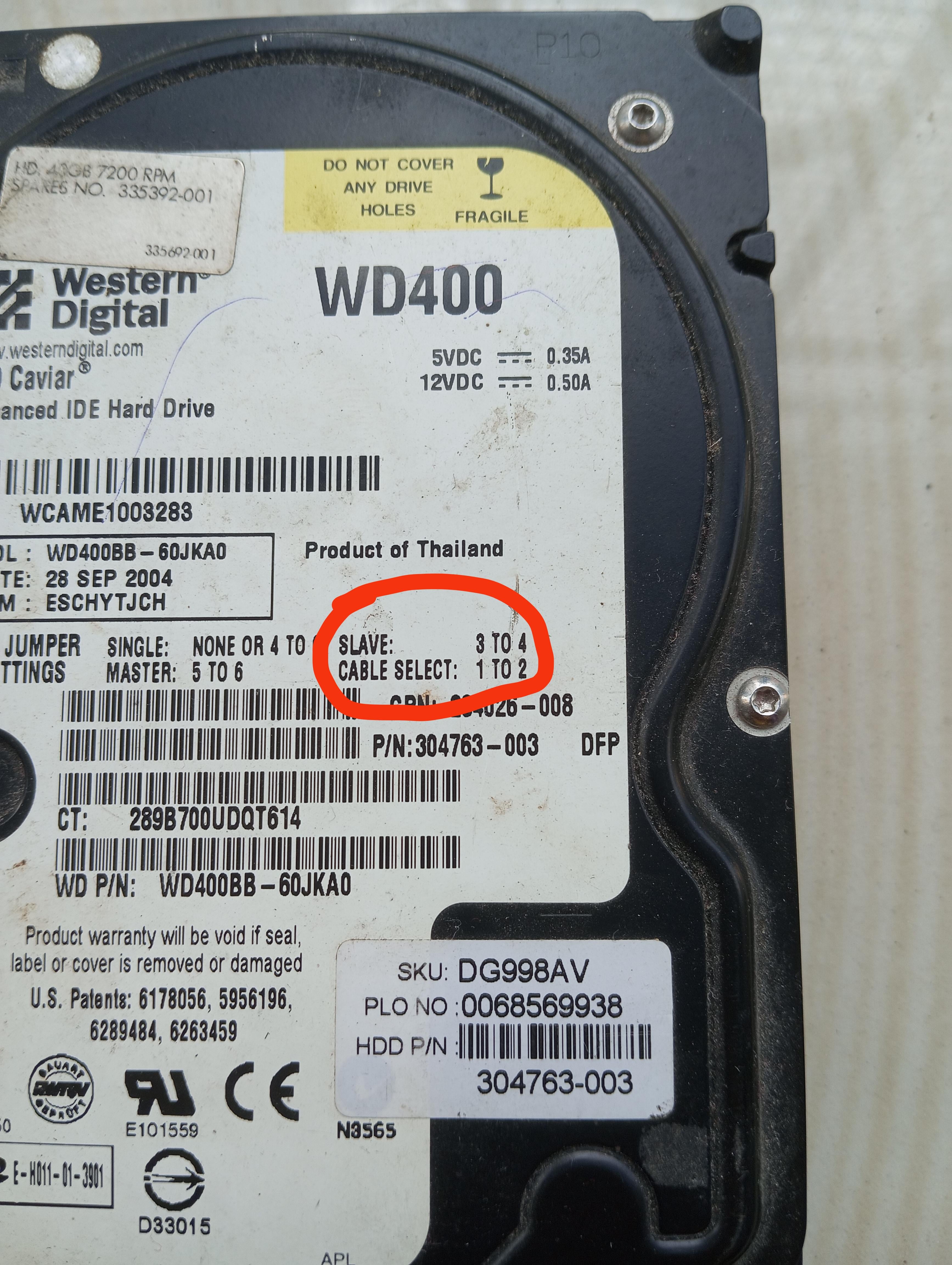
It’s telling you that if this isn’t the first hard drive on the cable to set the pins to slave. So if there is already a hard drive connected all the rest on that cable are slaves.
TokyoOldMan
It’s an IDE drive, which can be connected to the motherboard using a ribbon cable which generally has 2 connectors upon it. To distinguish between the 2 drives, would be designated as MASTER and the other as SLAVE. Motherboards generally has two IDE interfaces – a Primary and a Secondary interface. IDE/EIDE drives are very slow in comparison to modern day SATA drives.
Sparky81
When you had 2 drives on the same IDE cable you had to manually designate one to be master and the other slave to the computer could differentiate them from each other.
tk_20
Before ~~software could determine which drive to boot from~~ ***SATA, addressing *** was done with hardware jumpers to determine the HDD ~~was the master HDD~~ addresss
Edit for corrected info from knowledgeable people
crasagam
You used one cable to connect two drives in series. Look up 40pin ribbon cable. The first drive was the master (primary) the second slave (secondary). The cable did not always detect which was which so you set the jumpers to master and slave according in line.
Leviathan41911
Ah shit I’m old.
*old man grone as I stand up to walk put of this post*
Taikunman
Just leave it on cable select as this automatically configures master/slave.
KeepingIt100forLife
It took 3 to 4 of them to build that hard drive.
Wacky_Network
theres 3-4 of them searching on the disk inside instead of the read and write head
GoodMan_1996
its from 1800s
russiandobby
Its a slave to the machine
zfreakazoidz
It was owned by the KKK.
RandomGerman
Good old times. When you actually had to know stuff to even turn a computer on and use it. And know even more to build one. I mean you still do but damn was I proud when I built my first PC so, so long ago. It did not even have a CD drive yet. Floppy only.
Cozy_Minty
i hated these fucking jumpers they would spring off your fingernail and bury themselves in the carpet in another room
ZhangtheGreat
Damn, this brings back memories! I learned to build PCs from my uncle, and he made sure I understood the master-slave relationship between HDDs.
GermNation
I DO NOT MISS FUMBLING WITH HDD JUMPER PINS.
Sorry, y’all. Carry on.
ex0dite
Older PATA hard drives could be attached 2 to a single parallel cable (was a slight performance loss if using both drives simultaneously but for day to day wasn’t really an issue) in order to not confuse the IDE controller one drive had to be set to master the other to slave, eventually cable select was a thing (usually the drive at the end of the cable was master and the middle slave) but even still when making customer builds we would usually stick to setting master/slave.
People also had CDROM/DVD and HDD on a single cable which would also need to be set master/slave and always make me cry.
SATA/SSD/nvme have all made this obsolete.
UnitGhidorah
There’s a jumper pin position to differentiate hard drive types master/slave. Primary would be your bootable hard drive and slave would be a secondary data drive for example. These went away when IDE died and SATA came out.
SergeiTachenov
A lot of semi-accurate answers that don’t cover the whole picture fully.
These drives are connected to the motherboard with a huge ugly ribbon cable that has three connectors: one goes to the motherboard, the other two can be used to connect drives, up to two drives per cable. One of these drives would be called master, the other – slave. It’s just a form of addressing them from the OS, like in DOS one could be C: and the other D: (assuming they have one partition each).
To configure this shit, jumpers on drives were used. These instructions on the drive tell you how to put the jumper. There are several possibilities:
– SIGNLE: you remove the jumper (NONE) or connect the pins 4 and whatever another one is mentioned there (can’t see it because it’s crossed by your red circle). In this configuration this drive is supposed to be the only drive connected to the cable.
– MASTER: there are two drives, and this one is the master drive, regardless of which connector it’s connected to. Connect 5 and 6 pins to use it like this and make sure to configure the other drive as the slave.
– SLAVE: there are two drives, and this one is the slave drive, regardless of which connector it’s connected to. Connect 3 and 4 pins to use it like this and make sure to configure the other drive as the master.
– CABLE SELECT: there are two drives, the one connected to the first connector is the master, the other is the slave. Connect pins 1 and 2 and make sure you configure the other drive to cable select as well.
VoidowS
Slave and master slot, to tell your BIOS where to look for first in the hyarchy.
it’s a pin setting you have to change on your hardrive to activate it accordingly
BigRheno
It works for you until the day it dies
PeckerNash
It is a key to the jumper setting on the back of the drive. Slave simply means it is not the bootable drive if you have the jumpers set that way. Very obsolete as these days boot drive is controlled in BIOS. This would be important for a retro IDE build. SATA relies on BIOS.
Lanceo90
*perishes of old age*
_reddit_account
I feel old
Bikash0205
That means that drive was made before 1865
hugazow
Me remembering IDE cables on my windows 98 war machine

KyotoSoul
Fuck! And i just clipped my nails.
happyanathema
Now gather around the fire children and I’ll tell you a story about something called IDE.
If you are really well behaved I might even tell the tale of SCSI or scuzzy as he was known to his friends.
ezekirby
I hate you op. Thanks for reminding me how old I am.
Trash6789X
i feel attacked 😭
UhhCanYouLikeShutUp
Oh no! CANCEL THIS HARDDRIVE AT ONCE!!! THE INTERNET TOLD ME MY FEELINGS SHOULD BE HURT!!
RuSTyWhiTESocKz
It means N*****
AntisocialN2
It comes from a time before politically correct killed terms like these
Because both devices shared the cable, the way the computer had to tell who was who was by means of a jumper in the back of the drive that had to be set by the user.
It initially had mainly 2 positions and then later, a 3rd was added (there were a few more depending on the drive and model but these were the main ones), [master, slave and later on, cable select](https://i1.reclaime.com/jumpers.gif)
For drives to be detected, one had to be set as master and the other slave. Alternatively, if everything supported it, you could leave everything on cable select and the PC would sort itself correctly.
The positions for this jumper changed from drive to drive, model and brand so manufacturers included in the sticker on top of the drive instructions for the user to know how it needed to do for that particular drive. That’s what you’re reading there, for a slave config on your drive, you need to set the jumper on pins 3 to 4, master 5-6 and cable select 1-2.
As with most things made in the 80s, they didn’t give half a shit about politically correct stuff like today lol, so they named them master and slave instead of something like primary/secondary, one/two, etc.
Youd move a little jumper from some pins to another depending on what state you wanted the drive to be in. It was pretty stupid. But it worked.
AlanWik
Oh sweet summer child…
Nandabun
So I went to this new website named google, and I typed in your title, What does slave mean in this old harddrive, and it spit back out..
​
Showing results for What does slave mean in this old ***hard drive***
Search instead for What does slave mean in this old harddrive
Slave drives are **mostly used for storing data to protect it in the event of a system crash**. Master drives usually contain the operating system to run the computer. Computers without a secondary drive set as a slave drive will store their data on the main (only) hard drive, alongside the operating system.Mar 3, 2019

39 Comments
That it belongs to a master HDD.
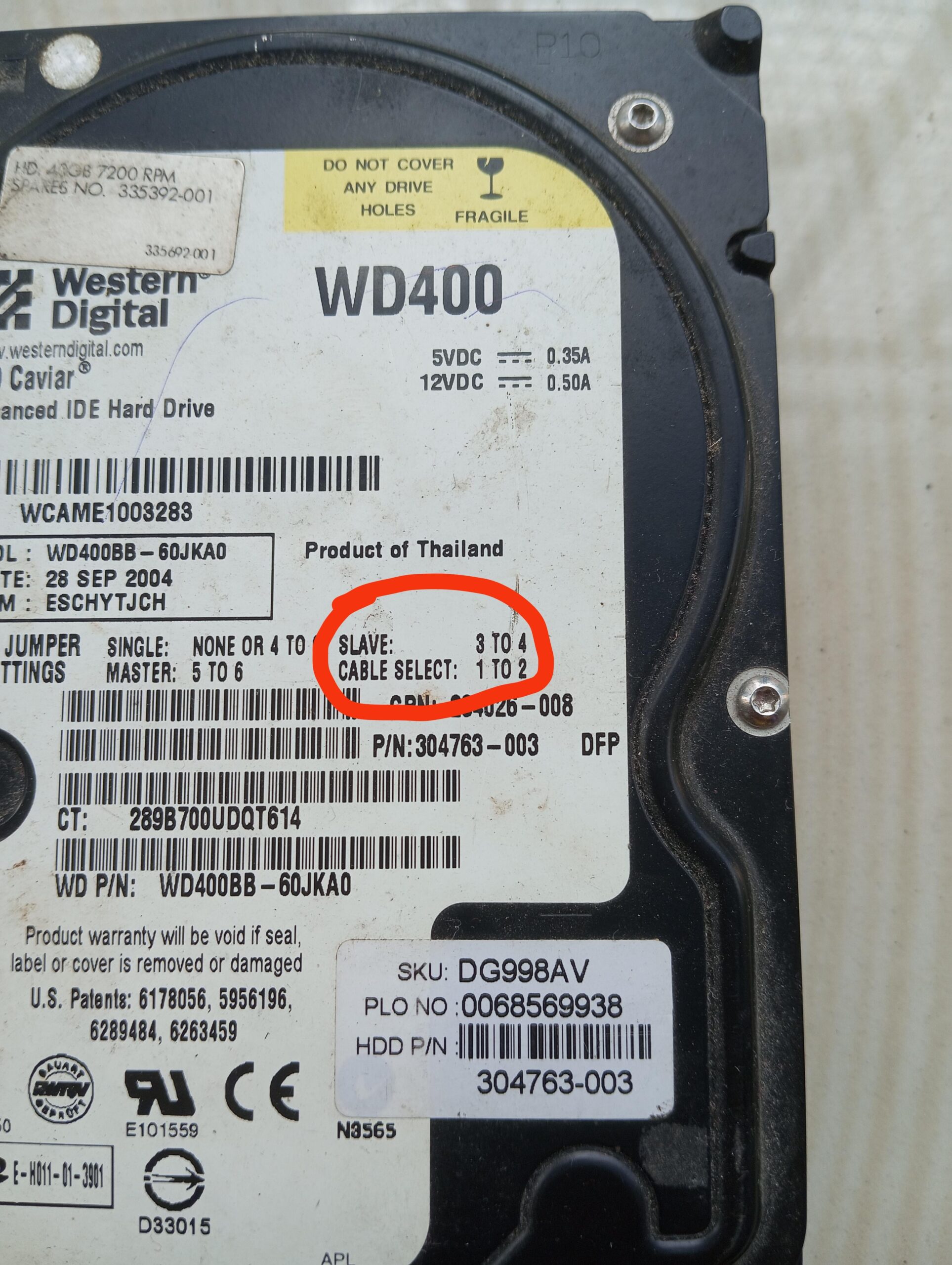
It’s telling you that if this isn’t the first hard drive on the cable to set the pins to slave. So if there is already a hard drive connected all the rest on that cable are slaves.
It’s an IDE drive, which can be connected to the motherboard using a ribbon cable which generally has 2 connectors upon it. To distinguish between the 2 drives, would be designated as MASTER and the other as SLAVE. Motherboards generally has two IDE interfaces – a Primary and a Secondary interface. IDE/EIDE drives are very slow in comparison to modern day SATA drives.
When you had 2 drives on the same IDE cable you had to manually designate one to be master and the other slave to the computer could differentiate them from each other.
Before ~~software could determine which drive to boot from~~ ***SATA, addressing *** was done with hardware jumpers to determine the HDD ~~was the master HDD~~ addresss
Edit for corrected info from knowledgeable people
You used one cable to connect two drives in series. Look up 40pin ribbon cable. The first drive was the master (primary) the second slave (secondary). The cable did not always detect which was which so you set the jumpers to master and slave according in line.
Ah shit I’m old.
*old man grone as I stand up to walk put of this post*
Just leave it on cable select as this automatically configures master/slave.
It took 3 to 4 of them to build that hard drive.
theres 3-4 of them searching on the disk inside instead of the read and write head
its from 1800s
Its a slave to the machine
It was owned by the KKK.
Good old times. When you actually had to know stuff to even turn a computer on and use it. And know even more to build one. I mean you still do but damn was I proud when I built my first PC so, so long ago. It did not even have a CD drive yet. Floppy only.
i hated these fucking jumpers they would spring off your fingernail and bury themselves in the carpet in another room
Damn, this brings back memories! I learned to build PCs from my uncle, and he made sure I understood the master-slave relationship between HDDs.
I DO NOT MISS FUMBLING WITH HDD JUMPER PINS.
Sorry, y’all. Carry on.
Older PATA hard drives could be attached 2 to a single parallel cable (was a slight performance loss if using both drives simultaneously but for day to day wasn’t really an issue) in order to not confuse the IDE controller one drive had to be set to master the other to slave, eventually cable select was a thing (usually the drive at the end of the cable was master and the middle slave) but even still when making customer builds we would usually stick to setting master/slave.
People also had CDROM/DVD and HDD on a single cable which would also need to be set master/slave and always make me cry.
SATA/SSD/nvme have all made this obsolete.
There’s a jumper pin position to differentiate hard drive types master/slave. Primary would be your bootable hard drive and slave would be a secondary data drive for example. These went away when IDE died and SATA came out.
A lot of semi-accurate answers that don’t cover the whole picture fully.
These drives are connected to the motherboard with a huge ugly ribbon cable that has three connectors: one goes to the motherboard, the other two can be used to connect drives, up to two drives per cable. One of these drives would be called master, the other – slave. It’s just a form of addressing them from the OS, like in DOS one could be C: and the other D: (assuming they have one partition each).
To configure this shit, jumpers on drives were used. These instructions on the drive tell you how to put the jumper. There are several possibilities:
– SIGNLE: you remove the jumper (NONE) or connect the pins 4 and whatever another one is mentioned there (can’t see it because it’s crossed by your red circle). In this configuration this drive is supposed to be the only drive connected to the cable.
– MASTER: there are two drives, and this one is the master drive, regardless of which connector it’s connected to. Connect 5 and 6 pins to use it like this and make sure to configure the other drive as the slave.
– SLAVE: there are two drives, and this one is the slave drive, regardless of which connector it’s connected to. Connect 3 and 4 pins to use it like this and make sure to configure the other drive as the master.
– CABLE SELECT: there are two drives, the one connected to the first connector is the master, the other is the slave. Connect pins 1 and 2 and make sure you configure the other drive to cable select as well.
Slave and master slot, to tell your BIOS where to look for first in the hyarchy.
it’s a pin setting you have to change on your hardrive to activate it accordingly
It works for you until the day it dies
It is a key to the jumper setting on the back of the drive. Slave simply means it is not the bootable drive if you have the jumpers set that way. Very obsolete as these days boot drive is controlled in BIOS. This would be important for a retro IDE build. SATA relies on BIOS.
*perishes of old age*
I feel old
That means that drive was made before 1865
Me remembering IDE cables on my windows 98 war machine

Fuck! And i just clipped my nails.
Now gather around the fire children and I’ll tell you a story about something called IDE.
If you are really well behaved I might even tell the tale of SCSI or scuzzy as he was known to his friends.
I hate you op. Thanks for reminding me how old I am.
i feel attacked 😭
Oh no! CANCEL THIS HARDDRIVE AT ONCE!!! THE INTERNET TOLD ME MY FEELINGS SHOULD BE HURT!!
It means N*****
It comes from a time before politically correct killed terms like these
*insert wdd “caviar” slave joke here*
On another note, I do feel old …
So, before serial ata (sata) drives, drives used parallel ata (pata, most commonly known as IDE) with a [flat cable to connect up to two devices to the motherboard.](https://www.itmegabyte.com/wp-content/uploads/2017/01/IDE-Cable-18-Inch-Dual-Drive-Ultra-ATA-IDE-Hard-Drive-Cable-IDE66.jpg).
Because both devices shared the cable, the way the computer had to tell who was who was by means of a jumper in the back of the drive that had to be set by the user.
It initially had mainly 2 positions and then later, a 3rd was added (there were a few more depending on the drive and model but these were the main ones), [master, slave and later on, cable select](https://i1.reclaime.com/jumpers.gif)
For drives to be detected, one had to be set as master and the other slave. Alternatively, if everything supported it, you could leave everything on cable select and the PC would sort itself correctly.
The positions for this jumper changed from drive to drive, model and brand so manufacturers included in the sticker on top of the drive instructions for the user to know how it needed to do for that particular drive. That’s what you’re reading there, for a slave config on your drive, you need to set the jumper on pins 3 to 4, master 5-6 and cable select 1-2.
As with most things made in the 80s, they didn’t give half a shit about politically correct stuff like today lol, so they named them master and slave instead of something like primary/secondary, one/two, etc.
Here’s the whole thing if you’d like to know more:
https://en.m.wikipedia.org/wiki/Parallel_ATA
Fuck, I’m old.
Slave = data drive
Master = boot drive
Thats my simple and limited experience
Youd move a little jumper from some pins to another depending on what state you wanted the drive to be in. It was pretty stupid. But it worked.
Oh sweet summer child…
So I went to this new website named google, and I typed in your title, What does slave mean in this old harddrive, and it spit back out..
​
Showing results for What does slave mean in this old ***hard drive***
Search instead for What does slave mean in this old harddrive
Slave drives are **mostly used for storing data to protect it in the event of a system crash**. Master drives usually contain the operating system to run the computer. Computers without a secondary drive set as a slave drive will store their data on the main (only) hard drive, alongside the operating system.Mar 3, 2019