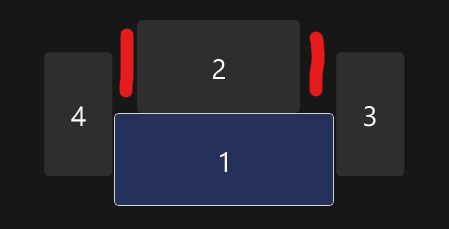
The two portrait monitors are 1920×1080, the top middle is 2560×1440, and the bottom middle is 3440×1440.
I just want my mouse to cross the gaps created by the ultrawide. Does anyone know a way to do this inside Windows 11? Or is there a piece of software that handles multiple displays better than Windows itself?
I thought I’d be able to deal with it, but it’s really driving me crazy!
Content_Career1643
As much as I’d love a feature like this, it simply isn’t possible in Windows. The only solution I can remember that somehow works is from displayfusion, but last I heard they only offer the option when you buy the paid version.
KYO297
I have my monitors misaligned in windows specifically so I can move my cursor between them easily. I have a 1440p main and a 1080p side one. Physically, their bottom edges are aligned. In windows, their top edges are because my cursor kept getting stuck in the top left corner of my main one when I wanted it to move to the side one.
So what I’d probably do is put the side ones in the corners created by the middle two. Assuming that’s even possible. Yeah now you’d have to move your cursor to the top corners of your bottom middle monitor to move it to the side ones, but at least for me it’d be preferable to it getting stuck in some corner
Dramatic_Switch257
I think you should extend your screen by using Win+P and choosing extend option
igaveuponfixingit
Might work with this program called littlebigmouse.
If you are using an Nvidia GPU setup DSR factors and “I crease” the resolution of your top monitor so it in software scales more properly with your setup your computer with think it’s a bigger screen. If on AMD use virtual super resolution.
After either rof those are turned on go into windows display and your top monitor will have exposed to it like 20 extra non. Native resolutions that it can use. It doesn’t affect picture quality at all if used in conjunction with proper scale %
I7sReact_Return
Use xrandr 🙂
TheRealMrTrueX
Get a wider top monitor, otherwise no.
Ambitious_Opinion_11
Make Screen 1 the same resolution as Screen 2. Unfortunately.
Cryogenics1st
There’s a checkbox to “ease cursor movement between displays” I take it that doesn’t help. Sorry I only have two screens. Also, 2 is offset a little bit to the left.
Chemical-Purpose-462
Maybe give it some cheese? 🧀
nilslorand
LittleBigMouse
JonDream00
Hey! any chance you can send or post a picture of your monitor setup? I’m looking for a multi-monitor with ultrawide setups for reference. Thanks anyways:D
DVXC
Not sure what version of windows you’re on but Win11 supports this feature:
I only have two screens and it isn’t what I’d call a good use-case for that, but in your case, might be worth a try.
the_ebastler
Settings -> System -> Display -> Multiple displays -> Ease cursor movement between displays
Does something very similar.
Evokamukke
Try with Microsoft power toys
Guy_in_Tank
Pick it up
DislocatedMind
Oh, a fellow 4 display fan in the wild.
Breklin76
In the simulation, drag them up into the red areas. Yeah, you’ll lose the ability to go from UWD laterally over to the outer monitors but at least you can move the mouse around to all 4.

21 Comments
The two portrait monitors are 1920×1080, the top middle is 2560×1440, and the bottom middle is 3440×1440.
I just want my mouse to cross the gaps created by the ultrawide. Does anyone know a way to do this inside Windows 11? Or is there a piece of software that handles multiple displays better than Windows itself?
I thought I’d be able to deal with it, but it’s really driving me crazy!
As much as I’d love a feature like this, it simply isn’t possible in Windows. The only solution I can remember that somehow works is from displayfusion, but last I heard they only offer the option when you buy the paid version.
I have my monitors misaligned in windows specifically so I can move my cursor between them easily. I have a 1440p main and a 1080p side one. Physically, their bottom edges are aligned. In windows, their top edges are because my cursor kept getting stuck in the top left corner of my main one when I wanted it to move to the side one.
So what I’d probably do is put the side ones in the corners created by the middle two. Assuming that’s even possible. Yeah now you’d have to move your cursor to the top corners of your bottom middle monitor to move it to the side ones, but at least for me it’d be preferable to it getting stuck in some corner
I think you should extend your screen by using Win+P and choosing extend option
Might work with this program called littlebigmouse.
https://github.com/mgth/LittleBigMouse
It won’t work if you are using a virtual display driver though
Little Big Mouse allows this
You can try mouse unsnag it works
If you are using an Nvidia GPU setup DSR factors and “I crease” the resolution of your top monitor so it in software scales more properly with your setup your computer with think it’s a bigger screen. If on AMD use virtual super resolution.
After either rof those are turned on go into windows display and your top monitor will have exposed to it like 20 extra non. Native resolutions that it can use. It doesn’t affect picture quality at all if used in conjunction with proper scale %
Use xrandr 🙂
Get a wider top monitor, otherwise no.
Make Screen 1 the same resolution as Screen 2. Unfortunately.
There’s a checkbox to “ease cursor movement between displays” I take it that doesn’t help. Sorry I only have two screens. Also, 2 is offset a little bit to the left.
Maybe give it some cheese? 🧀
LittleBigMouse
Hey! any chance you can send or post a picture of your monitor setup? I’m looking for a multi-monitor with ultrawide setups for reference. Thanks anyways:D
Not sure what version of windows you’re on but Win11 supports this feature:
https://preview.redd.it/jnqjri7tzsjc1.png?width=929&format=png&auto=webp&s=c7683d0ab9d7339c038c2358777adc2bc8956912
I only have two screens and it isn’t what I’d call a good use-case for that, but in your case, might be worth a try.
Settings -> System -> Display -> Multiple displays -> Ease cursor movement between displays
Does something very similar.
Try with Microsoft power toys
Pick it up
Oh, a fellow 4 display fan in the wild.
In the simulation, drag them up into the red areas. Yeah, you’ll lose the ability to go from UWD laterally over to the outer monitors but at least you can move the mouse around to all 4.