
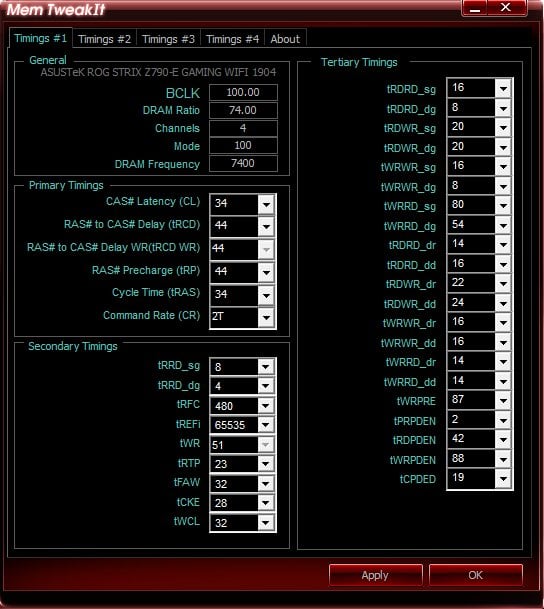
pc specs: 13900k, rog strix E gaming wifi(4 dimm board)
context: my 7600 g.skill ram is sometimes stable, sometimes not. it can go sometimes 10 hours+ in kahru and other benchmarks like TM5 and OCCT but a week later it will error out within an hour. i decided that my motherboard is just basically at the bleeding edge of stability at 7600. so i opted for 7400 but with tighter timings.
im completely new to ram overclocking (i didn’t know i needed a 2 dimm board for higher ram speed when I first got it)
my goal is lower latency/gaming performance.
any insight on what timings and numbers to tighten to would be extremely helpful. i tried watching buildzoids ddr5 videos but sometimes inputting his settings would just blackscreen me and the memory wouldnt even train.
right now im at 7400 cl34 at 1.45v . 34-44-44-34.
https://imgur.com/a/dRxb5Ed
3 Comments
Download and purchase “Karhu” memory test. Run it with things the way they are currently. If it cannot run for at least 4 hours without popping any errors, then it’s not even stable where it currently is. Ideally, you need to be able to run it for 10-12hrs without a single instance of error. I doubt that motherboard can even run 7600 stable. Only 2-DIMM motherboards can realistically train memory beyond 7200 or so.
Lastly, what do you want such a high frequency for? You wont notice in-game performance benefits from 7600 over 7200. To be honest, even if you could run 8600, you might only get a single FPS more from running it at 7200.
Maybe lowering tRefi could help, one of the hardest to test.
But error even sometimes is instable.
Some suggestions for Hynix A-Die:
– tRCDWr can likely go to 20 or lower
– tRTP can go to 12
– tFAW can go to 16 (although likely little uplift below 32)
– tWRPRE can likely go to 50 or lower (set using tWR if on auto)
– tCWL can likely go into the mid 20s or lower
– tCKE can be minimized, but I wouldn’t even bother with it until the end