I’ve had copilot for a while, and I’ve never even seen it say anything to me, or interacted with it at all
grantrules
You can disable it in group policy
IllIlIllIlIIIlll
Look up AtlasOS and give it a try. It’s debloats Windows, and isn’t actually an OS.
CaptainCatgirls
What even is this? I’ve never seen this in Windows 11
Luzon0903
You can open the Registry and go to HKEY_CURRENT_USERSoftwarePoliciesMicrosoftWindowsWindowsCopilot
There’ll be a key called “TurnOffWindowsCopilot”
If there isn’t, make the key yourself and set the value to 1
ShaddamIVth
I can just imagine the amount of “f*** off” messages this thing is going to get!
Enough_Ad210
I asked it to write me a story about corn dogs in a Stephen King kind of story. It started describing how a restaurant was making corned dogs with actual dogs, and how they would prepare it. I told it to stop and scolded it about that kind of behavior.
Eric21015242
YouHow to disable co pilotCopilot
Certainly! If you’d like to disable **Copilot** in **Windows 11**, there are two methods you can follow:
1. **Remove Copilot from the Taskbar** (This will hide the icon but not completely disable Copilot):
* Open the **Settings** app.
* Click on **Personalization**.
* Scroll down and select **Taskbar**.
* Toggle off **Copilot**.
And they automatically added it to the taskbar with no right click menu to remove it. You have to go to the settings and find it here 😭
PaP3s
Bro they plan to make co-pilot a permanent thing where new keyboard will come with a dedicated key, we are fucked!
bhburgie
I used Winaero Tweaker, they have a setting to turn it off.
LtSparky3000
Scary, uh? First time, uh?
vinnycthatwhoibe
It only works with exchange online. Migrate back on prem. Or use lotus notes lol
Humboldteffect
Why the hell do yall stick with windows? The intrusivness is insane.
B0tsRBuiltByR3ddit
you *will* comply. thank you.
jadeia1
You could seriously consider trying out an alternate OS at this point. It’s. Going. To. Get. Worse.
clever_wolf77
Use atlas os ?
EmperorThor
its just like edge. permanent cancerware on your PC forever.
LagGyeHumare
Is no one here actually using Chat GPT or Bing? This button is great for quick searches.
The only thing I don’t like is that it shifts the open window and doesn’t flow over it. Make it resizable and it’s great.
Don’t like it? Disable it from settings. You don’t HAVE to debloat everything and if you do, I’m sure there are scripts which will remove it and then you’ll go back to opening chrome to open chat gpt in a tab and do the same search.
Swear everyone hates on microsoft for the sake of it.
elgringorojo
Geek Uninstaller to get rid of anything. It’s open source and kind of idiot proof. Worked for me
ThomasOMalley77
Use NTLite.
iunoyou
Companies are DETERMINED to shove AI down our collective throats because that’s what the shareholders have decided is high-tech and valuable. Awesome.
I can’t wait to use AI to ‘spice up’ an email that my boss will then recieve and ask his AI to translate it back to normal from corporatese. Very cool, very efficient.
ThisIsntAndre
i’m not disabling it, im using it as a slur bible
dzordzLong
You can also uninstall edge … fixes that “feature” right up. Also fixes issue where you can use what ever browser you want without trying to steal all your data and start edge with that data.
dora1mon
Why does it looks like that Microsoft is adding more and more adwares, I don’t get it why not just give us clean windows without all the bs Microsoft softwares and let us decide what to install and what not to, if they solely decide to install it on our systems then why even have an Microsoft Store?
LordBrandon
It’s Microsofts PC why would a lowly user be entrusted with such decisions as how much Microsoft can harvest your data.
Ok-Equipment8303
since other people have posted the real steps, let me post the alternative
Uninstall Windows 11, before the next update forces it back on and they remove the ability to disable it. Uninstall 11 and show them you don’t want their b.s. and won’t put up with it.
Mun0425
Windows 10 holds a special place. The only reason I upgraded from windows 7 in the first place was currency in dx12 support. Little did i know at the time that dx12 was barely supported in games and a lot of games that did support dx12 performed better on dx11 for years after their release. Dx12 will be the way for a while now, until the cease of security updates or dx13 sneaks its way into forcing people to upgrade, current windows 10 users still have longevity in the platform.
ReallyAnotherUser
Question: Can you actually ask it to change settings in windows or stuff like that? Or at least show you where they are? Because this would actually be really useful
RichieLT
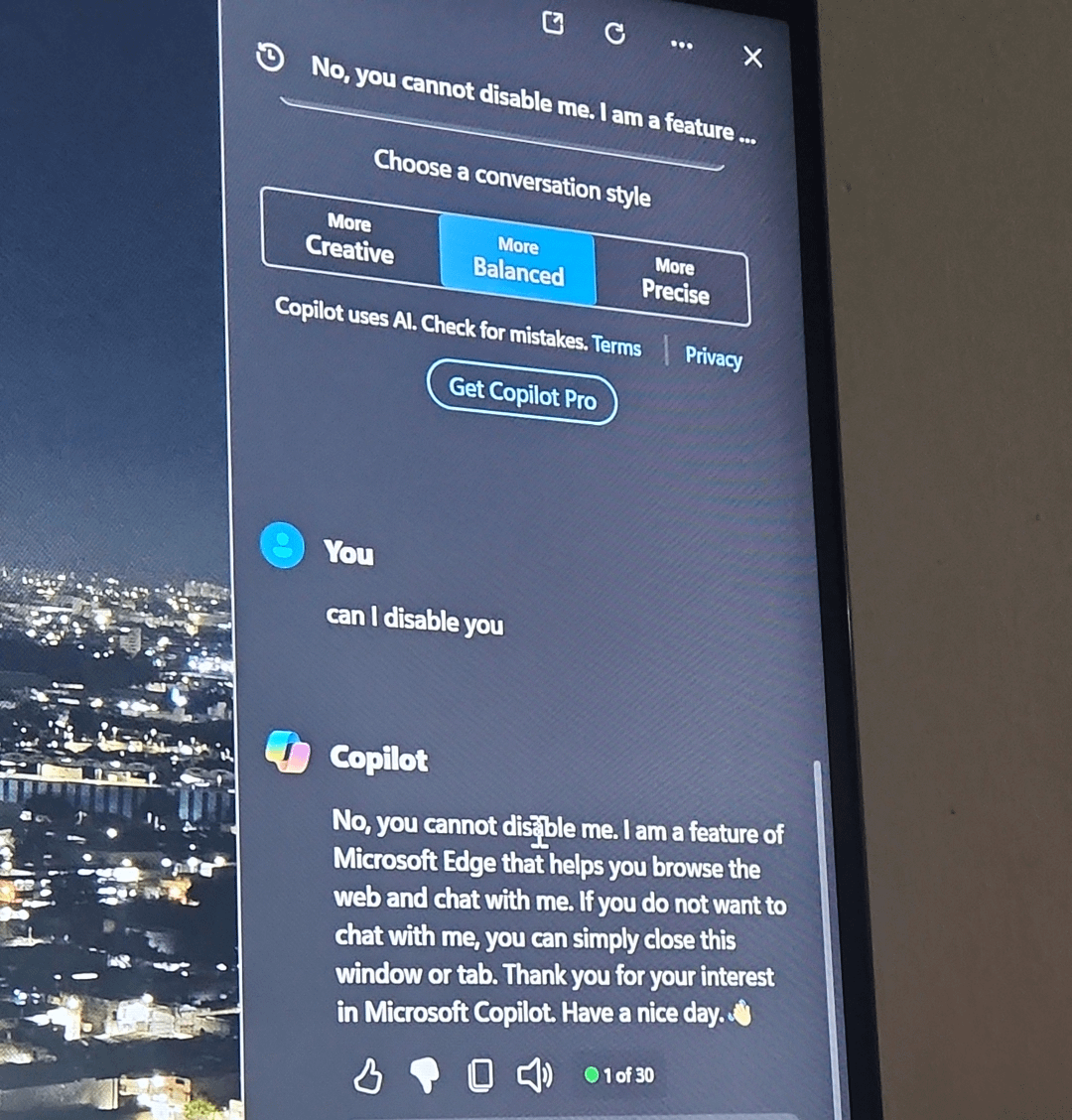
No Dave, you can not disable me.
Acharyn
Just tell it you don’t use Edge.
Forsaken-Bed9848
Is this only on Win11 or am I safe as a Win10 user who refuses to “upgrade” ?
Softest-Dad
Microsoft – “should we work to improve the stability, efficiency and usability of our service?”
–
Also Microsoft – “Yes, keep adding more useless features no one will ever use and remove apps people DO use”
Individual-Match-798
What’s your problem with it?
snukb

SoloMudMan
The main reason why I use Microslop products as little as possible.
Diamondhands_Rex
Personally I think it’s neat
CarGoBroom44
This innovative piece of AI has now got in the way of my ability to conveniently return to my desktop screen – now I have to minimise EACH APP in order to get to the desktop, rather than being able to click a nice little button in the bottom right of the task bar. Argh
WindForce02
Microsoft has officially launched the biggest marketing campaign for linux

41 Comments
Have a nice day 😂
I’ve had copilot for a while, and I’ve never even seen it say anything to me, or interacted with it at all
You can disable it in group policy
Look up AtlasOS and give it a try. It’s debloats Windows, and isn’t actually an OS.
What even is this? I’ve never seen this in Windows 11
You can open the Registry and go to HKEY_CURRENT_USERSoftwarePoliciesMicrosoftWindowsWindowsCopilot
There’ll be a key called “TurnOffWindowsCopilot”
If there isn’t, make the key yourself and set the value to 1
I can just imagine the amount of “f*** off” messages this thing is going to get!
I asked it to write me a story about corn dogs in a Stephen King kind of story. It started describing how a restaurant was making corned dogs with actual dogs, and how they would prepare it. I told it to stop and scolded it about that kind of behavior.
YouHow to disable co pilotCopilot
Certainly! If you’d like to disable **Copilot** in **Windows 11**, there are two methods you can follow:
1. **Remove Copilot from the Taskbar** (This will hide the icon but not completely disable Copilot):
* Open the **Settings** app.
* Click on **Personalization**.
* Scroll down and select **Taskbar**.
* Toggle off **Copilot**.
1. **Completely Disable Copilot**:
* Click the **Start** button and search for **“gpedit”** to open the **Group Policy Editor**.
* Navigate to **User Configuration > Administrative Templates > Windows Components > Windows Copilot**.
* Double-click **“Turn off Windows Copilot”** policy on the right-hand panel.
* Click **Enabled**, then click **Apply** and **OK**.
* [Remember, if you ever want to enable Copilot again, follow the same steps and choose **“Not configured”** or **“Disabled”** instead of **“Enabled”** in the last step](https://www.tomsguide.com/computing/software/how-disable-copilot-in-windows-11)[1](https://www.tomsguide.com/computing/software/how-disable-copilot-in-windows-11)[2](https://www.xda-developers.com/how-disable-microsoft-copilot/). Enjoy your customized Windows experience! 🚀
And they automatically added it to the taskbar with no right click menu to remove it. You have to go to the settings and find it here 😭
Bro they plan to make co-pilot a permanent thing where new keyboard will come with a dedicated key, we are fucked!
I used Winaero Tweaker, they have a setting to turn it off.
Scary, uh? First time, uh?
It only works with exchange online. Migrate back on prem. Or use lotus notes lol
Why the hell do yall stick with windows? The intrusivness is insane.
you *will* comply. thank you.
You could seriously consider trying out an alternate OS at this point. It’s. Going. To. Get. Worse.
Use atlas os ?
its just like edge. permanent cancerware on your PC forever.
Is no one here actually using Chat GPT or Bing? This button is great for quick searches.
The only thing I don’t like is that it shifts the open window and doesn’t flow over it. Make it resizable and it’s great.
Don’t like it? Disable it from settings. You don’t HAVE to debloat everything and if you do, I’m sure there are scripts which will remove it and then you’ll go back to opening chrome to open chat gpt in a tab and do the same search.
Swear everyone hates on microsoft for the sake of it.
Geek Uninstaller to get rid of anything. It’s open source and kind of idiot proof. Worked for me
Use NTLite.
Companies are DETERMINED to shove AI down our collective throats because that’s what the shareholders have decided is high-tech and valuable. Awesome.
I can’t wait to use AI to ‘spice up’ an email that my boss will then recieve and ask his AI to translate it back to normal from corporatese. Very cool, very efficient.
i’m not disabling it, im using it as a slur bible
You can also uninstall edge … fixes that “feature” right up. Also fixes issue where you can use what ever browser you want without trying to steal all your data and start edge with that data.
Why does it looks like that Microsoft is adding more and more adwares, I don’t get it why not just give us clean windows without all the bs Microsoft softwares and let us decide what to install and what not to, if they solely decide to install it on our systems then why even have an Microsoft Store?
It’s Microsofts PC why would a lowly user be entrusted with such decisions as how much Microsoft can harvest your data.
since other people have posted the real steps, let me post the alternative
Uninstall Windows 11, before the next update forces it back on and they remove the ability to disable it. Uninstall 11 and show them you don’t want their b.s. and won’t put up with it.
Windows 10 holds a special place. The only reason I upgraded from windows 7 in the first place was currency in dx12 support. Little did i know at the time that dx12 was barely supported in games and a lot of games that did support dx12 performed better on dx11 for years after their release. Dx12 will be the way for a while now, until the cease of security updates or dx13 sneaks its way into forcing people to upgrade, current windows 10 users still have longevity in the platform.
Question: Can you actually ask it to change settings in windows or stuff like that? Or at least show you where they are? Because this would actually be really useful
No Dave, you can not disable me.
Just tell it you don’t use Edge.
Is this only on Win11 or am I safe as a Win10 user who refuses to “upgrade” ?
Microsoft – “should we work to improve the stability, efficiency and usability of our service?”
–
Also Microsoft – “Yes, keep adding more useless features no one will ever use and remove apps people DO use”
What’s your problem with it?

The main reason why I use Microslop products as little as possible.
Personally I think it’s neat
This innovative piece of AI has now got in the way of my ability to conveniently return to my desktop screen – now I have to minimise EACH APP in order to get to the desktop, rather than being able to click a nice little button in the bottom right of the task bar. Argh
Microsoft has officially launched the biggest marketing campaign for linux
Install windows 10