
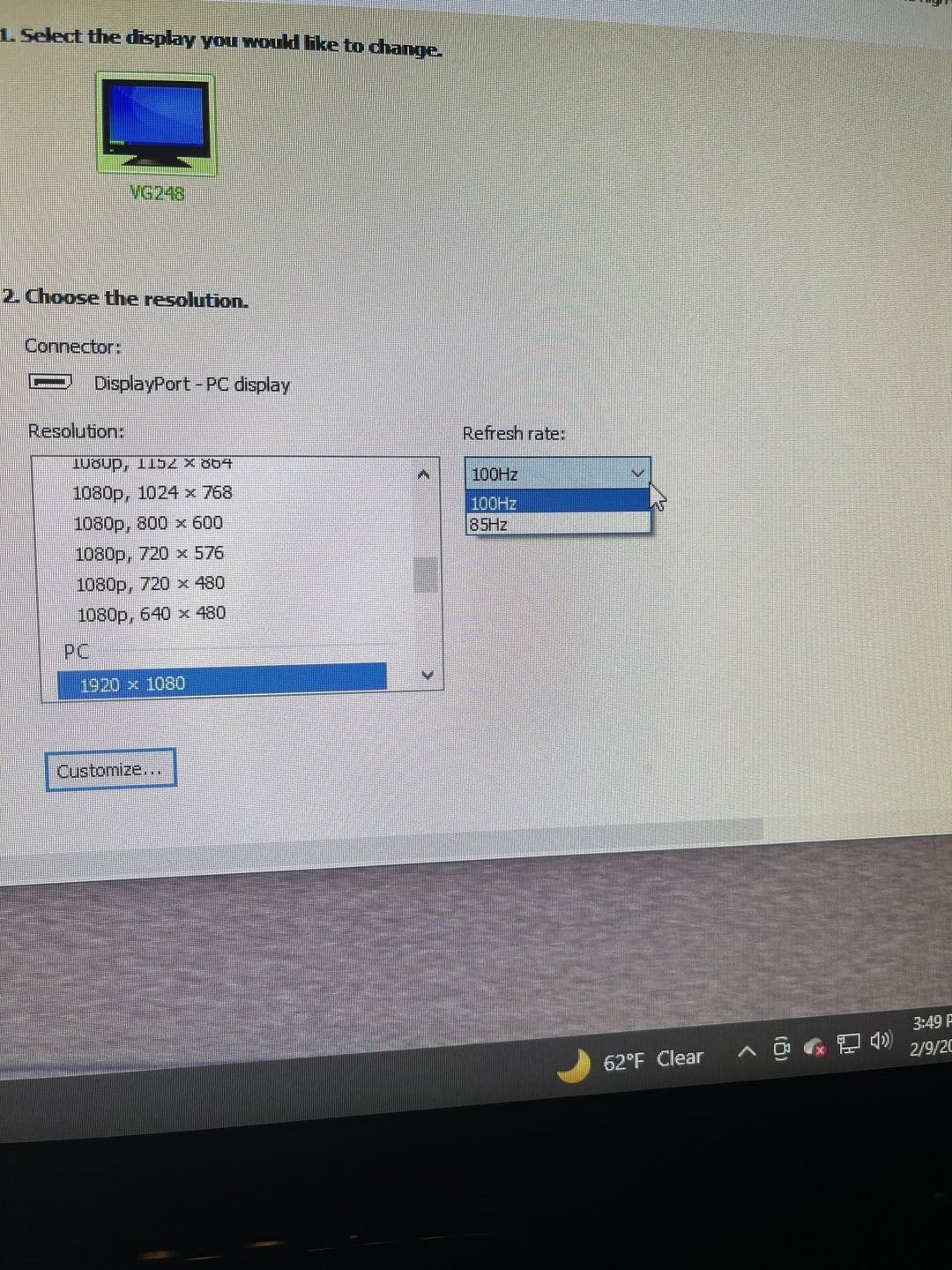
I have an Asus monitor that I bought like 5 years ago and I remember going in the settings and changing it to display at 144hz. It’s always been set at that. Today I went in to look at some other settings and I noticed it said my monitor was only displaying at 100hz. And I can’t set it any higher. I also went into Nvidia control panel and it said the same thing and there’s no option for anything higher than 100hz. I have no idea why it changed. I’ve upgraded my gpu since buying my pc maybe that has something to do with it? I’m using a display port cable that I’ve always used with no issues.
33 Comments
Sometimes the monitor itself needs to be ‘overclocked’ in the monitor settings through the On Screen Display to get 120/144hz.
Maybe because you are in FHD and not HD, there are sometimes 2 different resolution of 10920×1080
[deleted]
Check the manual for each HDMi/DisplayPort specification. Not every port supports 144Hz
Is this pure DisplayPort, or is it getting adapted to HDMI?
Also, why are you using YCbCr422 instead of RGB?
Ok so all I did was disconnect my display port cable from my monitor and reconnected it and it fixed it. Wow. No idea why that fixed it but ok. Thanks guys.
Because you do not know much about DisplayPort cable versions
It “might” be a cabling issue, but it could also be a feature on the monitor itself. On my Asus monitor, I have to overclock it from the monitor’s built-in UI first, then I can adjust the refresh rate in Windows.
you can try creating a custom resolution at 144hz in nvidia control panel and see what happens. I have a tv that doesn’t properly report the resolutions and refresh rates it’s capable of and I literally have to create a custom resolution to use it.
I have the same problem with my Asus 4K 144Hz monitor, happens with both DP and HDMI.
My solution was to set up a custom resolution, but to make it work I had switch to Ultra HD, HD, SD 4K 60Hz or PC 3840×2160 first and then a reboot before i was able to select the custom resolution.
I have had this problem with two different Asus monitors paired to a 1080ti and a 4090.
Are your gpu and cables good enough to run it at 144?
cable’s fucked up get a better cable.
Among the plethora of other things to check, check device manager and verify your GPU is recognized
Cable
HDMI cable or port is the limitation. Get a high quality cable and check the output port can output 144
Lower the bit depth from 12 or 10 to the next one down. A lot of monitors one do highest refresh with x bit colour turned down.
Get a high quality DP cable
Download Custom Resolution Utility (CRU.exe)
Your cable sucks not all of them can support 144hz.
Your cable is probably not new enough to support 144 HZ.
Buy a DisplayPort cable. That’s the trick.
Probably the cable. You need DP 1.4 or HDMI 2.1. It looks the same but the internals are different
Do you suspend/hibernate? That can sometimes cause confusion with the EDID information.
You can tell the NVidia controll panel to use the EDID from a file and it should be less likely to get confused.
Check monitors settings. My 165hz 1440p came default 60hz
The real question is why are you still using 1080p in 2024.
Are you using HDMI or DisplayPort? My monitor supports 144Hz with HDMI but 165Hz with DP.
It’s the cable
What is that color format?
This held me up dumbfounded having installed a fresh windows. Two days trying to work out why “no signal” from new built PC…..fing HDMI cable. It had worked on previous install because I had limited the refresh to 100Hz to accommodate the HDMI (which couldn’t do 144hz at 1440 over 10m). But fresh install, back to 144hz and “no signal”. Two days of unplugging RAM, changing gfx card etc and still not even the BIOS (I thought)..
Do you like having a slice of pizza in your search box?
Could also be resolution. Might only be 144hz at 1080p
Idk I have a 240hz monitor and windows let me set it above 144
Usually the port decides how fast your framerate will be, and HDMI will be the fastest. Anything other than HDMI will be capped, hence it explains your limit of 100 hz. Put the cable in your HDMI slot; that’s the solution to your query.
maybe check virtual super resolution?I had that problem recently when I tried to connect my PC to a 4K TV, it locked on 24hz. Then I fiddled around on driver setting and I turned off the virtual super resolution and my problem went away lmao