
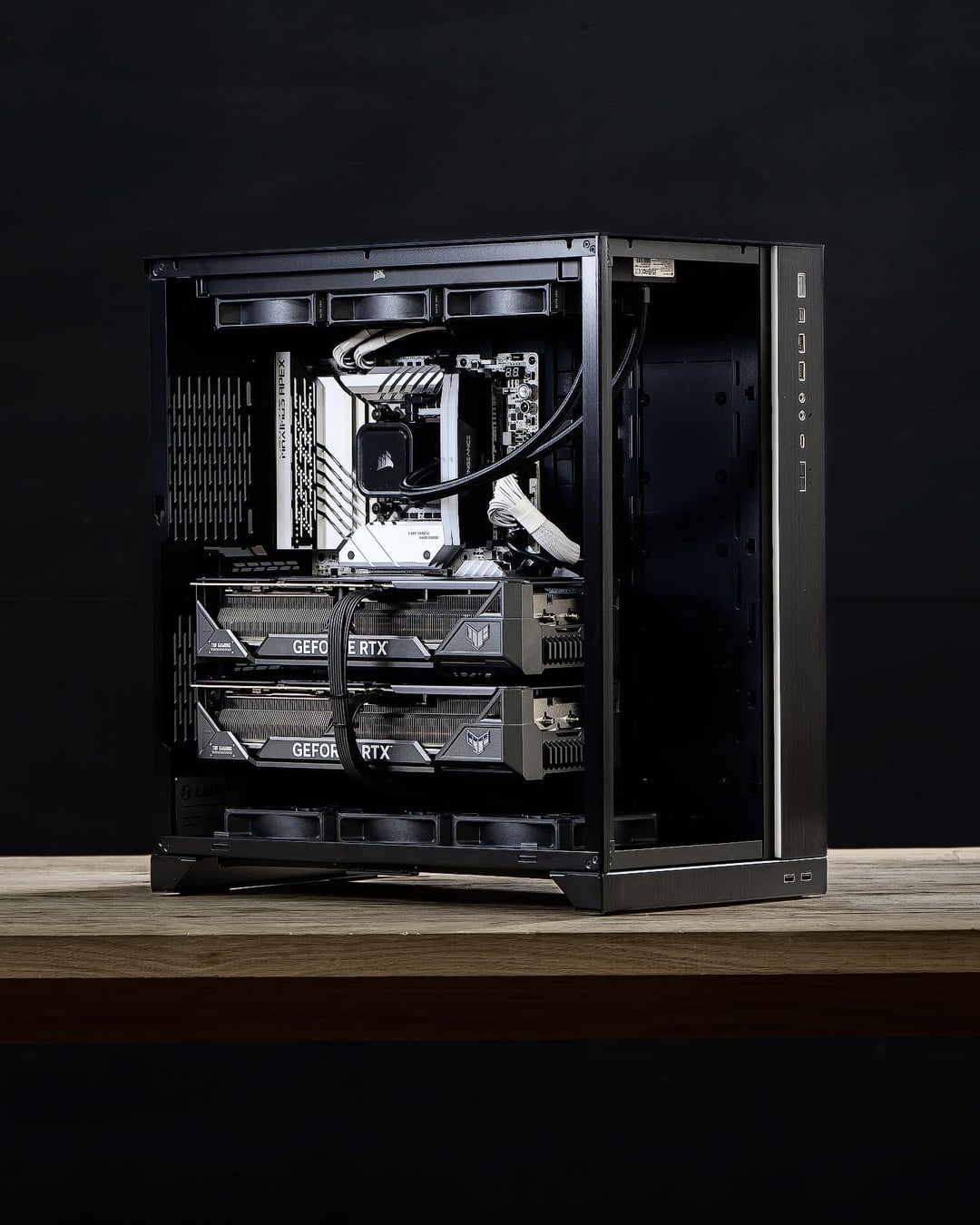
CPU: i9 14900k
CPU Cooler: Corsair 360mm AIO Watercooler
Motherboard: ASUS Z790
GPU: 2x ASUS RTX 4090 TUF, 24GB
RAM: 96GB (2x48GB) 5200MHz DDR5
SSD: 1TB + 2TB Samsung 980 Pro GEN4 NVMe Storage
Power Supply: 1500w 80+ Platinum
Cables: 2x 12vHPWR Gen4 PCIE Power Cables
Case: Lian Li 011D XL
OS: Windows 11 Pro
Fans: Corsair AF120 Elite
38 Comments
Looks mad clean congrats. Just out of curiosity, what are you planning to do with this rig?
That’s a lot of PC
Looks good. Probably would’ve spent the extra $500 Australian on an AIO version of that top 4090 if it was me, even if it would’ve looked messier.
Looks great but…why?
Insane bulld, very cool!
[deleted]
Saw 2 sticks of RAM and was thinking WTF?!? What kinda workstation with 2 4090s needs so little RAM
Scrolled back up to your description…. Damn I am definitely falling behind on current developments in RAM
need 3 more intake fans on the side!
How are you preventing sag? I have one card and the thing that came with the gpu was useless, I had to build my own.
Am I the only one wondering where is the PSU?
I guess it’s behind the MOBO, but I’m not sure.
Desperately needs front mesh kit and additional intake
30% gpu by volume, 70% by weight. I like these ratios.
​
https://preview.redd.it/5mzqbyp98ehc1.png?width=640&format=png&auto=webp&s=ea4d4f9b37929e1dcb8a0119f723469b13c6bc4b
*Wind farm and solar panels not included!
https://preview.redd.it/aafsyi9aaehc1.jpeg?width=1290&format=pjpg&auto=webp&s=4be8cf1d4e06a8d9cd3b20ab0e400d0aea731d0d
How are temps in that upper 4090? Seems like quite a small slit for fresh air so I’m curious how it actually behaves.
Why not 990 Pro NVME if you were going all out, just curious.
This is gonna sound like the biggest nitpick of all nitpicks but I’m very surprised it doesn’t have a rear exhaust fan. Even if the AIO is moving enough air over the VRMs & chokes, it’s like an additional $30 on something so beastly and it’s not like it would make anything worse.
It looks great though.
Out of curiosity, why the 14900 instead of a threadripper?
When the wife leaves you.
Can you actually use two gpus for gaming?
Just me is is the ram in the wrong slots lol also are the cpu pcie wires in the fans? Or just an optical illusion
2 4090s are cool and all, but look at all those usb ports!
Hard to find S tier memory overclocking z790 just to pair it with 5200MT/s RAM. Nicez
Anyone else notice the RAM is installed wrong?
Edit: why only 3 RAM slots, and one blocked off? I’m so confused.
“Yes mom,I need this for school”

I’m a beginner, how do two GPU’s work?
Took me a minute to figure out why your RAM was touching and there were only 3 slots. The third slot is for mounting two SSDs.
https://gadgetmates.com/understanding-dimm-2-slots-for-ssd-expansion
I was a little confused about there only being 2 sticks of RAM but forgot about the Maximus APEX board being insanely high end, not to mention super high capacity DIMMS. Beautiful workhorse my friend.
Goes for 2 4090s but then only gets 2 out of 4 slots that arnt even in dual channel 😭
OP you might want to double check the user manual for your mobo on the RAM slots to use. Dual channel should likely be in A2 and B2 (slots 2 & 4). Looks like you got the memory in 1 and 2.
Sweet machine.
Nice! I can put my grandpa’s old mouse on it. Doom2 will look so sick!
Maybe I’m wrong, but… Is one of the RAM slots **missing*?? :O
All that just for Skyrim?
Yep, workstation, is that what the GF thinks lol
That pc costs more than my car DX
Pfft only 2 RAM Sticks ha..
oh.
Oh damn.
https://preview.redd.it/jkjh75wi5fhc1.jpeg?width=1079&format=pjpg&auto=webp&s=57c6ccfc701df53faef0cbb2341e62aac296cd87