No. Take it to a board repair shop. They can help you.
Store it in a fireproof box until you’re able to take it there. Don’t power it or charge it.
CaptainAddi
Do it outside, so it doenst burn down the house if it blows up. Get rid of it as soon as possible after that
AmpersandWhy
Obvious solution: remove the battery.
MacBooks will still operate without a battery so long as they’re plugged in. Remove data at your leisure.
SoDrunkRightNow2
NO, it is not safe to turn on. Take it to a repair shop if you can.
If you absolutely must extract the data yourself:
-take laptop to a safe area outdoors
-wear eye protection
-wear protective clothing, gloves, labcoat, etc
-have a fire extinguisher on hand
-have a water hose nearby
Open the laptop carefully and disconnect the battery. Do NOT touch, prod, poke, cut, jostle, or compress the battery. Do NOT throw it in the trash. Take it to a hazardous waste recycling center. Check call2recycleDOTorg for a location.
Now that the battery is removed and you’re sure none of the contents have leaked into your laptop, you may now safely plug it in and extract the data. You can always buy a new battery too.
vlken69
Unless your drive is encrypted, just connect it into different PC.
syberianbull
Remove the battery and connect to wall; use for as long as you want/need. The battery is pretty easy to replace if you want to keep using it in the future.
PumaMyPants
Wear gloves and safety glasses before you touch it again
nankerdarklighter
Remove battery, plug macbook into another mac, Start in target disk mode via pressing cmd + t during startup and transfer data.
Hdd is also easy to access, if it doesn’t power up anymore
Those were the days to have a mac
Imaginary_ToniStark
Thanks all for your advice. After reading I decided to remove battery and plug it in without battery. So far I have removed the screws but failed on tri-wing and I will get it to finish the work in couple of hours. Need to buy tri-wing tool.
Appreciated your help!
LukeShiftwalker
Take the Batterie out and run it on wall power, but be careful when taking out the batterie.
No_Interaction_4925
No. You shouldn’t have vital info on your laptop with no backups.
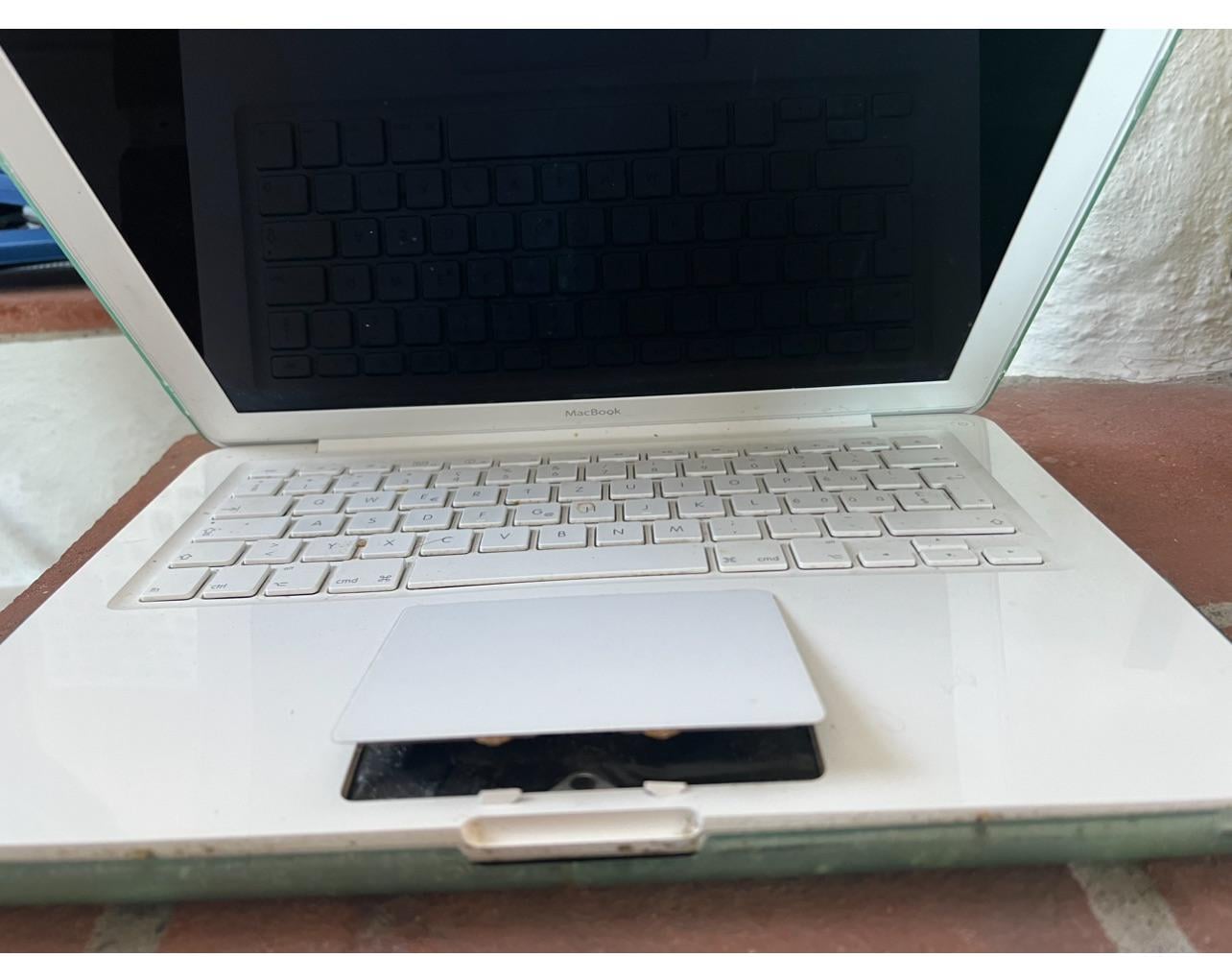

11 Comments
That’s a very r/spicypillows worthy device.
No. Take it to a board repair shop. They can help you.
Store it in a fireproof box until you’re able to take it there. Don’t power it or charge it.
Do it outside, so it doenst burn down the house if it blows up. Get rid of it as soon as possible after that
Obvious solution: remove the battery.
MacBooks will still operate without a battery so long as they’re plugged in. Remove data at your leisure.
NO, it is not safe to turn on. Take it to a repair shop if you can.
If you absolutely must extract the data yourself:
-take laptop to a safe area outdoors
-wear eye protection
-wear protective clothing, gloves, labcoat, etc
-have a fire extinguisher on hand
-have a water hose nearby
Open the laptop carefully and disconnect the battery. Do NOT touch, prod, poke, cut, jostle, or compress the battery. Do NOT throw it in the trash. Take it to a hazardous waste recycling center. Check call2recycleDOTorg for a location.
Now that the battery is removed and you’re sure none of the contents have leaked into your laptop, you may now safely plug it in and extract the data. You can always buy a new battery too.
Unless your drive is encrypted, just connect it into different PC.
Remove the battery and connect to wall; use for as long as you want/need. The battery is pretty easy to replace if you want to keep using it in the future.
Wear gloves and safety glasses before you touch it again
Remove battery, plug macbook into another mac, Start in target disk mode via pressing cmd + t during startup and transfer data.
Hdd is also easy to access, if it doesn’t power up anymore
Those were the days to have a mac
Thanks all for your advice. After reading I decided to remove battery and plug it in without battery. So far I have removed the screws but failed on tri-wing and I will get it to finish the work in couple of hours. Need to buy tri-wing tool.
Appreciated your help!
Take the Batterie out and run it on wall power, but be careful when taking out the batterie.
No. You shouldn’t have vital info on your laptop with no backups.