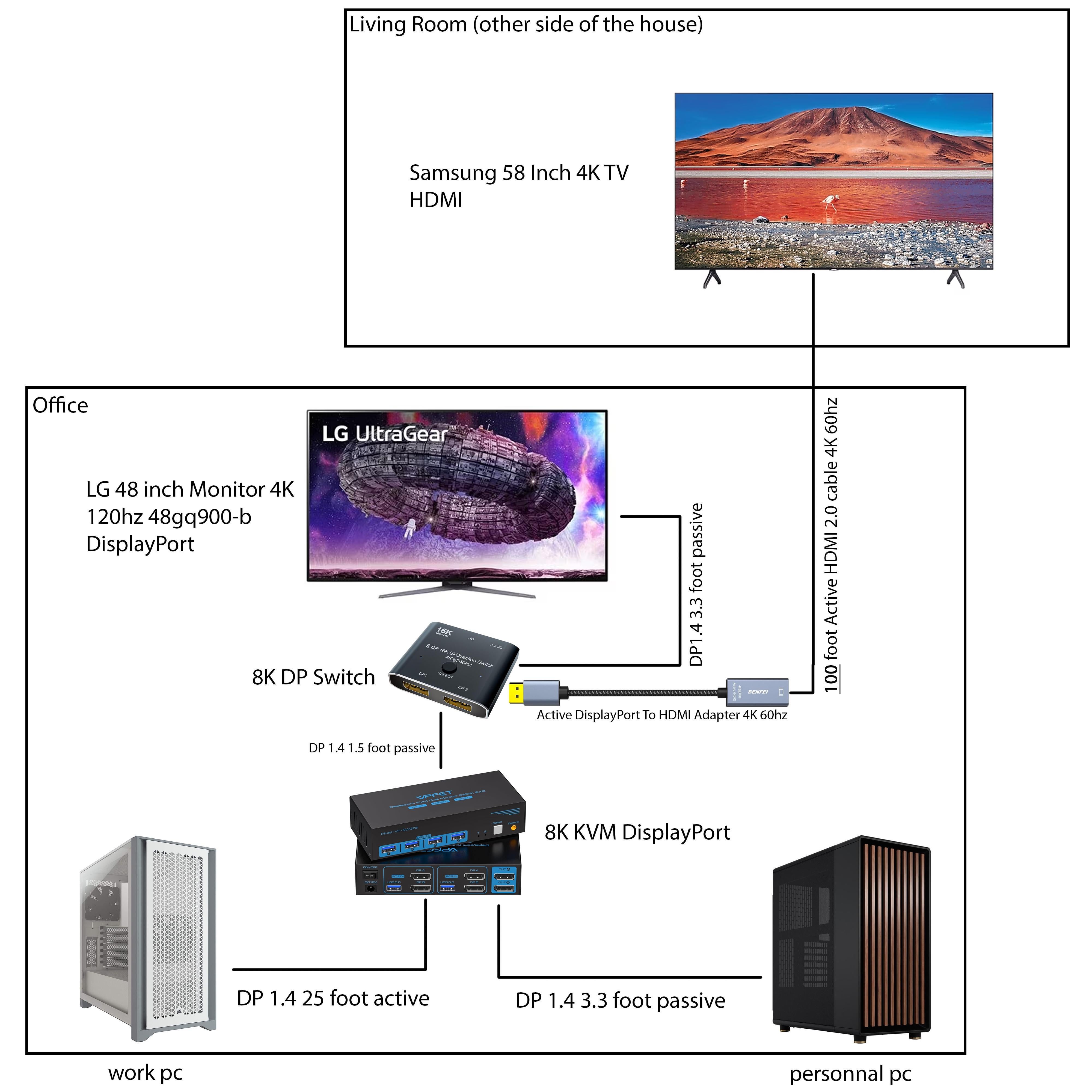
I want to be able to choose any pc on any screen. When I use the KVM without the switch, everything works perfectly. When I use the switch without the KVM, everything perfectly. When I use both the KVM and the switch, my screen keeps disconnecting constantly at random intervals. What am I missing?
[deleted]
[removed]
UwUMaster99
You might have better luck sending the signals through cat 6 instead of hdmi
Toosexy4mysocks
The Living Room TV would struggle with the signal. I’d use a fiber optic HDMI cable for a 100’ cable. Also, having both a KVM AND a DP switch would make the signal way worse too. Do your PC’s not have HDMI out?
AustinPatron
Could do HDMI over ethernet also
Retrolad2
Monitor brothers 😎
AcordeonPhx
I just roll my gaming PC to the living room (wheels) and keep a work pc separate with its own monitor
chipotlemylife836
Off topic but super curious, what do you do for work that has you with a supposedly high end work pc, and a tasteful personal pc? I strive to have something like that.
Bergdoktor
Can’t chime in on the signal issue much apart from video over ethernet or instead of a switcher maybe duplicating the video signal to avoid handshake issues could help. Not sure you even need the switch at all since the KVM has two dp outputs?
On a different note: have you considered running both your environments on just one piece of hardware to eliminate some of the complexity? I work from home and have my work os in a VM, running within my personal Windows. Also have a hackintosh on a dual boot drive in case my wife (seldom) has to work from home.
Renive
Use fiber cables for HDMI. I recommend phoosno, they are recommended by HDTVTest on YouTube, they are certified and I’m using them to have a PC in the basement, no issues.
It converts HDMI signal to run over CAT cable and provides a KVM functionality. Your solution doesn’t include support for a wireless mouse/keyboard in your other room. The KVM I linked gives you both the audio/video extension and lets connect two USB 2.0 devicess (or a hub) in the room with a TV.
​
You’re not stupidby any means. I have a traditional KVM in my office and two of these running to my living room and bedroom TV. Let’s me access any of my four computers (Personal PC, personal Linux, and two work computers) from my office, living room, and bedroom. Totally worth it
mzivtins_acc
You’ll want to keep all paths in any route/chain identical formats everywhere otherwise you can run into some god awful latency issues.
Let the KVM do all the work and just run some beautiful fibre the distance needed.
FoxiDaFluffyFemboy
i am possibly not understanding, but why the dp switch? wouldnt it work better to just have an hdmi to dp adapter from the original kvm switch to ur gaming monitor, and keep the tv hdmi cord with no adpaters on the tv end?
beo19
Real question is: will your wireless mouse and keyboard go that far or how will you control that tv?
amtrkr
I have the same setup myself. I sim race on my living room TV when not in VR. I highly recommend buying a fiber optic HDMI cable for any distance over 15 feet
5p33dphr34k
I have this exact setup. Minus the KVM. Logitech makes decent keyboards and mice with like a ms of lag. Just get a few HDMI switches instead and save the money from the KVM to buy a few games or something. I have only one source, so mine is simpler.
AshCraftgamez565
Yes you are we all are
midsprat123
I would suggest:
Replace the switch with a DisplayPort DA (which will stabilize the EDID) and swap out the finer hdmi for some flavor of extended kit over shielded cat cable
de4thqu3st
are you planning on gaming on the livingroom tv? for the price of the equipment needed, you could probably build a budget media PC
Band_aid_2-1
Literally would be cheaper and easier to build a sFF pc
ScatpackZ31
It’ll work, but depending on how you are going to use the TV, my suggestion would be to just steam wirelessly. That’s what I do and it works great. Only thing that wouldn’t be good would be an esport title that needs low latency. Additional benefits is you can stream games to your phone so it’s like having a steam deck too. Though you will need good internet to take it outside the house.
JJisTheDarkOne
You already have a work PC and a personal PC.
Just do what I did and **put a LoungePC at the TV.**
ChemicalCheetah
Tbh I would’ve thought you were crazy, but then I saw a post on this subreddit where someone put their PC in the basement and have it hooked up on the top floor. So I’m sure there’s a way to
xD3I
Why don’t you connect the other room’s tv to the gaming PC? I have the same setup with my gaming computer and Mac from work and I have just an 8k kvm with DP switch but my living room TV is directly connected to my PC with a 15m fiber HDMI and I just use wireless controllers when I use it
LazerHawk84
Before you spend any money. You could try streaming to your displays over the network. (Cat 6 cables) Sunshine app on PC and Moonlight app on TV. I personally use an Nvidia shield Pro android TV box.
Individual-Match-798
Optic HDMI would probably be a better solution for the TV.
Otherwise the whole thing should work. Probably.
Carl_Wheeze
If you want a cheap solution, those steam streaming boxes are 30-50 usd a pop, I use one to connect my pc to my living room tv that’s 450ft away.
Hottage
Why would you use two switches when there are dual monitor KVMs and you could just have your displays in mirror mode?
FuckSticksMalone
IMO any modern home theatre receiver is better suited to handle the multi monitor/dual zone audio should you choose to do so.

29 Comments
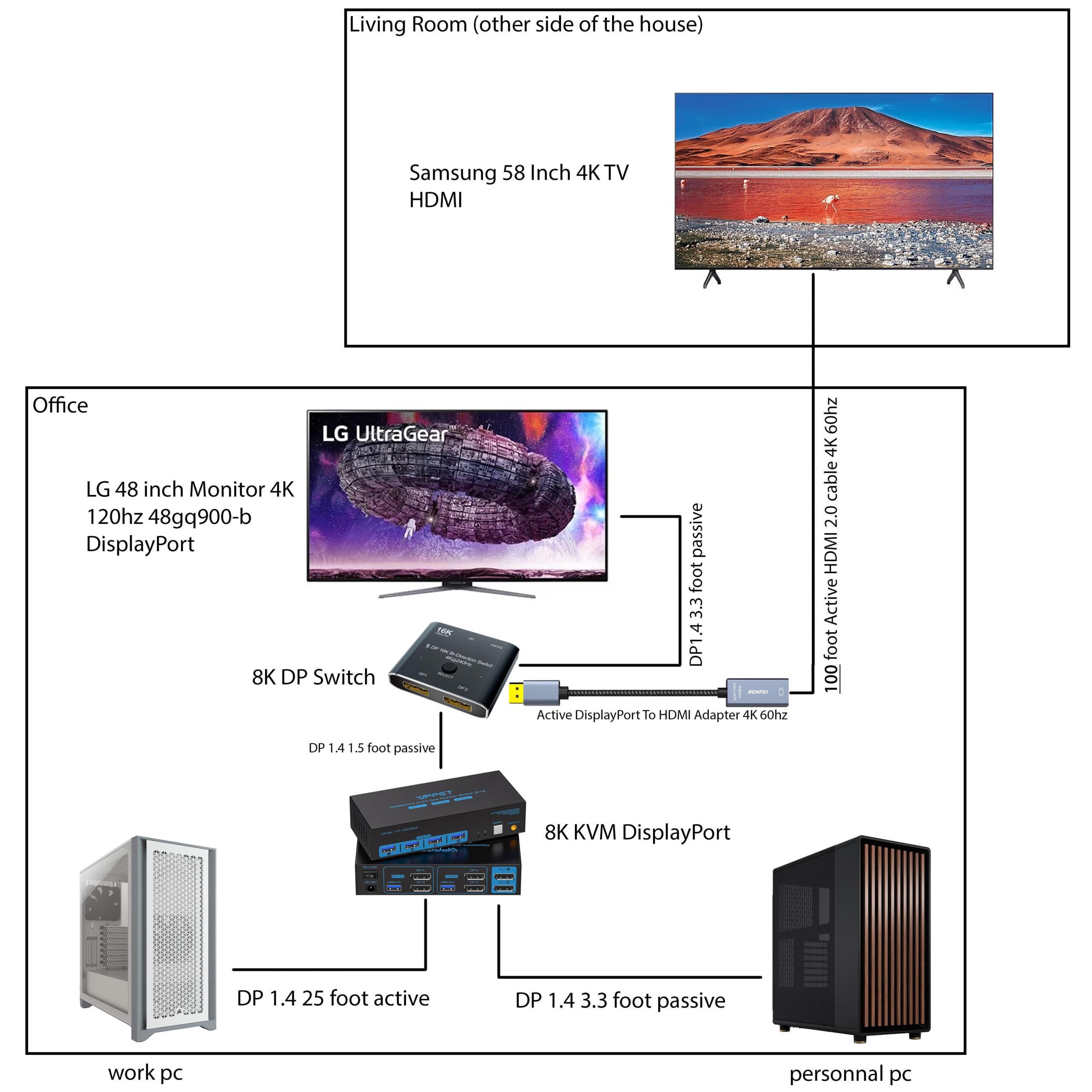
I want to be able to choose any pc on any screen. When I use the KVM without the switch, everything works perfectly. When I use the switch without the KVM, everything perfectly. When I use both the KVM and the switch, my screen keeps disconnecting constantly at random intervals. What am I missing?
[removed]
You might have better luck sending the signals through cat 6 instead of hdmi
The Living Room TV would struggle with the signal. I’d use a fiber optic HDMI cable for a 100’ cable. Also, having both a KVM AND a DP switch would make the signal way worse too. Do your PC’s not have HDMI out?
Could do HDMI over ethernet also
Monitor brothers 😎
I just roll my gaming PC to the living room (wheels) and keep a work pc separate with its own monitor
Off topic but super curious, what do you do for work that has you with a supposedly high end work pc, and a tasteful personal pc? I strive to have something like that.
Can’t chime in on the signal issue much apart from video over ethernet or instead of a switcher maybe duplicating the video signal to avoid handshake issues could help. Not sure you even need the switch at all since the KVM has two dp outputs?
On a different note: have you considered running both your environments on just one piece of hardware to eliminate some of the complexity? I work from home and have my work os in a VM, running within my personal Windows. Also have a hackintosh on a dual boot drive in case my wife (seldom) has to work from home.
Use fiber cables for HDMI. I recommend phoosno, they are recommended by HDTVTest on YouTube, they are certified and I’m using them to have a PC in the basement, no issues.
You’re better off with an HDBaseT KVM like [this](https://www.orei.com/products/hdmi-extender-with-hdbaset-over-cat5e-6-7-up-to-400-ft-ir-control-keyboard-mouse-over-network-uhd-exb400ur-k?_pos=4&_fid=db7911952&_ss=c) one by OREI
​
It converts HDMI signal to run over CAT cable and provides a KVM functionality. Your solution doesn’t include support for a wireless mouse/keyboard in your other room. The KVM I linked gives you both the audio/video extension and lets connect two USB 2.0 devicess (or a hub) in the room with a TV.
​
You’re not stupidby any means. I have a traditional KVM in my office and two of these running to my living room and bedroom TV. Let’s me access any of my four computers (Personal PC, personal Linux, and two work computers) from my office, living room, and bedroom. Totally worth it
You’ll want to keep all paths in any route/chain identical formats everywhere otherwise you can run into some god awful latency issues.
Instead of complicating your chain, just simplify and go KVM Source to two heads:[KVM Extenders | Adder Technology](https://www.adder.com/en/kvm-solutions/extenders)
Let the KVM do all the work and just run some beautiful fibre the distance needed.
i am possibly not understanding, but why the dp switch? wouldnt it work better to just have an hdmi to dp adapter from the original kvm switch to ur gaming monitor, and keep the tv hdmi cord with no adpaters on the tv end?
Real question is: will your wireless mouse and keyboard go that far or how will you control that tv?
I have the same setup myself. I sim race on my living room TV when not in VR. I highly recommend buying a fiber optic HDMI cable for any distance over 15 feet
I have this exact setup. Minus the KVM. Logitech makes decent keyboards and mice with like a ms of lag. Just get a few HDMI switches instead and save the money from the KVM to buy a few games or something. I have only one source, so mine is simpler.
Yes you are we all are
I would suggest:
Replace the switch with a DisplayPort DA (which will stabilize the EDID) and swap out the finer hdmi for some flavor of extended kit over shielded cat cable
are you planning on gaming on the livingroom tv? for the price of the equipment needed, you could probably build a budget media PC
Literally would be cheaper and easier to build a sFF pc
It’ll work, but depending on how you are going to use the TV, my suggestion would be to just steam wirelessly. That’s what I do and it works great. Only thing that wouldn’t be good would be an esport title that needs low latency. Additional benefits is you can stream games to your phone so it’s like having a steam deck too. Though you will need good internet to take it outside the house.
You already have a work PC and a personal PC.
Just do what I did and **put a LoungePC at the TV.**
Tbh I would’ve thought you were crazy, but then I saw a post on this subreddit where someone put their PC in the basement and have it hooked up on the top floor. So I’m sure there’s a way to
Why don’t you connect the other room’s tv to the gaming PC? I have the same setup with my gaming computer and Mac from work and I have just an 8k kvm with DP switch but my living room TV is directly connected to my PC with a 15m fiber HDMI and I just use wireless controllers when I use it
Before you spend any money. You could try streaming to your displays over the network. (Cat 6 cables) Sunshine app on PC and Moonlight app on TV. I personally use an Nvidia shield Pro android TV box.
Optic HDMI would probably be a better solution for the TV.
Otherwise the whole thing should work. Probably.
If you want a cheap solution, those steam streaming boxes are 30-50 usd a pop, I use one to connect my pc to my living room tv that’s 450ft away.
Why would you use two switches when there are dual monitor KVMs and you could just have your displays in mirror mode?
IMO any modern home theatre receiver is better suited to handle the multi monitor/dual zone audio should you choose to do so.