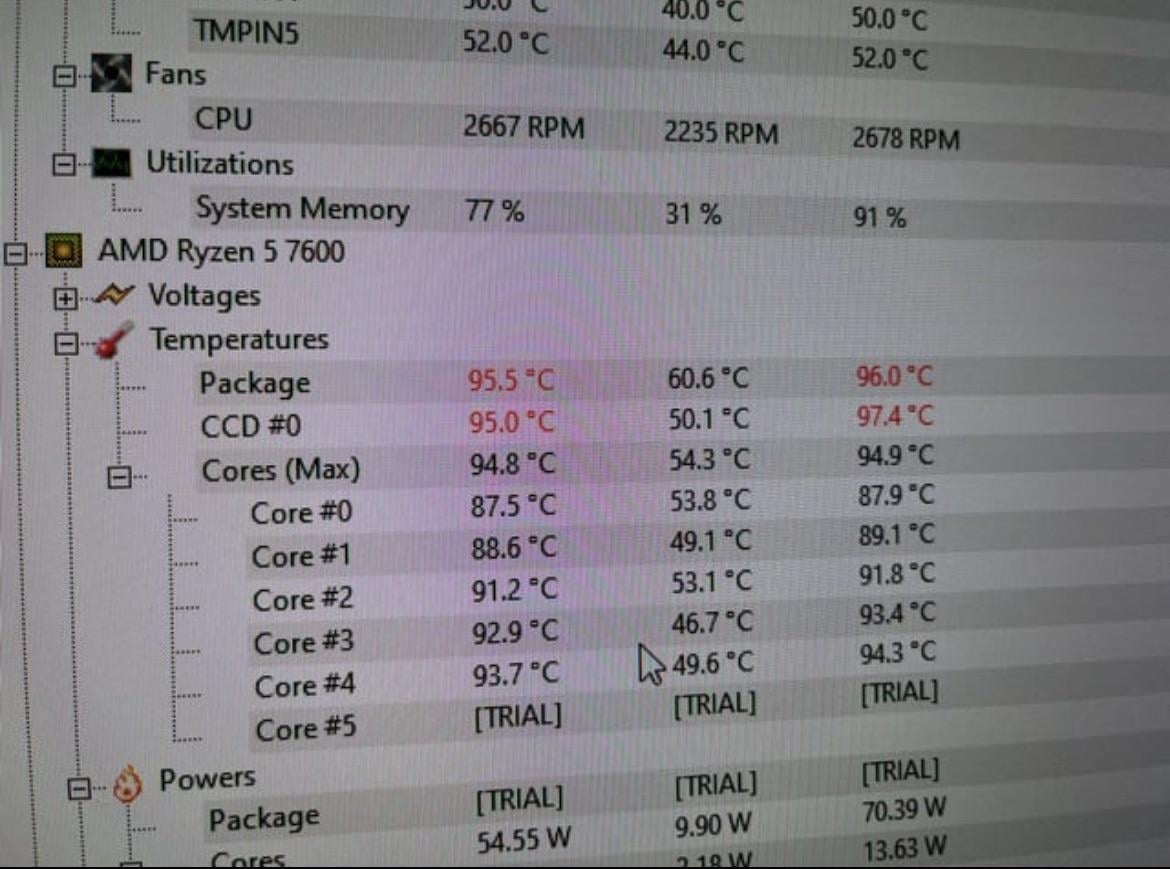
Got a new pc a few days ago and wondering if this is safe. I have Ryzen 5 7600 and the stock amd cooler that comes with it. Doing file decompression so very heavy load for the CPU.

Got a new pc a few days ago and wondering if this is safe. I have Ryzen 5 7600 and the stock amd cooler that comes with it. Doing file decompression so very heavy load for the CPU.
47 Comments
No
Seems like the cooler have the film protection still attached
Edit: damn, are you downvotes alright?, it’s seen plenty of times that thermal limiting on stock settings, I caused by improper cooling…
Too hot
Ignore all these idiots screaming “too hot” etc.
It’s a 7000 series CPU on the stock cooler.
It’s designed to max out it’s clocks until thermals or power limitations no longer allow it to. It’s by design.
A better cooler will lower temps, but the things are literally designed to run at their max 95c under heavy loads. They boost clocks until they hit 95c then stay at that frequency.
I would personally still change the cooler out to get those lower, but as long as temps are sensible when idle etc, then there is nothing to worry about.
Also check your clock speeds are as advertised, to be sure it’s not throttling too early. You didn’t include them, so we can’t say. Should be somewhere between 4.6 and 5.1ghz in a non AVX task, if I recall correctly.
The rest of you, do some fucking research. Times have changed.
https://community.amd.com/t5/gaming/ryzen-7000-series-processors-let-s-talk-about-power-temperature/ba-p/554629
You could cook with that
This is absolutely typical behaviour for Zen 4 CPUs. They can clock so high that it will reach such temps on almost any cooler. You install better cooler, temps stay the same, but clocks increase.
Fine, but can do better with a better cooler
I have the 7600x and yep it goes to 95 and then lock the temp you’re fine
Working as intended.
All new consumer-grade CPUs from both AMD and Intel are factory OCd and squeezed to their max potential, leading to high temps out of the box. You can try to undervolt, improve the cooling or don’t do anything. Worst case – CPU will throttle upon reaching Tj temp.
For example, my 13700K coupled with NH-D15 reaches 100 from time to time (usually when under heavy prolonged AVX workload), leading to automatic drop in voltage and clocks.
Is it safe? Yes
Is it pleasant? If you like heated rooms, sure.
Can you fix it? Yes, you can get a cheap cooler from Amazon that will perform a bit better.
It’ll do this anyway, Zen 4 chips are hot bois, but even though it’s safe what you’re missing out on is higher clocks with the stock cooler. Chuck a proper cooler on, you’ll gain clock speed and the temps might go down to 90ish
Working absolutely fine they run hotter than Intel chipsets
No if you wanna use it for a long time.
of course not
Technically speaking no matter what it won’t be dangerous, since modern electronics thermal throttle to protect themselves from properly overheating anyway, you just lose performance. And for Zen 4 they ALWAYS boost to the limit.
you should only start worrying when your oven becomes obsolete
Don’t use a stock cooler.
My 7600x basically spends most of its time under load locked at 95°C
… File decompression, eh? (≖⌣≖)
Arr, matey, them’s be some fine temps.
Still to hot hot my liking, my CPU doesn’t go above 60c with AIO cooler under intense gaming. I set a really good fan curve as well. These temps would annoy the shit outter me, too close to max temps but that’s my opinion not telling you what to do.

How do you guys even check your temps? Is there a program in Windows for it or do you use a third-party one?
Red = bad.
If its idle , not good
So many people exposing themselves as clueless in this thread. So sure of themselves too
You actually want the numbers in red. Red means fast, it is like getting flames painted on your 1970s Firebird. The real issue is that the package is over 95, but the individual cores aren’t. You gotta bump those numbers up, those are rookie numbers. You want to get them all in the red.
You’re losing performance. If in USECASE, not benchmark youre sitting at thermal limit – upgrade your cooling. If you don’t give cpu headroom it will throttle down to not bur itself up losing substantial chunk of performance making your purchase of exact cpu sub optimal. You bought 100% of the performance, you’re getting anywhere from -5% to -50% with putting extensive stress on cpu.
It is “safe”. Its just thermal throtteling, and you should probably install a better cooler in the near future. Its not very healthy for the cpu, but its not devastating either
Nice and comfy in wintertimes! It so much in the summer.
Other than that … you’re fine
Not safe
NO
NO – It should be well below the max temperature
I would suggest repasting in case it’s been awhile – strongly recommend a better cooler. I used to get this until I swapped to an H60, nothing fancy, then eventually went to a 360mm rad with a 6 fan setup. I no longer have any thermal issues.
You’ll get a lot of people telling you that 90+ C is fine – but really, long term – it’s not. Heat is always going to be the enemy of your hardware, period. Get those temps down if you can.
Source: ME – I run a 5800x with a 3080ti. My temps when stressing are MAYBE topping 70c, anything higher and I’m shocked. Even my GPU doesn’t get that much more hot.
Love how you posted this samething in the pirate games forum about installing a repack and getting these temps 🤣
Red means no.
Above 110’C are abnormal, but up to 150’C are functional. Water boiling point doesn’t matter. It’s not a car.
hehe r/ pirated games
Remove the cooler, peel off the protective film, and then reattach it with new thermal paste.
It’s crazy how some individuals here claim that to be normal… By the way, the temperature limit for CPUs is 89°C, and yours is close to shutdown.
change stock cooler ma dude it aint cutting it anymore
Stock amd coolers are good up to 2000maube lower 3000 series
Completely normal phenomenon. Intel ones go for 100C.
7600 should never reach these kind of temps…. Would recommend picking up the PS120SE
safe yes, but the longer they stay hot the less the life span is. Be it one day, one month, one year who knows
No
try windows energy mode balanced, not high
https://preview.redd.it/pnzujwmx67fc1.jpeg?width=840&format=pjpg&auto=webp&s=34a0a314b7324217e687206b19f71fb8f3b541af
Bru cant you afford a 20€ copper cooler after spending 200+ on a cpu…
is this in idle ?!