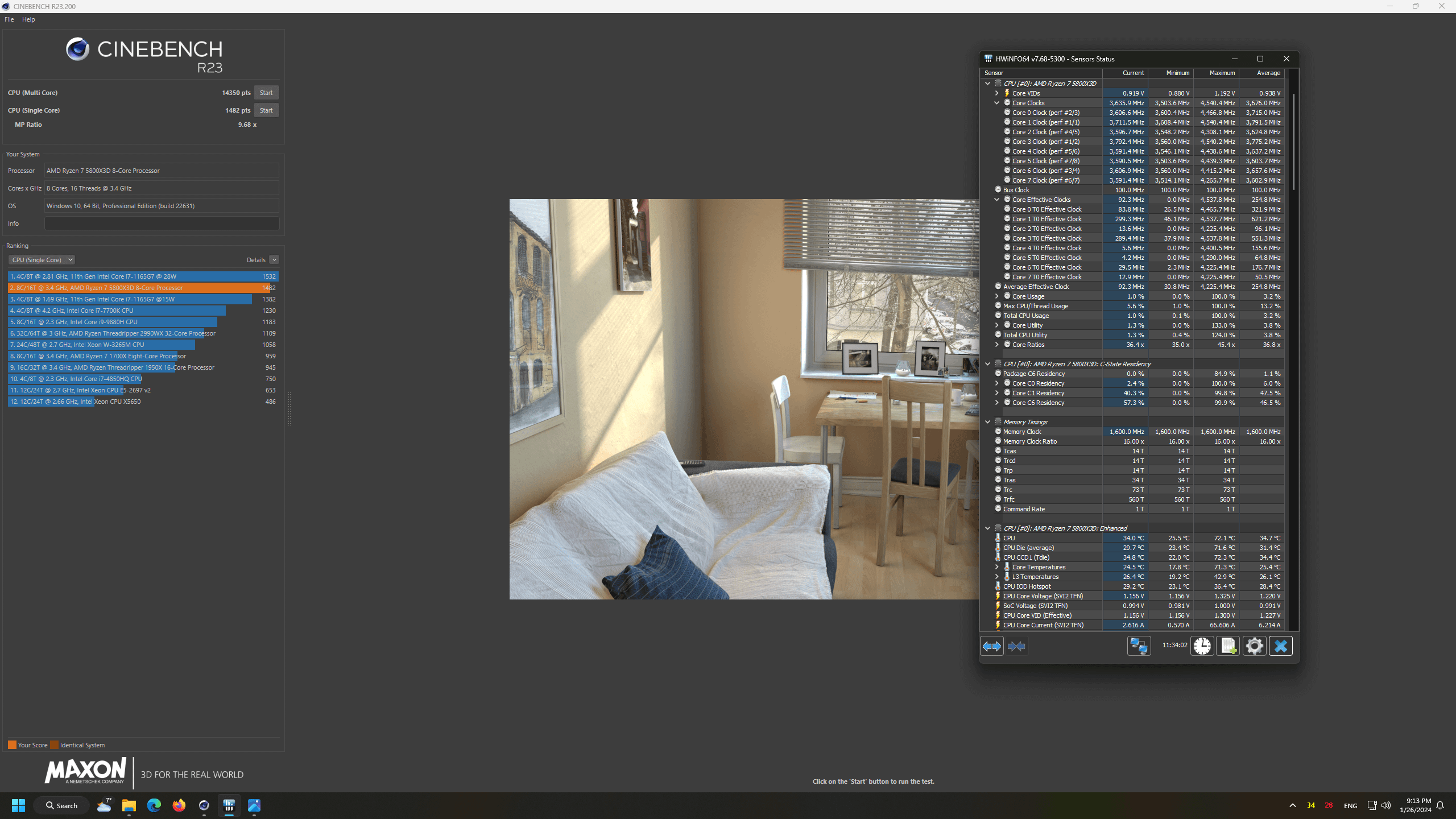
I use windows 11 latest edition and no 10 as the cinebench23 says…
also i have a freezer 34 esports duo with mx-6 thermal paste
on a carbide spec 01 case with 2 bionix p140 intakes and 3 bionix p120 exhaust case fans
rest of the build is
asus b550-A rog strix
Asrock Rx 6950XT PG OC
Coolermaster v850W v2 gold
Gskill 32GB 4×8 3200 Cl14 ram
2x1TB KC3000 Gen 4 ssds (1tb os drive pcie 4×4 and 1tb gaming drive pcie 3.0 x4)
512GB XPG8200 pro (on a m2 to pcie x1 adapter)
and 2x6tb toshiba hard drives.
after a small research on google i think i have good enough scores.
and after some comparison with the scores my old r7 5700x
any advice for the bios settings or windows settings for a r7 5800x3d?
IrvinDgl
hm not sure about 5800x3d but mine 5800x doing arround 16100/16200 and single core 1600+ with 4750 effec clocks and 5050mhz single core boost. But with 200mhz+ boost and tuned CO per core and with 3800mhz OC ram with tuned timings.
Whats your temps? Best u can do is CO tune per core to lower temps and find sweet spot for your cpu. Curve Optimizer try youtune there is tutorial what it is to understand the basic. But its long process sometimes can take 2-3days but i heard the x3d cpu are more stable with CO.
Also u can push your ram to 3600 which is best for ryzen. But OC ram and timings will take 1-2 weeks and can be frustrating 😀
Best idea do the Curver Optimizer first for CPU. And then join discord and ask plenty of people will help and its faster communicate with
AMD-Bad-IntelGood
this is how they score, they are kinda like if amd took a 9900k from 2018, slapped a layer of cache on top and called it a 5800x3d

3 Comments
I use windows 11 latest edition and no 10 as the cinebench23 says…
also i have a freezer 34 esports duo with mx-6 thermal paste
on a carbide spec 01 case with 2 bionix p140 intakes and 3 bionix p120 exhaust case fans
rest of the build is
asus b550-A rog strix
Asrock Rx 6950XT PG OC
Coolermaster v850W v2 gold
Gskill 32GB 4×8 3200 Cl14 ram
2x1TB KC3000 Gen 4 ssds (1tb os drive pcie 4×4 and 1tb gaming drive pcie 3.0 x4)
512GB XPG8200 pro (on a m2 to pcie x1 adapter)
and 2x6tb toshiba hard drives.
after a small research on google i think i have good enough scores.
and after some comparison with the scores my old r7 5700x
any advice for the bios settings or windows settings for a r7 5800x3d?
hm not sure about 5800x3d but mine 5800x doing arround 16100/16200 and single core 1600+ with 4750 effec clocks and 5050mhz single core boost. But with 200mhz+ boost and tuned CO per core and with 3800mhz OC ram with tuned timings.
Whats your temps? Best u can do is CO tune per core to lower temps and find sweet spot for your cpu. Curve Optimizer try youtune there is tutorial what it is to understand the basic. But its long process sometimes can take 2-3days but i heard the x3d cpu are more stable with CO.
Also u can push your ram to 3600 which is best for ryzen. But OC ram and timings will take 1-2 weeks and can be frustrating 😀
Best idea do the Curver Optimizer first for CPU. And then join discord and ask plenty of people will help and its faster communicate with
this is how they score, they are kinda like if amd took a 9900k from 2018, slapped a layer of cache on top and called it a 5800x3d