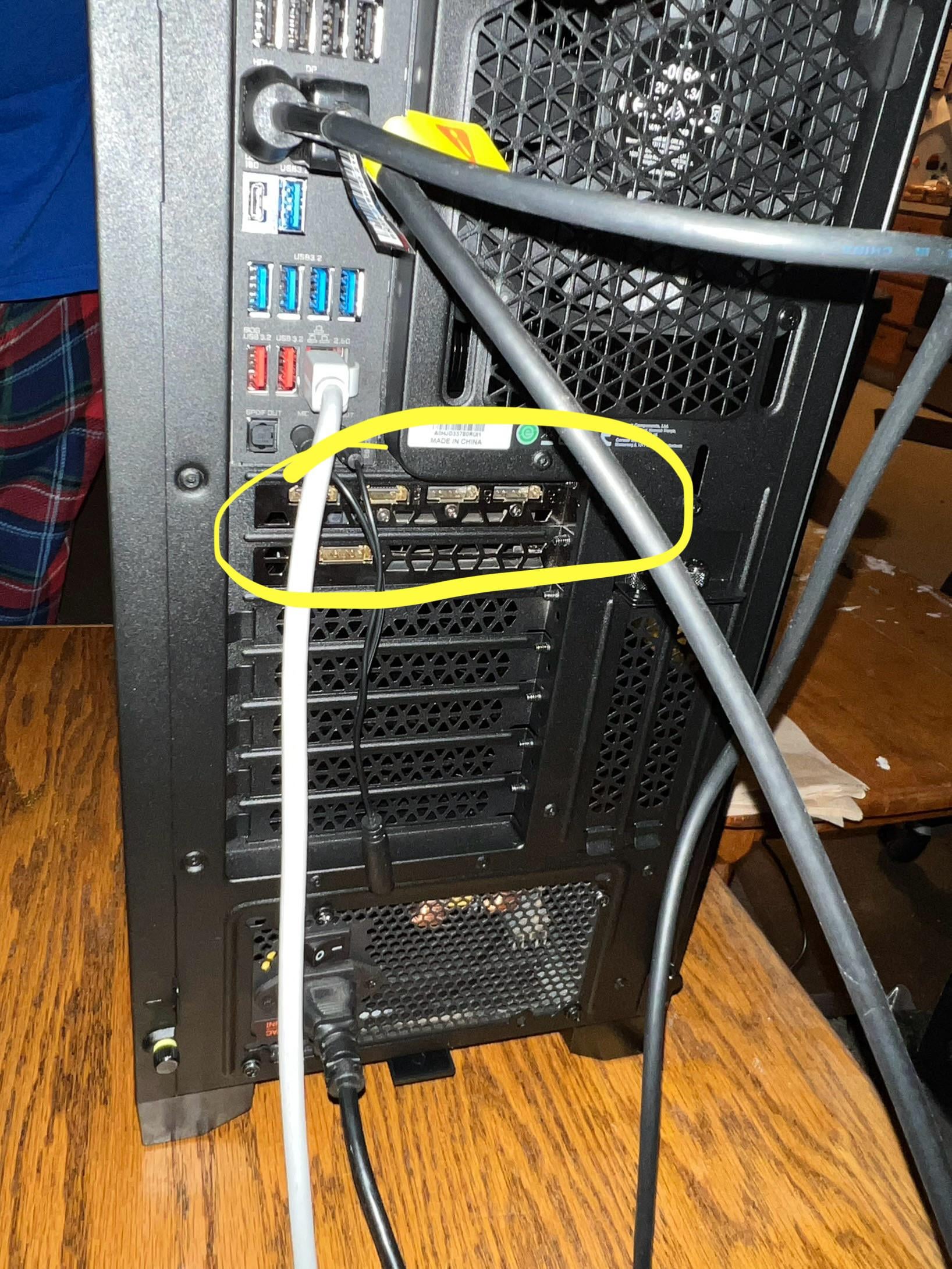
My son got a new computer built recently. Am I tripping or should his monitor be plugged into the yellow area instead of the top left spot? Isn’t that the graphics card?

My son got a new computer built recently. Am I tripping or should his monitor be plugged into the yellow area instead of the top left spot? Isn’t that the graphics card?
39 Comments
Yes it should be. The motherboard port uses the integrated graphics in the cpu.
You are correct
Yes but don’t say anything. When he complains about needing an upgrade it’s going to be free.
https://preview.redd.it/w29kpgp7jtec1.jpeg?width=890&format=pjpg&auto=webp&s=7c8c8543ae85f863c632adc40472883f5815d6d4
Yeah
Good dad. Yeah just change it over night and prepare for surprise. Make sure you install driver’s from the respected company’s website. Unless the shop did it I doubt they have been installed
Thanks for the replies everyone. His text response when I told him about this post was “oh lol”.
YES! That way is only using the IGPU on the CPU
Classic.
well he`s been using the IGPU of the CPU then
Love how BOTH monitors are connected to the integrated graphics instead of the GPU.
Lol yes
Lol your son needs to sell that and get a PlayStation
Shhhh. Let him suffer with low fps first. Lol.
Nope not tripping. You are correct, monitor is plugged into the wrong connections.
GPU unless you have a apu
Yes.
Tell him he needs to cut the lawn and do some cleaning/chores for a month, and you’ll ‘upgrade’ his PC 😀
you are correct
i love how hes been having fun with integrated graphics lol
And looking at the GPU it supports multiple displays. So if he saves up for another he can have chat, walk through sites, discord etc on the second display.
I cannot get into BIOS on my Asus B650E motherboard unless I plug into the integrated. I assume this will be fixed in the future.
And of course I forget to put it back, until something very nVidia-unlike happens.
Yeah, is it too late to abort your son?
Some motherboards allow GPU signal to pass through to the mobo hdmi plug. So he could be fine.
You aren’t trippin these video cables go into the video card
Yes, that’s the graphics card circled in yellow. The monitor is currently plugged into the motherboard which uses an integrated gpu; at best it’s a very basic graphics engine nowhere near as powerful as the standalone graphics card. Plug the monitor into the graphics card for optimal performance.
Ding ding ding chicken dinner winner. Plug that monitor in to that GPU!!!!
Absolutely correct
Does not matter much. The mobo graphics out are redirected to the GPU anyways, when one is present in the system.
I’m gonna have to plug into one of those at some point for my little brother’s setup… But I need to get the drivers installed first.
Got to learn somehow.
Both, you’re tripping and it needs to be plugged in the yellow area
Ah yess the rookie mistake
You are in fact NOT tripping.
It should be in the top left DisplayPort port
Yes it really should, he’s not using his graphics card…
Holy moly this is hilarious because I was doing the same thing for months! I was wondering why I was capped at 119.297 Hz on a 144 Hz monitor 😂
I just want to take a moment to comment that it took way too long to realize you had circled that area and that it was not a rubber band.
Also yeah, you CAN run it through mobo ports and still use the GPU for processing, but its not ideal and some games will not work with it like that. I would just plug it into the lower slot for him.
Given how often this comes up it’s crazy that Windows doesn’t alert the user they have a graphics card plugged in with no monitor attached to it.