100% chance if you rub the plastic wrappers on your hair
WeakDiaphragm
Why not detach the motherboard and wrap it up separately, place it in a box, wrap that box, and then put it in the case, then wrap the case.
Smackdaddy122
no but the static will kill it
Weekly_Will_435
Maybe screw it in then use bubblewraps/styrofoam or newspapers to fully stuff the empty spaces of the chassis especially if thers’s gpu in it. Oh and make sure to cover the cpu socket especially those with protruding pins.
David0ne86
Honestly i wouldn’t even bother UNLESS you are gonna place some other components inside the case (which i’d highly advise against to begin with but hey, you do you). I never had issues with motherboards during shipping UNLESS a gpu was on the pci ex slot (i never did but i’ve seen so many horror stories).
The only thing i would take out would be an aio/cpu cooler and the gpu. Ram and nvme i would leave on em, they’re not impactful.
As i said the ones you’d want to remove and ship into a separate box are the gpu and the cpu cooler.
_j03_
Eh, why are you wrapping mobo inside a case? It’s not like something would hit inside there.
Pinsir929
If all possible get the anti static bag the motherboard came in (assuming you built it from scratch.) and then you put the plastic wrap. Back in the box and then bubble wrap the box works even better.
Trapper1111111
They make bubble wrap for electronics ya know.
Ill-Drawer-1953
unnecessary. just wrap the box instead. just send your gpu separately
PixelCortex
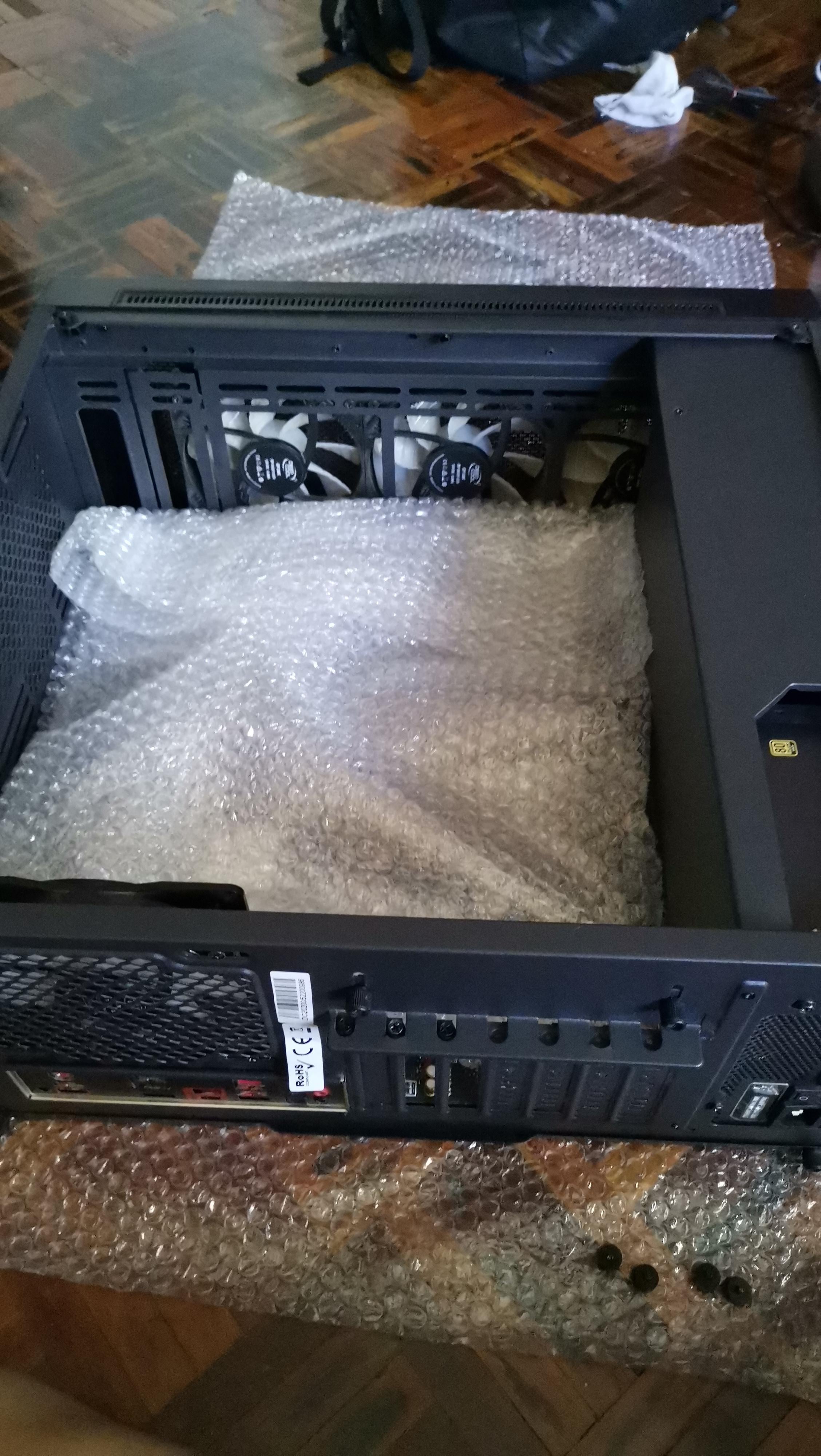
It’s not necessary to put bubble wrap inside your case, it’s not going to protect anything and will only introduce the possibility of static.
There’s no GPU and it looks like you are using a standard CPU cooler, theses are normally the 2 things you want to limit the movement of.
jon8855
Don’t use that. Go to Amazon and purchase a inflatable packing foam bag or whatever they are called.
You break the capsule in the bag starting a reaction then you shove it in case and put panel on fast. It’ll blow up and keep everything from moving. Obviously don’t have the gpu in, ship that in its original box.
ksn0vaN7
Get the gpu and cpu cooler out. Tie any loose wires to the case. Put the pc in the box and surround it with soft foam. Wrap the box with bubble wrap.
SysGh_st
Static buildup on regular bubble wrap as it is handled can damage electronics.
I’d say you’re really gambling it here.
It might survive just fine.
It might get damaged so much so the PC won’t boot .
Most likely the PC will boot fine at first. But as minor ESD damages slowly deteriorate you are going to have random problems that slowly start to show as time goes on.
danya_dyrkin
Static charge kinda discharges itself when it touches a conduit. Your wrap touched the case and motherboard constantly, so it should be unable to accumulate any charge.
AlkalineBrush20
If it’s not a tower cooler in there, it’s unnecessary. I’ve shipped a couple of machines, all I did was remove the GPU and the cooler if it was big, all arrived just fine. Just make sure the screws are tight all around so no drives, fans, PSU or the mobo comes loose.
GalwayBogger

Recipe-Jaded
not very likely with modern electronics. is it possible? sure, but as long as you aren’t shipping it with loose, charged capacitors and steel wool, it’ll be okay.
IBringTheHeat1
Hey buddy, if you’re not comfortable tossing the box with the pc onto the ground about 3-4 feet in front of you then it’s not wrapped enough. Also stand on top of it, it’s probably gonna end up on the bottom of a trailer with 8 feet of packages on top of it.
SwagChemist
I separated and placed all my parts in my carryon when I traveled over seas. I had to buy a new cheap case and a monitor but it worked. The only part I put in my backpack is the gpu since it’s expensive and easily stolen.
PowerPie5000
Looking at this fills my eyeballs with static.
NomadicWorldCitizen
I shipped two computers in a container from the west coast of the US to Switzerland (via a port in Germany or the Netherlands).
One of them (Fractal node 804) with a bit Noctua CPU cooler. Documentation suggested removing the cooler which I did. The case was in the original box with styrofoam padding (like when I bought it). One PCIe NVME card I left in and 4 HDDs.
The other one (Lian Li O11D XL), removed the GPU, put in original box.
After plugging in what I removed, they both worked perfectly on the first go. I was told by the moving company that some stuff inside the container could be damaged because sometimes they’re treated roughly (or even drop them).
Hope this helps you make the best decision for your use case.
RhetoricalReaper
Is the board covered in antistatic before the bubble wrap?
I’d be afraid of zapping the board with bubble wrap.
SquirrelBlind
When I was leaving Russia, I disassembled my PC. The empty body I left at home, CPU, GPU and SSD/HDD I took with me in backpack to cabin, and the rest of the machine, motherboard included, I put into luggage. This luggage flew with me from Moscow to Yerevan, and from Yerevan to Frankfurt and Munich. On the flight from Yerevan the suitcase with the motherboard was lost and was missing for three weeks. Then it was delivered to my hotel by Lufthansa. When I finally assembled the PC (more than half a year later) everything was working just fine.
travelavatar
It wouldn’t. I had my PC shipped all across europe with bubble wrap and other things inside of it. No damage.
I didn’t have GPU or cpu cooler installed. I transported my ryzen 3900X in the pocket of my jacket by plane haha. Didn’t trust to leave it with the courier
__SpeedRacer__
I don’t think static will be a problem as the motherboard is installed and thus grounded to the case.
donkingdonut
No, not really. Just don’t forget to take the bubble wrap off before plugging the computer on
Spaghetti_meatbaIIz
Hopefully
frag_grumpy
Remove the mobo, wrap it and put it wrapped inside the case. Then add more packaging material to avoid it moving around.
If you keep it screwed to the case it will get stretched if the case impacts on something and twist even slightly.

30 Comments
zero. it is the discharge that kills things.
i doubt that will generate static charge anyway.
Lazy way but go ahead..
100% chance if you rub the plastic wrappers on your hair
Why not detach the motherboard and wrap it up separately, place it in a box, wrap that box, and then put it in the case, then wrap the case.
no but the static will kill it
Maybe screw it in then use bubblewraps/styrofoam or newspapers to fully stuff the empty spaces of the chassis especially if thers’s gpu in it. Oh and make sure to cover the cpu socket especially those with protruding pins.
Honestly i wouldn’t even bother UNLESS you are gonna place some other components inside the case (which i’d highly advise against to begin with but hey, you do you). I never had issues with motherboards during shipping UNLESS a gpu was on the pci ex slot (i never did but i’ve seen so many horror stories).
The only thing i would take out would be an aio/cpu cooler and the gpu. Ram and nvme i would leave on em, they’re not impactful.
As i said the ones you’d want to remove and ship into a separate box are the gpu and the cpu cooler.
Eh, why are you wrapping mobo inside a case? It’s not like something would hit inside there.
If all possible get the anti static bag the motherboard came in (assuming you built it from scratch.) and then you put the plastic wrap. Back in the box and then bubble wrap the box works even better.
They make bubble wrap for electronics ya know.
unnecessary. just wrap the box instead. just send your gpu separately
It’s not necessary to put bubble wrap inside your case, it’s not going to protect anything and will only introduce the possibility of static.
There’s no GPU and it looks like you are using a standard CPU cooler, theses are normally the 2 things you want to limit the movement of.
Don’t use that. Go to Amazon and purchase a inflatable packing foam bag or whatever they are called.
You break the capsule in the bag starting a reaction then you shove it in case and put panel on fast. It’ll blow up and keep everything from moving. Obviously don’t have the gpu in, ship that in its original box.
Get the gpu and cpu cooler out. Tie any loose wires to the case. Put the pc in the box and surround it with soft foam. Wrap the box with bubble wrap.
Static buildup on regular bubble wrap as it is handled can damage electronics.
I’d say you’re really gambling it here.
It might survive just fine.
It might get damaged so much so the PC won’t boot .
Most likely the PC will boot fine at first. But as minor ESD damages slowly deteriorate you are going to have random problems that slowly start to show as time goes on.
Static charge kinda discharges itself when it touches a conduit. Your wrap touched the case and motherboard constantly, so it should be unable to accumulate any charge.
If it’s not a tower cooler in there, it’s unnecessary. I’ve shipped a couple of machines, all I did was remove the GPU and the cooler if it was big, all arrived just fine. Just make sure the screws are tight all around so no drives, fans, PSU or the mobo comes loose.

not very likely with modern electronics. is it possible? sure, but as long as you aren’t shipping it with loose, charged capacitors and steel wool, it’ll be okay.
Hey buddy, if you’re not comfortable tossing the box with the pc onto the ground about 3-4 feet in front of you then it’s not wrapped enough. Also stand on top of it, it’s probably gonna end up on the bottom of a trailer with 8 feet of packages on top of it.
I separated and placed all my parts in my carryon when I traveled over seas. I had to buy a new cheap case and a monitor but it worked. The only part I put in my backpack is the gpu since it’s expensive and easily stolen.
Looking at this fills my eyeballs with static.
I shipped two computers in a container from the west coast of the US to Switzerland (via a port in Germany or the Netherlands).
One of them (Fractal node 804) with a bit Noctua CPU cooler. Documentation suggested removing the cooler which I did. The case was in the original box with styrofoam padding (like when I bought it). One PCIe NVME card I left in and 4 HDDs.
The other one (Lian Li O11D XL), removed the GPU, put in original box.
After plugging in what I removed, they both worked perfectly on the first go. I was told by the moving company that some stuff inside the container could be damaged because sometimes they’re treated roughly (or even drop them).
Hope this helps you make the best decision for your use case.
Is the board covered in antistatic before the bubble wrap?
I’d be afraid of zapping the board with bubble wrap.
When I was leaving Russia, I disassembled my PC. The empty body I left at home, CPU, GPU and SSD/HDD I took with me in backpack to cabin, and the rest of the machine, motherboard included, I put into luggage. This luggage flew with me from Moscow to Yerevan, and from Yerevan to Frankfurt and Munich. On the flight from Yerevan the suitcase with the motherboard was lost and was missing for three weeks. Then it was delivered to my hotel by Lufthansa. When I finally assembled the PC (more than half a year later) everything was working just fine.
It wouldn’t. I had my PC shipped all across europe with bubble wrap and other things inside of it. No damage.
I didn’t have GPU or cpu cooler installed. I transported my ryzen 3900X in the pocket of my jacket by plane haha. Didn’t trust to leave it with the courier
I don’t think static will be a problem as the motherboard is installed and thus grounded to the case.
No, not really. Just don’t forget to take the bubble wrap off before plugging the computer on
Hopefully
Remove the mobo, wrap it and put it wrapped inside the case. Then add more packaging material to avoid it moving around.
If you keep it screwed to the case it will get stretched if the case impacts on something and twist even slightly.