What game is it? Also it’s entirely possible it’s a single threaded application, or is very limited with how many CPU cores it can use, and is using 100% of 1 or 2 cores.
AAKphoenix
What’s your CPU?
resetallthethings
overwatch won’t play beyond refresh rate of the monitor unless it’s in fullscreen rather then windowed/borderless windowed
other games might be similar I’m sure
CharlesEverettDekker
The game is probably not optimized, that’s it. Look at teach core/thread of your CPU and see how many of them are used to the brim and which ones are barely touched. If you see this – it’s 99% of the times that the game just doesn’t use all of your your cores/threads and you can do nothing about it.
FS22Reddit2024
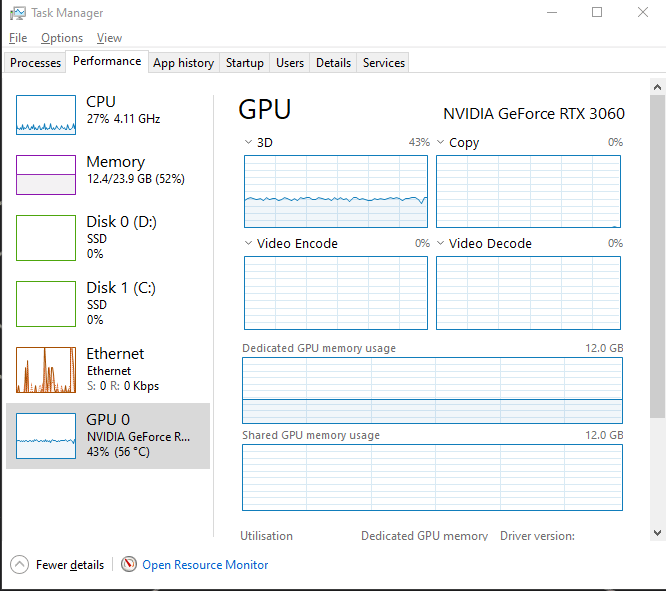
My advice: stop looking at your task manager. You have a 4.11Ghz CPU, an RTX 3060, 24 Gigs of ram and SSD’s.
You should be able to run all your games just fine and like others said; could be bad optimization, not using all cores etc.
Dremy77
you’re single thread limited on the cpu. the cpu isn’t showing as maxed out because the game wasn’t designed to use all those cores.
TheeProdigalDaughter
It’s not all about your hardware, you can also be limited by the games engine.
A_Person77778
Task Manager isn’t that good at reporting GPU usage, and since you said it was on Minecraft, that’s sort of normal behavior for that game
tjorben123
vsync is on i guess
A4K0SAN
not having high cpu and gpu usage isn’t always an issue keep that in mind
EightSeven69
unoptimized app.
check a program that tells you per-core usage of the CPU and you’ll likely see one core being used more than the others at any one point (it will swap around between cores though)
often times, apps need one main core and the other cores are only barely used. It’s pretty common. Nothing you can do about it…besides buying a processor with one big core and smaller, less performant cores that doesn’t yet exist in the mainstream market
No_Interaction_4925
24GB is a strange amount of RAM. Do you have an odd number of sticks in your pc?
LenoVW_Nut
If you are single thread limited, see if you can get down to 4 cores and overclock them (Use windows msconfig or Process Lasso or something). (Ideally move to a 12100F, it is a beast for 1-6 threaded apps, but if you like switching to 5600 or one of the X3D chips is an upgrade too).
SoupAEthan
Use a mod called NVIDIUM, works with NVIDIA cards.
HighwayMcGee
“Help my PC runs fine and isn’t bottlenecking and breaking down”
42Porter
If u don’t have a significant bottleneck it could just be a poorly optimised game or one that was optimised for older machines. Some source engine games will max out at like 300-500fps with about 20% CPU usage and 30% GPU on an even halfway decent modern build.
Twenmod
Ok ignore the others i have the true solution It’s easy.
Just quickly recode Minecraft from the ground up and make sure to correctly use multi threading to its max
Then just run your program and enjoy the full extend of your PC’s power.
Lolle9999
Ah yes the classic overall cpu usage
UnsettllingDwarf
Bro same. My gpu sometimes just goes down in usage for no reason. No cpu bottleneck.
Brainl3ss
I have the same problem with Tarkov. Nothing is maxed out, not even single cores. Couldn’t figure it out.
Brainl3ss
I have the same problem with Tarkov. Nothing is maxed out, not even single cores. Couldn’t figure it out.
TrophyMaster21
Try to use sodium and use that with the shaders thing thats not optifine. That’s what I used to do

23 Comments
What game is it? Also it’s entirely possible it’s a single threaded application, or is very limited with how many CPU cores it can use, and is using 100% of 1 or 2 cores.
What’s your CPU?
overwatch won’t play beyond refresh rate of the monitor unless it’s in fullscreen rather then windowed/borderless windowed
other games might be similar I’m sure
The game is probably not optimized, that’s it. Look at teach core/thread of your CPU and see how many of them are used to the brim and which ones are barely touched. If you see this – it’s 99% of the times that the game just doesn’t use all of your your cores/threads and you can do nothing about it.
My advice: stop looking at your task manager. You have a 4.11Ghz CPU, an RTX 3060, 24 Gigs of ram and SSD’s.
You should be able to run all your games just fine and like others said; could be bad optimization, not using all cores etc.
you’re single thread limited on the cpu. the cpu isn’t showing as maxed out because the game wasn’t designed to use all those cores.
It’s not all about your hardware, you can also be limited by the games engine.
Task Manager isn’t that good at reporting GPU usage, and since you said it was on Minecraft, that’s sort of normal behavior for that game
vsync is on i guess
not having high cpu and gpu usage isn’t always an issue keep that in mind
unoptimized app.
check a program that tells you per-core usage of the CPU and you’ll likely see one core being used more than the others at any one point (it will swap around between cores though)
often times, apps need one main core and the other cores are only barely used. It’s pretty common. Nothing you can do about it…besides buying a processor with one big core and smaller, less performant cores that doesn’t yet exist in the mainstream market
24GB is a strange amount of RAM. Do you have an odd number of sticks in your pc?
If you are single thread limited, see if you can get down to 4 cores and overclock them (Use windows msconfig or Process Lasso or something). (Ideally move to a 12100F, it is a beast for 1-6 threaded apps, but if you like switching to 5600 or one of the X3D chips is an upgrade too).
Use a mod called NVIDIUM, works with NVIDIA cards.
“Help my PC runs fine and isn’t bottlenecking and breaking down”
If u don’t have a significant bottleneck it could just be a poorly optimised game or one that was optimised for older machines. Some source engine games will max out at like 300-500fps with about 20% CPU usage and 30% GPU on an even halfway decent modern build.
Ok ignore the others i have the true solution It’s easy.
Just quickly recode Minecraft from the ground up and make sure to correctly use multi threading to its max
Then just run your program and enjoy the full extend of your PC’s power.
Ah yes the classic overall cpu usage
Bro same. My gpu sometimes just goes down in usage for no reason. No cpu bottleneck.
I have the same problem with Tarkov. Nothing is maxed out, not even single cores. Couldn’t figure it out.
I have the same problem with Tarkov. Nothing is maxed out, not even single cores. Couldn’t figure it out.
Try to use sodium and use that with the shaders thing thats not optifine. That’s what I used to do
Make sure vsync is off