
Hi all,
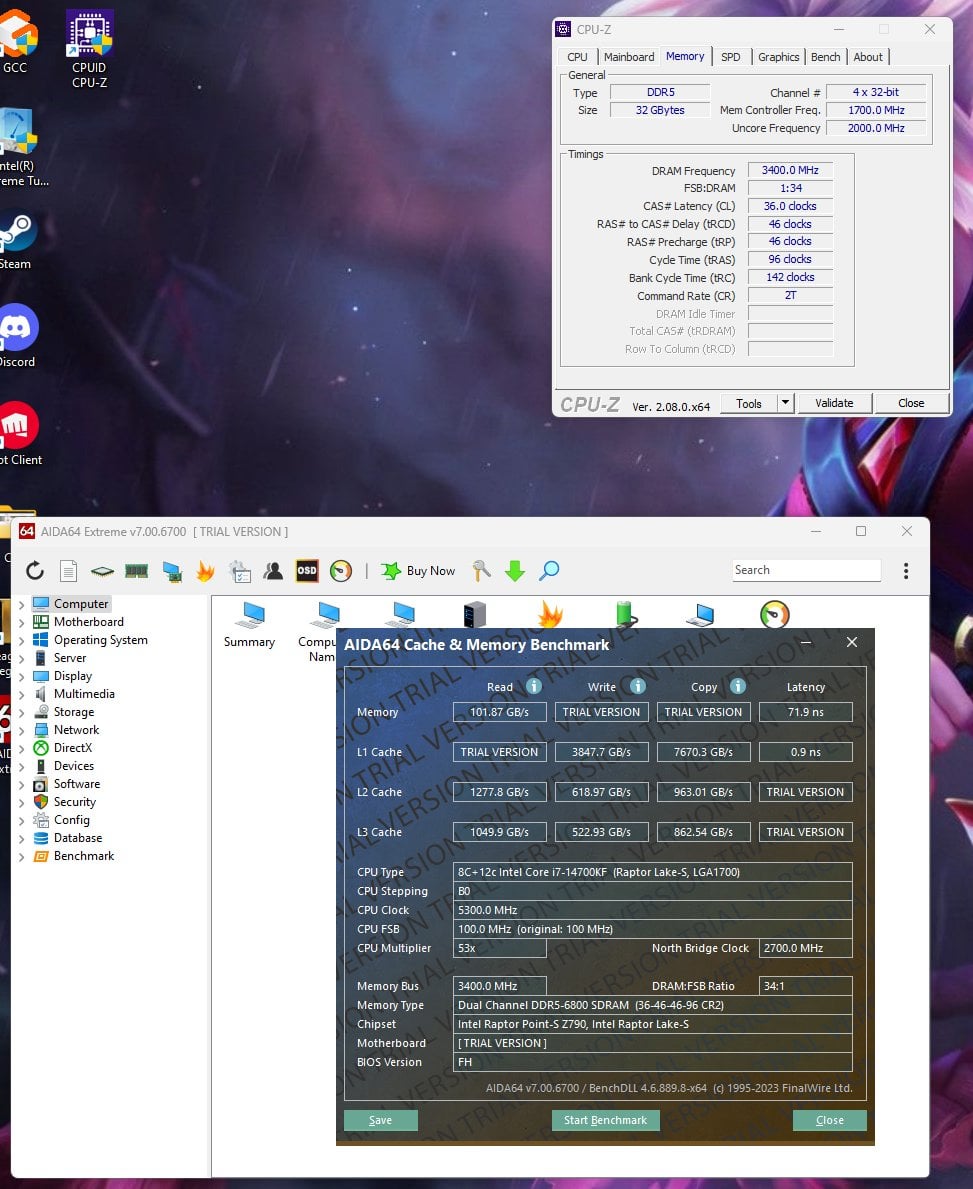
Recently built this PC and I am unable to get the RAM to pass stress tests above 6800Mhz. My kit can reach 7200mhz XMP (supposedly) and from reading the forum this should be very doable on the i7 14 series.
I’m currently running it at 7200mhz XMP settings but manually set to 6800mhz – It is stable for the most part. The latency though is abysmal and I probably should’ve done more research before purchasing. Which is why I’m hoping on reaching 7200mhz to lower it a bit.
My guess is the RAM is the problem but would like your opinion if I’ve just lost the IMC lottery or my MOBO is not capable? Unfortunately, I do not have spare parts to test anything and cannot return anything. At 7000mhz OCCT gives gives me ‘CPU errors’ and Memtest86 also more errors.
Do you know if not reaching XMP settings is grounds for RMA when the RAM works completely stock.
[Images – Tests and timings](https://imgur.com/a/5lgB4xT)
**Parts list:**
* **CPU -** Intel Core i7 14700KF
* **MOBO -** Gigabyte Z790 AORUS ELITE AX LGA 1700 ATX Motherboard v1.1
* **Memory -** Thermaltake TOUGHRAM XG RGB D5 32GB (2x16GB) DDR5 7200MT/s C36 Memory
* **PSU -** Corsair RMx SHIFT Series RM850x Power Supply
* **GPU** \- 1660 Super (I know it’s old – I’m waiting for the supposed 4070 Super Ti)
* **SSD -** Kingston FURY Renegade 2TB M.2 NVMe PCIe Gen4 SSD
* **OS -** Microsoft Windows 11 Home 64-Bit
Appreciate any help!
​
2 Comments
Doubt it’s the RAM if 6800 MT/s is fine. Using a 4 DIMM motherboard is a big limitation beyond 7000/7200 MT/s or so. The vast majority of IMCs on 14th gen should be able to handle up to 7200 MT/s without any issues unless you just have an unlucky chip, and assuming your motherboard can handle it.
Try tweaking these voltage slightly up and down. Most CPU / motherboard combos need a sweet spot of voltages to get stable at higher RAM frequency, especially when using a motherboard with 4 DIMM slots. Even after tweaking, there’s still a large chance you’ll never get 7200 MT/s stable with that motherboard.
– CPU VDD2: 1.4v
– CPU VDDQ: 1.4v
– VCCSA: 1.2v
I used to have the exact same Mobo but when I “side” upgraded to the Z790 Aorus Elite X Wifi 7 it was a game changer. The mobo is your limitation here. I could barely get 7000MT/s stable on it. Gigabyte thickened the mobo and drilled the memory lanes differently (I dont have a clue on the technicalities of it) on the X series of the Elite mobo’s and that made things more compatible with higher speed ram.