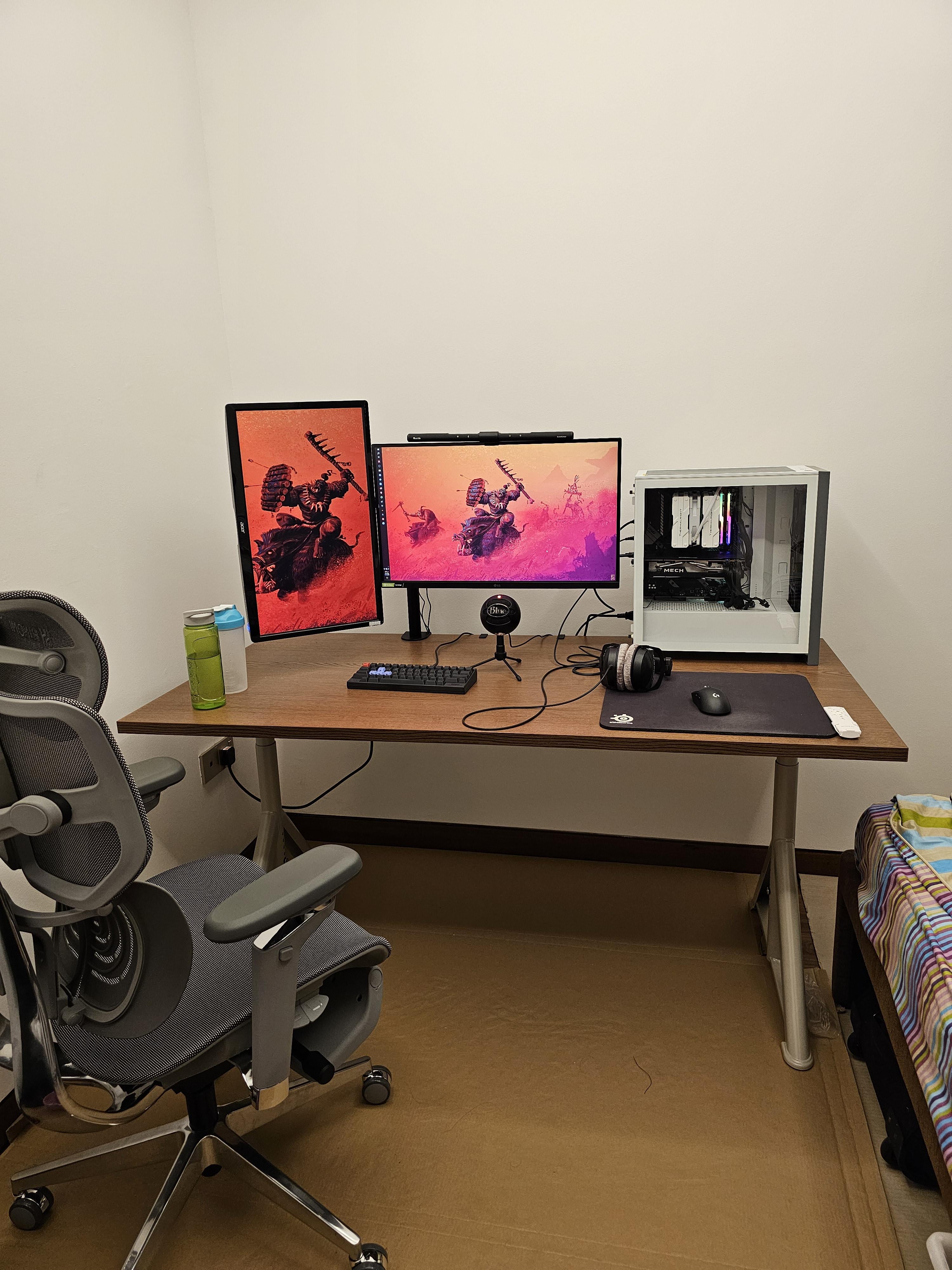
never had a room to myself before until now, would like some tips on how to make my desk abit more lively
by Shawnehh

never had a room to myself before until now, would like some tips on how to make my desk abit more lively
by Shawnehh
35 Comments
Don’t let anyone tell you it’s bad, if it’s first time, ur gonna be an interior designer cuz DAAAMN
Tender love and care and occasional clean ups. That’s all I got
Maybe some artwork on the wall?
This is really nice for your first time! You can add fake plants from IKEA. It’ll add some color and liven up the place, plus make it more cozy. In addition, you can hang up some artwork you like on the wall to express yourself more
Trust me, personally I wish a desk and setup it looks fantastic
So happy for you and wish you all happiness and good luck❤
Some greenery, maybe succulents should do the trick. Also cable management.
Side note: on your monitor? Eye tracking?
What kind of chair are you using?
Yea
Wow… What an absolute beast of chair do you have there.
Is it good? I mean, do you have kind of back pain?
Can you tell me his name? I dont think I will be able to buy it but…
looks awesome! you don’t need to change a thing, but here are some ideas if you want to.
rotate your pc case so the cables hang out the back, this should give you more space horizontally on the desk (if you need it).
coasters so you don’t get water marks on your desk surface, those beverage look a little condensatiated (not a word but you know what i mean).
your keyboard is small but you might still like trying a large keyboard/mouse mat (here is a cheaper one with multiple size options: [https://www.amazon.com/dp/B0788LMLZL/ref=twister_B0C6STHF2J?_encoding=UTF8&psc=1](https://www.amazon.com/dp/B0788LMLZL/ref=twister_B0C6STHF2J?_encoding=UTF8&psc=1))
and like others said, wall art can’t hurt anything! if you keep your monitor setup in this style i would maybe opt for a 16:9 or 21:9 piece of art above the monitors on the wall or a clock or photographs or something.
DA WAAAAAGH
take it slow /s
Put the PC behind the vertical monitor and scoot everything over a few inches to the right. Cable wraps and a cable tray under the desk. Good to go.
Whatever is most comfortable for you. If it were my setup I’d probably rotate the computer to help hide the cables. I’d probably also route the headphone cable underneath of the desk and just get cable organizers or even tape to keep the cable stuck to the bottom of the desk. Maybe a headphone stand to keep them somewhere when not in use. I’d probably try to do something to tidy up the keyboard and mic cables too, but it’s really not that bad. I can always appreciate a nice, simple setup. Not every setup needs to have a bunch of RGB and a ton of stuff all over the desk. Just all depends on the setup and the persons preferences.
Just a tip, if you get a bigger mouse pad and lower your DPI you will reduce wrist fatigue it saved me after moving out of my parents and having wrist issues at a young age turned out it was my tiny mouse pad and 3k dpi lol (and you will be better at fps games)
You can get a cheap mouse mat on Amazon. That would look a lot cleaner and be more comfortable for your desk. Replace the tiny mouse pad for a big mouse mat
Are those DT 990s plugged right into the motherboard? Get a DAC.
That a DT770?
Looks good overall! Only thing I’d say, because I love cable management, is maybe buy a pack of cable sleeves to wrap the wires coming off the mobo/gpu. On the desk or the wall, maybe a couple funkos/a poster of your favorite media (game, movie, shows, whatever!).
I would get a plastic cover for the floor instead of the cardboard. For lights I can recommend Govee, glide hexa light panels paired with their ai gaming sync box
Don’t upgrade every year and only purchase what you can afford.
Are you using any amplifier for the headphones?
I mean some light above the setup on the wall? like NanoLeafs or that type of stuff?
If you wanted you could do some sort of wallpaper that spanned both monitors instead of mirroring the same image twice.
first off I love the setup! i think you should put it some ambient lighting in the background instead of having a single light. it’ll create a foundation for other accessories!
Just a suggestion. Cable management can be better. For example, the headphone cable can be routed from under the desk. Just use some cable management clips to hold the cable under the desk so that they’re not dangling. And you can use some Velcro straps to tie the cables under the monitor to the monitor arm and also tie the keyboard and mic cables together to make it look more cleaner. Apart from that, I don’t want to suggest any things that will require you to spend a lot of money.
Use condoms
The cardboard mat is OP
Use a condom
PC on the left closer to your power outlet wall, angle to hide cables, large mouse pad thats centered on your desk and under your keyboard. Wall art. Single fake plant.
Nice! Thats also a way to put the case on the desk btw. Might try it
I know people find different things comfortable, but how the hell do you play games with your mousepad that far away?
Better cable management makes a huge difference.
Quality over quantity.
Get a leg shelf or floor roller your computer. Besides the pic you just took there’s no practical reason for a pc tower to be taking up space on the desk.
And start enjoying buying art. Start smal, develop an aesthetic. You don’t need to stick the “the script” we see too much around here of everyone having the same knick-knacks and tchotchkes.