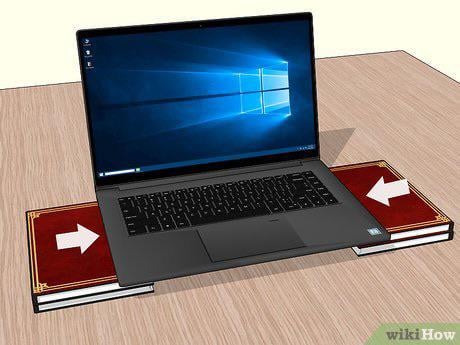
Not dumb. It’s a good idea to allow cooler air to flow under the laptop.
Some people use chill mats that are essentially laptop stands with holes to elevate the laptop and let cool air cycle through.
X-29488
If it looks dumb, but works. I think it’s a win.
Mad_Arson
I used 4 water bottle caps you know the plastic ones to lift it up these 2 cm, before i bought actuall cooling pad.
Kulaoudo
Good idea but did you really create a 3D render to explain that idea ?
rfmocan
Good idea. They sell stands, which have the additional benefit of reducing the footprint and bringing the screen up, closer to your eye line.
But books would work in a pinch.
RainbowFTW
It’s not dumb if it works, I used 4 Lego pieces to lift mine up.
MrVernon09
Cooler Master, among others, sells laptop cooling stands. I have one for my laptop that includes a single 160mm fan, two feet to elevate the stand. It is USB powered and has a pass through so that you don’t completely lose that USB port. I have had no issues with my laptop overheating.
Secure_Serve_6415
the only reason, my laptop didnt melt yet, is one of those DJ laptop stands.
this is what i do!
i have 2 books at the back of my laptop that angle it upwards
from my experience it does help with temperatures
then i have a wrist rest so my wrists don’t get sliced open by my laptop (it has a stupidly sharp edge, made out of metal)
Anotherthrowawayboye
Cooler master u2 and u3 coolers have changed the game for me
The trick is to buy u3 replacment fans and buy a u2 cooling stand so you csn get 3 adjustable fans cheaper than a standard U3
TheRealSmolt
I used to play Factorio on a really old laptop, and I found that if I lifted it off the desk by half an inch I could play with the higher resolution textures without it shutting off from overheating.
RustyDawg37
It’s a bad idea, not because of airflow, but because your laptop will be flexing. This will have bad long term effects. You can buy laptop cooling pads that fully support the laptop. Buy one.
Karekter_Nem
Realistically you only need 1 book along the back.
Yorudesu
It’s great but if you really have heat issues you could buy a plastic pad with extra fans in it to blow even more air
Few_Juice_3755
I cut 2 little pieces off a 2×4 and used that plus a mini desk fan blowing over it
C3ncio
I worked in a laptop specialized repair lab.
elevating your laptop is a good idea and, even if there is not much to gain, for sure it doesn’t hurt. The most important things are:
1- be sure to never use your laptop while on a blanket or anything too soft, the computer will “sink” on it actually blocking the vents that take air. That’s the most common issue that i observed while working there. Tons of integrated graphic cards destroyed because of that.
2- don’t buy/use those station with fans to cool your laptop from below. Problem from them is, the idea is good, but the result is not. The reason is, lots of laptops have temperature sensors very close to the bottom of it. If you put fans under your laptop they will blow cold air to the bottom of it actually cooling the plastic but almost nothing (because of air pressure and small vents) will actually enter inside the laptop and cool it. This will create a problem because what need to be cooled is inside the laptop, it will not be cooled, but temperature sensors will register lower temperatures from the bottom surface and this will increase the probability of a false temperature read that can seriously damage you cpu/gpu or something else.
Mictor_Grossenstein
And this is why I buy apple laptops, never had an issue other than the G4 powermac back in the early 2000’s with overheating.
likeonions
It’s dumb for a laptop to be designed with its intakes on the bottom
Mnoonsnocket
I do it.
Wonderful_Season_360
I used to use 4 dice to hold my laptop up
Huey_P
You could just get a cooling pad. I got mine because I had a gaming laptop at the time and it worked like a charm. Think I paid like 10 bucks for it on Amazon.
newagereject
Nope, when I was on vacation this summer I brought my laptop to play league with my friends when everyone went to bed, I propped up the back with a note book and the Temps dropped a few degrees
coffeejn
Not dumb but you better know where the fans are. Some laptop have one inlet that is near the back left which would be blocked by that book.
Steve490
Pretty sure I saw a Jayztwocents vid recently where he did this with an Alienware laptop and it improved the performance and temp.
K1W1-Elite
You are all ready smarter then most laptop users.
SuperToxin
I’ve done this and had a small desk fan aimed at my laptop on high blowing on it too cool down so I could play BF4 when it came out.
I had a friend use ice trays to elevate his laptop and cool it down. He had enough trays to constantly swap them out.
Tbh this is weak you could be crazier.
thetrainisacoming
I use a plastic rack from the dollar store. Laptop runs cooler for sure. I say do it
Quiet_Desperation_
Doesn’t the this gen of MBP have vents on the sides and the back? Wouldn’t you just be putting the side vents onto the books instead of the table?
SirRonaldBiscuit
If I’m running 3d modeling software on my work laptop I will prop up the back end with a piece of 80/20 (aluminum extrusion) to try and keep the heat down, I will say it works
vargsint
It’s a must. Gaming laptops get so freaking hot. As the temp goes up you eventually get throttled. The fan cooling stands are shit, just get it off the desk and make sure the fans inside are not obstructed. Also check for dust buildup regularly, meaning take the back plate off and clean.
RippingMadAss
Test it with and without the laptop elevated.
If the temperature is cooler with the extra space, then it’s not dumb.
If the temperature is not cooler with the extra space, then it is dumb.
SilverSpoon1463
Literally the point of external fans, it’s to raise your laptop and pull heat away from the bottom. This is doing the same thing without the extra fans, which is already huge.
vertigostereo
I had my PS3 elevated too.
Bangbashbonk
Depends, my work laptop is a MacBook Pro, no vents on the bottom, however it gets hotter than hell, so even air cooling the bottom is better but a heavy aluminium stand would help it not get quite as bollock toasting.
My beloved elitebook from yesteryear has an intake on the bottom but big feet, so not as much difference.
My previous Fujitsu work laptop absolutely required more breathing space for the intake than the feet have it on a desk.
So if it intakes on the bottom, probably good, if it does side to side flow, it’s not as important but may still help – if you imagine the airflow around the entire laptop, it can still be better by not blocking an entire plane of potential air from it.
Qazernion
It’s pretty much a requirement for any laptop these days. If you are running any significant load they can’t cope without ridiculous throttling. I use a cage style adjustable stand from Amazon, not really expensive regardless of where you get them.
dumbasPL
This is why I treat laptops as thin clients. Web browsing and light work are fine, anything more demanding gets offloaded to a powerful server
Sorry_U_R_Wrong
No, this works.
But just get a simple laptop riser with fan built in. I got one for $20 online, and it works great. They plug in to a free USB slot, so they are as mobile as your laptop is.

37 Comments
Not dumb. It’s a good idea to allow cooler air to flow under the laptop.
Some people use chill mats that are essentially laptop stands with holes to elevate the laptop and let cool air cycle through.
If it looks dumb, but works. I think it’s a win.
I used 4 water bottle caps you know the plastic ones to lift it up these 2 cm, before i bought actuall cooling pad.
Good idea but did you really create a 3D render to explain that idea ?
Good idea. They sell stands, which have the additional benefit of reducing the footprint and bringing the screen up, closer to your eye line.
But books would work in a pinch.
It’s not dumb if it works, I used 4 Lego pieces to lift mine up.
Cooler Master, among others, sells laptop cooling stands. I have one for my laptop that includes a single 160mm fan, two feet to elevate the stand. It is USB powered and has a pass through so that you don’t completely lose that USB port. I have had no issues with my laptop overheating.
the only reason, my laptop didnt melt yet, is one of those DJ laptop stands.
https://preview.redd.it/9812lnqma2cc1.jpeg?width=251&format=pjpg&auto=webp&s=4b9c8f9dad4f39fbbd2bf9bbe95f44cc4fc27d83
this is what i do!
i have 2 books at the back of my laptop that angle it upwards
from my experience it does help with temperatures
then i have a wrist rest so my wrists don’t get sliced open by my laptop (it has a stupidly sharp edge, made out of metal)
Cooler master u2 and u3 coolers have changed the game for me
The trick is to buy u3 replacment fans and buy a u2 cooling stand so you csn get 3 adjustable fans cheaper than a standard U3
I used to play Factorio on a really old laptop, and I found that if I lifted it off the desk by half an inch I could play with the higher resolution textures without it shutting off from overheating.
It’s a bad idea, not because of airflow, but because your laptop will be flexing. This will have bad long term effects. You can buy laptop cooling pads that fully support the laptop. Buy one.
Realistically you only need 1 book along the back.
It’s great but if you really have heat issues you could buy a plastic pad with extra fans in it to blow even more air
I cut 2 little pieces off a 2×4 and used that plus a mini desk fan blowing over it
I worked in a laptop specialized repair lab.
elevating your laptop is a good idea and, even if there is not much to gain, for sure it doesn’t hurt. The most important things are:
1- be sure to never use your laptop while on a blanket or anything too soft, the computer will “sink” on it actually blocking the vents that take air. That’s the most common issue that i observed while working there. Tons of integrated graphic cards destroyed because of that.
2- don’t buy/use those station with fans to cool your laptop from below. Problem from them is, the idea is good, but the result is not. The reason is, lots of laptops have temperature sensors very close to the bottom of it. If you put fans under your laptop they will blow cold air to the bottom of it actually cooling the plastic but almost nothing (because of air pressure and small vents) will actually enter inside the laptop and cool it. This will create a problem because what need to be cooled is inside the laptop, it will not be cooled, but temperature sensors will register lower temperatures from the bottom surface and this will increase the probability of a false temperature read that can seriously damage you cpu/gpu or something else.
And this is why I buy apple laptops, never had an issue other than the G4 powermac back in the early 2000’s with overheating.
It’s dumb for a laptop to be designed with its intakes on the bottom
I do it.
I used to use 4 dice to hold my laptop up
You could just get a cooling pad. I got mine because I had a gaming laptop at the time and it worked like a charm. Think I paid like 10 bucks for it on Amazon.
Nope, when I was on vacation this summer I brought my laptop to play league with my friends when everyone went to bed, I propped up the back with a note book and the Temps dropped a few degrees
Not dumb but you better know where the fans are. Some laptop have one inlet that is near the back left which would be blocked by that book.
Pretty sure I saw a Jayztwocents vid recently where he did this with an Alienware laptop and it improved the performance and temp.
You are all ready smarter then most laptop users.
I’ve done this and had a small desk fan aimed at my laptop on high blowing on it too cool down so I could play BF4 when it came out.
I had a friend use ice trays to elevate his laptop and cool it down. He had enough trays to constantly swap them out.
Tbh this is weak you could be crazier.
I use a plastic rack from the dollar store. Laptop runs cooler for sure. I say do it
Doesn’t the this gen of MBP have vents on the sides and the back? Wouldn’t you just be putting the side vents onto the books instead of the table?
If I’m running 3d modeling software on my work laptop I will prop up the back end with a piece of 80/20 (aluminum extrusion) to try and keep the heat down, I will say it works
It’s a must. Gaming laptops get so freaking hot. As the temp goes up you eventually get throttled. The fan cooling stands are shit, just get it off the desk and make sure the fans inside are not obstructed. Also check for dust buildup regularly, meaning take the back plate off and clean.
Test it with and without the laptop elevated.
If the temperature is cooler with the extra space, then it’s not dumb.
If the temperature is not cooler with the extra space, then it is dumb.
Literally the point of external fans, it’s to raise your laptop and pull heat away from the bottom. This is doing the same thing without the extra fans, which is already huge.
I had my PS3 elevated too.
Depends, my work laptop is a MacBook Pro, no vents on the bottom, however it gets hotter than hell, so even air cooling the bottom is better but a heavy aluminium stand would help it not get quite as bollock toasting.
My beloved elitebook from yesteryear has an intake on the bottom but big feet, so not as much difference.
My previous Fujitsu work laptop absolutely required more breathing space for the intake than the feet have it on a desk.
So if it intakes on the bottom, probably good, if it does side to side flow, it’s not as important but may still help – if you imagine the airflow around the entire laptop, it can still be better by not blocking an entire plane of potential air from it.
It’s pretty much a requirement for any laptop these days. If you are running any significant load they can’t cope without ridiculous throttling. I use a cage style adjustable stand from Amazon, not really expensive regardless of where you get them.
This is why I treat laptops as thin clients. Web browsing and light work are fine, anything more demanding gets offloaded to a powerful server
No, this works.
But just get a simple laptop riser with fan built in. I got one for $20 online, and it works great. They plug in to a free USB slot, so they are as mobile as your laptop is.