
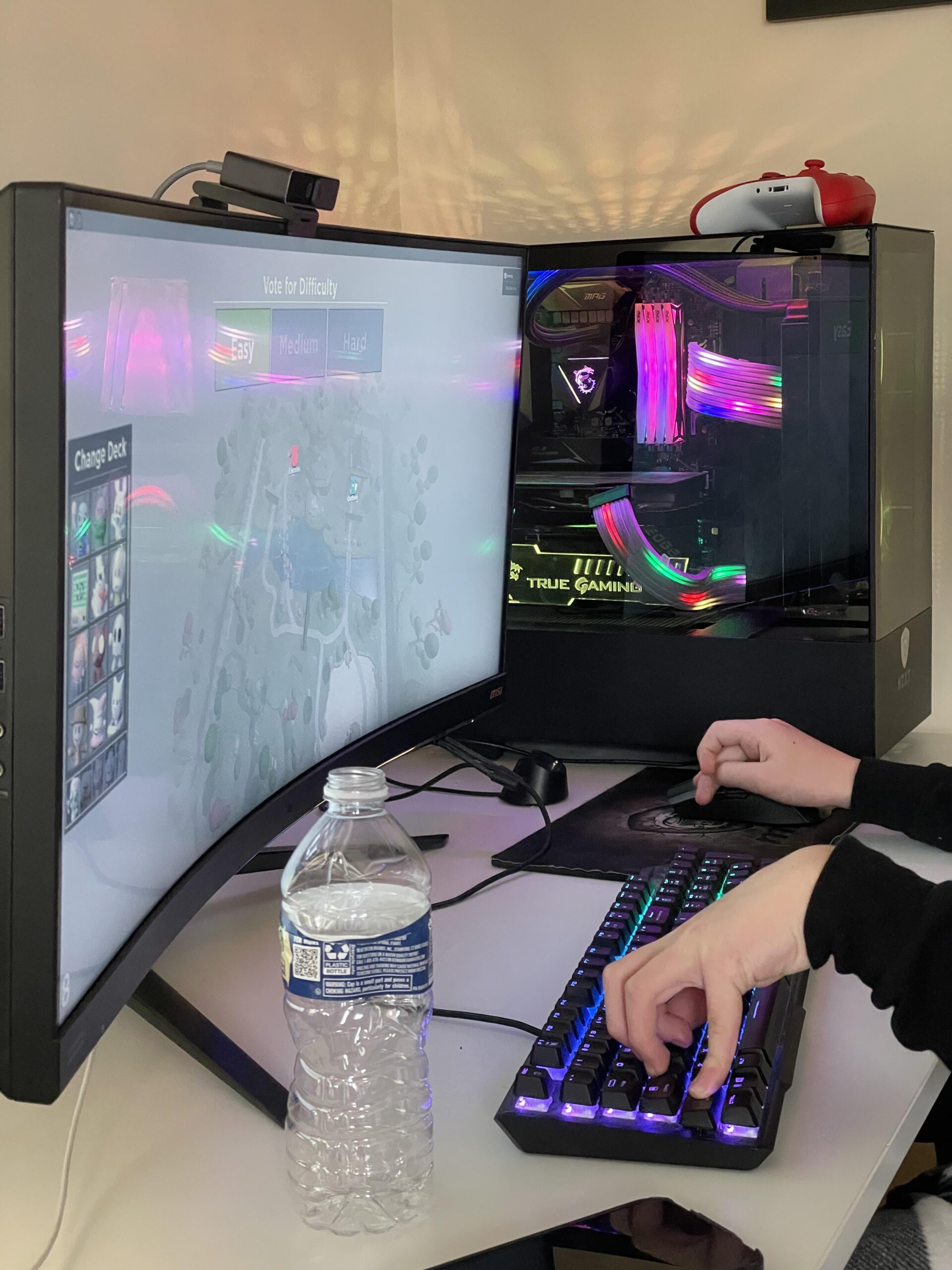
Is it time to upgrade this kids (12) first build.
He is complaining about his computer being laggy and saying it’s the internet even know we have 500Mb down and usually 20MB up using a Google Nest WiFi Pro Router that supports 802.11ax as does the motherboards embedded card.
I’ve had the Processor overclocked at 5Ghz and the quad XPG 8Gb (32Gb total) memory using a overclock profile for 3200Mhz rather than the default 2800Mhz which I think is a CPU limitation.
I tried to tech him how to use afterburner on his little GTX 1660 Super but I’m not sure it makes that big of a difference. I don’t have much experience overclocking so I could be doing things wrong as well.
Any suggestions are welcomed other than getting a RTX 4090 as I am not working due to a medical condition, so funds are a bit limited. 🤣
Below is the current spec on the computer:
[PCPartPicker Part List](https://pcpartpicker.com/list/tMzCMV)
19 Comments
I mean what is he playing usually? And what does he mean by ‘laggy’? Is it stuttering or are the FPS in games low?
That gpu is low end for 1080p. He’s on a 21:9 1440p, which is approx. 30% more demanding than regular 1440p. I’d say rtx4060 is minimum gpu I’d try.
The best anti-lag device is a LAN cable 😉
No need of a 4090, imho. A 3060 would be a great improvement for a little expense (if compared to the 4090).
Cheap upgrades would be replace the 4x DDR4 kit with a higher capacity 2xDDR4 kit, replace the 2x SSD with a single 1TB nvme.
More expensive, upgrade the GPU to a 30 series.
Since money is tight, you might have luck shopping from electronic recyclers. I generally recommend against like Facebook marketplace or similar.
CPU’s and GPU’s run much closer to their maximum stable operating speeds these days. This means the potential for overclocking performance boosts is nothing like it used to be with older generations. You can even argue these days you are better off finding ways to run the system cooler and allow it to boost more than bother with overclocking.
Fix his left wrist lmao.
TLDR:
get RX 5700XT – were talking apex legends 1080p high settings 170 fps
1440p high settings 120 fps-ish
200€
which is absolutely insane!!!
Not TLDR:
my tip is – get him a Amd card without raytracing, since I dont think raytracing is something he will be aiming for, for now – since its Simply Ressource costly
the best amd card is 5700XT – I had that for a while before upgrading to rtx 3080 and I have to say – the amd card did an exceeeeellent job for its price man
its 200€ in my country now (germany) which i CANNOT UNDRSTAND LMAO
its a modern card, so overclocking is still pretty safe, since before anything happens it just .. stops you know
Also the AMD Software is more userfriendly than Nvidia Control panel
I mean wtf yohre doing with a 4080 on this Kids PC?
Also im sure he has 60hz Monitor?
noooooooo need for that.. Also.. playing at this young age, Im kinda sure He’s gonna play free online games like apex, fortnite, league of legends and sometimes Story games lieb assassins creed – so dont waste the Extra 1000€ on raytracing, invest it rather for 144hz – if you didnt do already
RX5700 works awesome on 1080p and on Medium settings you skyrocket fps even at 1440p
(I was playing apex legends with medium/high settings on 300fps – 1080p)
get this card pls 😉
Overclocking will help of course, although the resolution hes playing at is making that 1660 a big bottleneck, so naturally you’d upgrade that if at all. Perhaps look at the 7800 XT, 4060 ti, or anything used in that price range. AMD and NVIDIA have new offerings coming out this year too though.
Put it on LAN. If the budget allows, aim for an 6800xt or 7800xt considering the monitor. And a cheap upgrade would be 2x16GB as high as cpu supports.
> I tried to tech him how to use afterburner on his little GTX 1660 Super but I’m not sure it makes that big of a difference
Single or low double digit percentages most likely. Realistically the options are either run at very low settings, lower the resolution, or buy a better card. A 1660S is just not going to cut it for 144hz 1440 ultrawide.
You can start by upgrading the GPU. That’s gonna be a huge improvement.
Grab something like 7800XT if you do not have a lot of money.
And you don’t have to upgrade your PSU for that GPU. 650W should be ok
3200mhz isn’t a cpu limitation, but it’s 4 stick and who knows what ram die
Also what ram voltages have you tried?
The cheapest option, let him deal with older hardware, so playing on lower settings before he wants even a better pc i guess. I used to have like 10yr old hardware and play games on minimum settings 30 fps, and obviously older titles. So maybe just wait 2/3 years and get him new parts. Maybe let him try to overclock while you are checking him if he doesn’t do it too extreme, give him the experience of upgrading him self and the huge performance boost after.
Is this stance on the keyboard common for the games you play?
https://gpu.userbenchmark.com/Compare/Nvidia-RTX-3070-vs-Nvidia-GTX-1660S-Super/4083vs4056
No doubt the video card should be the first component to upgrade. He’d be stoked about the fps gains, especially considering the 1440p monitor. 3070 or 6700 xt are the lowest end cards I would consider nowadays. It’s easy to skimp but you’ll lose $ in the long run with any less vram or speed
Depends on if you can afford an upgrade, that gpu is more then fine for a kid though
Fix his grip first geez 🤣
GPU upgrade and 650 watts I think is low for a new GPU so PSU upgrade too!!!