Run a scan with rkill and Malwarebytes. These 2 never failed me
koordy
There’s no way I wouldn’t format the whole drive and made a fresh windows install after seeing something like this.
F0RCE963
Looks like vanguard/valorant to me
fxfire
Clean install windows. Don’t sit on it.
[deleted]
[removed]
NicoleMay316
Malwarebytes
Fun_Abbreviations345
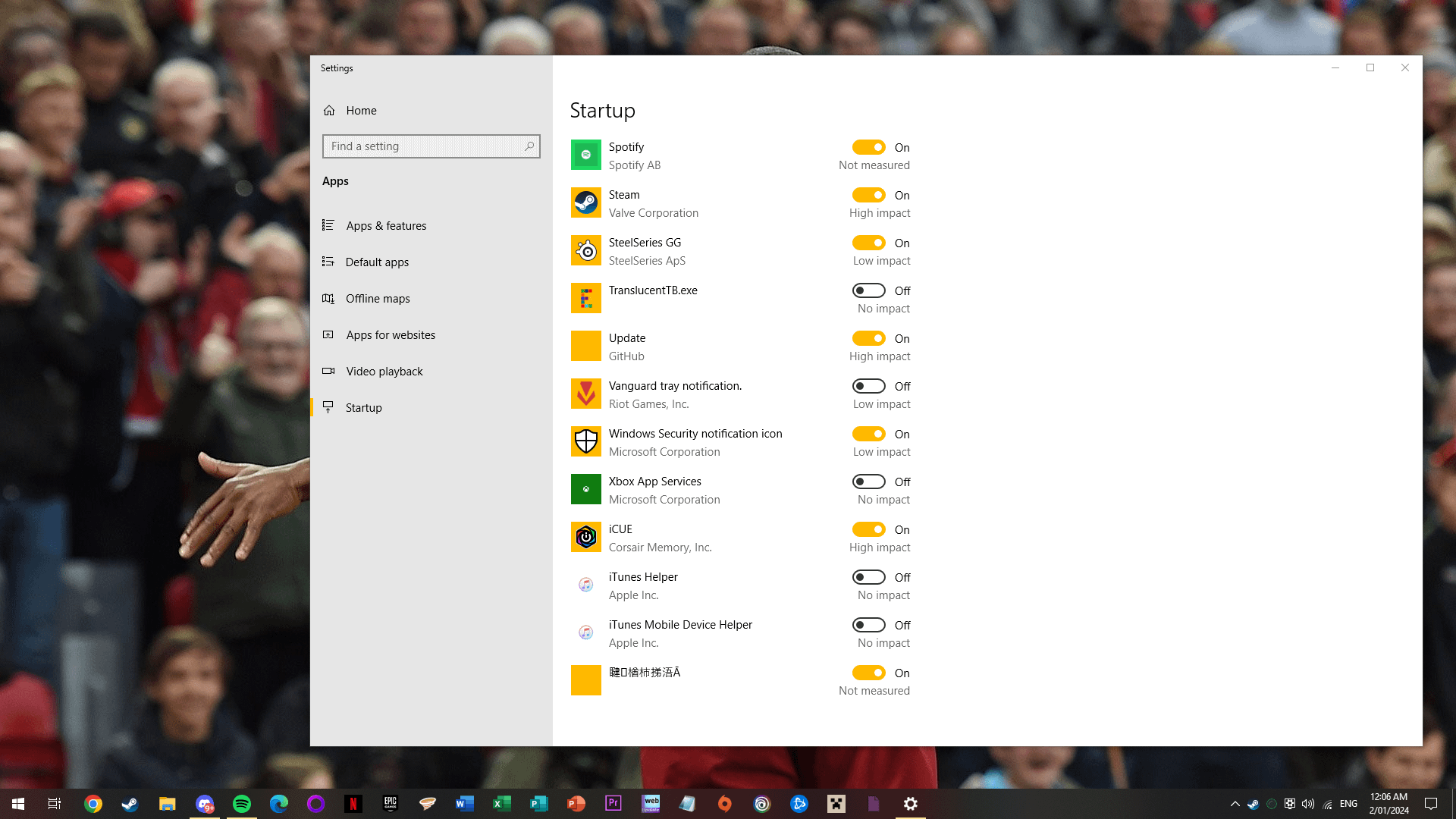
It’s not Chinese. It’s Garbled characters
Xenon-Hacks
Nuke the system, someone probably put malware on your system using a vulnerability in Vanguard.
Necessary_Film_1742
Reinstall windows , if something penetrated your startup . It for sure modified your registry , which means your recovery drive is also compromised .
Reinstall windows using your cd , or usb or any other external way. Do not just reinstall windows from your recovery partition.
hairyandhairless
Apply democracy
itsokayimhandsome2
When I got my Chinese made GPD Win 4 I knew I wasn’t going to log in with the OS already installed, NOPE. It was a clean install for me. Even if you have to install the drivers later on.
You just never know what they could have loaded into the OS from the start. I get that you can install side loaded software too, but I preferred doing a clean install anyway.
Icy-Negotiation-5851
I had the exact same thing, when I tried to remove it it also removed the windows boot command. Shit is definitely malware
ya_seen998
reinstall windows
ItsmeWardogjr97
Time to wipe the drive and fresh Install your os. There’s no point in trying to fix it. But revo Uninstaller is a really great tool.
Zagorim
If you find it in the startup tab from task manager, then you can right click it and get to properties or “open file location” to get the full path and probably know more about the software.
You could also submit the .exe to something like virustotal
SubstantialDiver2359
This youtube video goes by several steps you can take. It helped me out.

35 Comments
It changes name every time I open the Startup list. I am perplexed.
Update: It has disappeared before I got the chance to turn it off. What should my next steps be?
If you are worried, reinstall windows
Uninstall it, reinstall windows, scan your computer
Clean install your windows this is the only way to get rid of it completely.
Give a shot to malwarebytes and full offline Windows defender scan
Run a defenders full scan.
Run a defender offline scan
Run these three
[NPE](https://support.norton.com/sp/en/us/home/current/solutions/kb20100824120155EN) [KVRT](https://www.kaspersky.com/downloads/free-virus-removal-tool) [ESET online scanner](https://www.eset.com/us/home/online-scanner/)
Pray
Run a scan with rkill and Malwarebytes. These 2 never failed me
There’s no way I wouldn’t format the whole drive and made a fresh windows install after seeing something like this.
Looks like vanguard/valorant to me
Clean install windows. Don’t sit on it.
[removed]
Malwarebytes
It’s not Chinese. It’s Garbled characters
Nuke the system, someone probably put malware on your system using a vulnerability in Vanguard.
Reinstall windows , if something penetrated your startup . It for sure modified your registry , which means your recovery drive is also compromised .
Reinstall windows using your cd , or usb or any other external way. Do not just reinstall windows from your recovery partition.
Apply democracy
When I got my Chinese made GPD Win 4 I knew I wasn’t going to log in with the OS already installed, NOPE. It was a clean install for me. Even if you have to install the drivers later on.
You just never know what they could have loaded into the OS from the start. I get that you can install side loaded software too, but I preferred doing a clean install anyway.
I had the exact same thing, when I tried to remove it it also removed the windows boot command. Shit is definitely malware
reinstall windows
Time to wipe the drive and fresh Install your os. There’s no point in trying to fix it. But revo Uninstaller is a really great tool.
If you find it in the startup tab from task manager, then you can right click it and get to properties or “open file location” to get the full path and probably know more about the software.
You could also submit the .exe to something like virustotal
This youtube video goes by several steps you can take. It helped me out.
https://youtu.be/btRnfFsa_Lg?si=plXKcbuNWlXn9KQ8
Let’s figure out what wallpaper that is
this is a time you need to reformat the drive and reinstall windows. DO NOT, I REPEAT, DO NOT reinstall onedrive and “settings from last installation”
OR
You might just reinstall this backdoor of whatever kind it is lol
skill issue.
Someone failed their cyber security awareness courses….
hammer
Whats your wallpaper, mate?
Average Windows experience
Be aware that uninstalling it will reduce your social credit score
https://preview.redd.it/bycae1pgov9c1.png?width=680&format=png&auto=webp&s=d39cc106c556e65ea4d8f7aca72db11ad7a9dc7b
Ik everyone is suggesting you wipe your pc, but to be sure, maybe you should run HitManPro in offline mode to see if it detects anything.
*Our startup list*
Do a complete clean reinstall. Change your passwords and you should be safe. (99.99%)
Malwarebytes
Did you try to download dragon scimitar mouse cursor?