
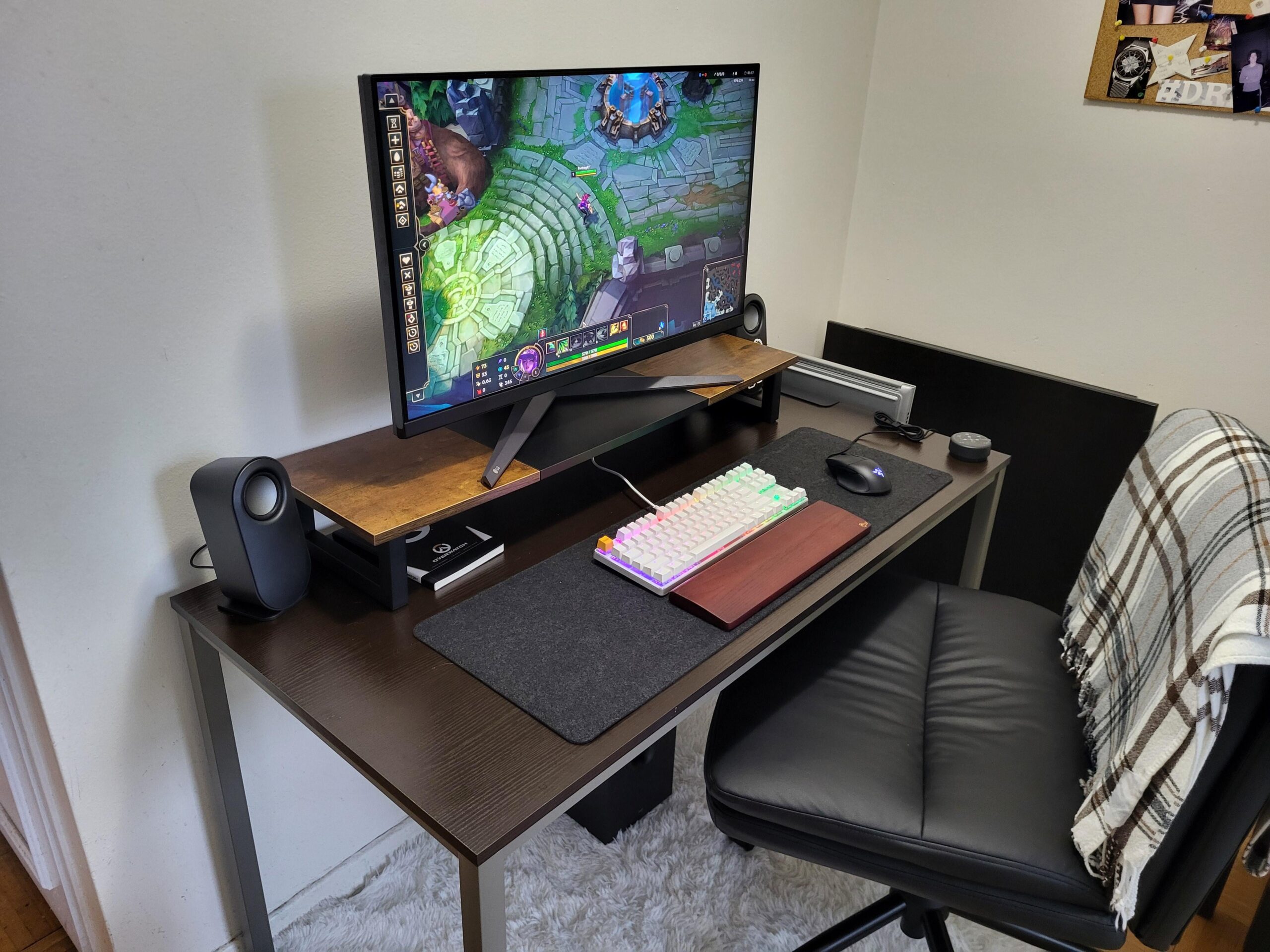
Total first world problem, but the monitor I bought for my desk is too big. It strains my eyes to look at it. Is there anything I can do? It’s a 32 inch. I bought it on sale on Amazon, and it was the same price as the 27 inch. So I obviously went bigger. I was also worried about 32 inch fomo if I went with the smaller one.
I can ship it back and exchange if I have to, but I’d like to make it work if I can. If you have tips I’d appreciate it. Thanks!
39 Comments
Take periodic breaks
There are glasses with yellow tint that help with that.
Deeper desk or a wall mount to move it back
Led back lights.
Buy a strip of whatever. Doesn’t need to be addressable. Just some light at the wall so there isn’t a hard edge.
Upping the reds also have helped me.
Has anyone here heard of night light mode (unless you use Linux) you can find it in settings app on windows and also don’t worry about it looking ugly, you haven’t seen my setup yet (Its ugly, but practical). If that problem persists then try angling the monitor to get it further away, or take a break for at least a day, it helps more than you’d think👍
Stop playing league.
go to the eye doctor and see if you need glasses. even if your vision is almost perfect a pair of reading glasses does wonders
If I went to someone’s house and this is the setup they had I’d immediately clock them as a serial killer
You have 3 options…
1. get a bigger desk and scoot the monitor back.
2. get a smaller monitor
3. stop playing league
I am using a 48″ monitor. The size is not your problem.
1. The distance between you and the monitor should be enough.
2. The upper part of the monitor should be under your eyes. Right now you try so hard to open your eyes looking at the screen because it is above you (this was a thing recommended by my doctor) and it creates dryness and strain. I mean, you specifically made it higher 😀
3. Lower brightness and better room lighting. Do not use dark rooms if possible and try to lower your brightness to 15%. Most monitors I have tested had recommended amount of brightness (below 120cd) with 10 to 20% settings. Mostly the monitors have extremely high brightness levels.
4. Take breaks.
[deleted]
Get some blue light glasses
You stop playing league
#1 leading cause of eye strain is LoL
Touch grass?
I like that chair. Do you have a link or remember where you got it?
is the chair too high? there’s like no room for your legs
Lower the monitor and check the settings, you may have the brightness turned up. That looks cool for a demo and it’s striking at a glance but it’s horrible for long term use. Also wall mounting it or increasing the distance between you and it will help.
Also the desk?
I find 27 to be a good size. 27in 1440p. Might not help with eyestrain, if only to reduce the distance your eyes have to travel to scan the screen.
Puncherize a few holes in the wall and put it in the next room?
144hz helps
[deleted]
Flu.x
Gamer glasses. Blocks some blue light reduces eye strain from screens. I have it on my prescription glasses. I can work 8hrs staring at monitors then come home and game in the evenings no problem.
Get more monitors
32 is too big, get 27inch, it’s the sweet spot.
Change the resolution to a near 27″. That or get the one with better ppi ratio. It makes all the lines more crisp in derails. Pixel per inch
Backlighting. White backlighting.
Take breaks🤷
Couple of issues here.
First, your monitor is way too high. The top of the monitor should be eye level. Unless you’re an absolute giant and your chair is too small, then the monitor is way too high. Second, do NOT waste money on blue filter glasses or other “blue light filter” shit. They’re scams: https://www.nbcnews.com/health/health-news/blue-light-blocking-glasses-dont-protect-eyes-improve-sleep-study-find-rcna100283
Lastly, only use dark Mode at night. Reading white text with a black background is worse for your eyes and causes more strain. This is because the black background causes our eyes to dilate which makes focusing on the white text harder:
https://www.allaboutvision.com/digital-eye-strain/is-dark-mode-better-for-eyes/#:~:text=Using%20dark%20mode%20is%20helpful,your%20vision%20becomes%20less%20clear
Eye strain really isn’t an issue you can magically solve. You need to speak with an actual doctor. The only real way to reduce eye strain without medication is to not use your eyes as much. Shorter gaming sessions.
uninstall league
I wear blue light glasses, they are like 0.0 reading glasses. Makes a good improvement on eyestrain.
This is why I like curved monitors they really help reduce the strain
I wear glasses and I’m rocking a 34” ultrawide that said I only wear glasses due to eye strain. That’s what my optician suggested and I don’t need them for anything else except gaming and working on my puter
Use night mode that make the screen. Orange, it’s better on your eyes.
If you wear glasses get blue filter. If not look into blue filter glasses.
Move the monitor back in some way.
Or get a smaller screen
Blue Lens glasses, I think they sell them prescriptionless
Blue light glasses. Take breaks
Keep to overwatch you should be fine