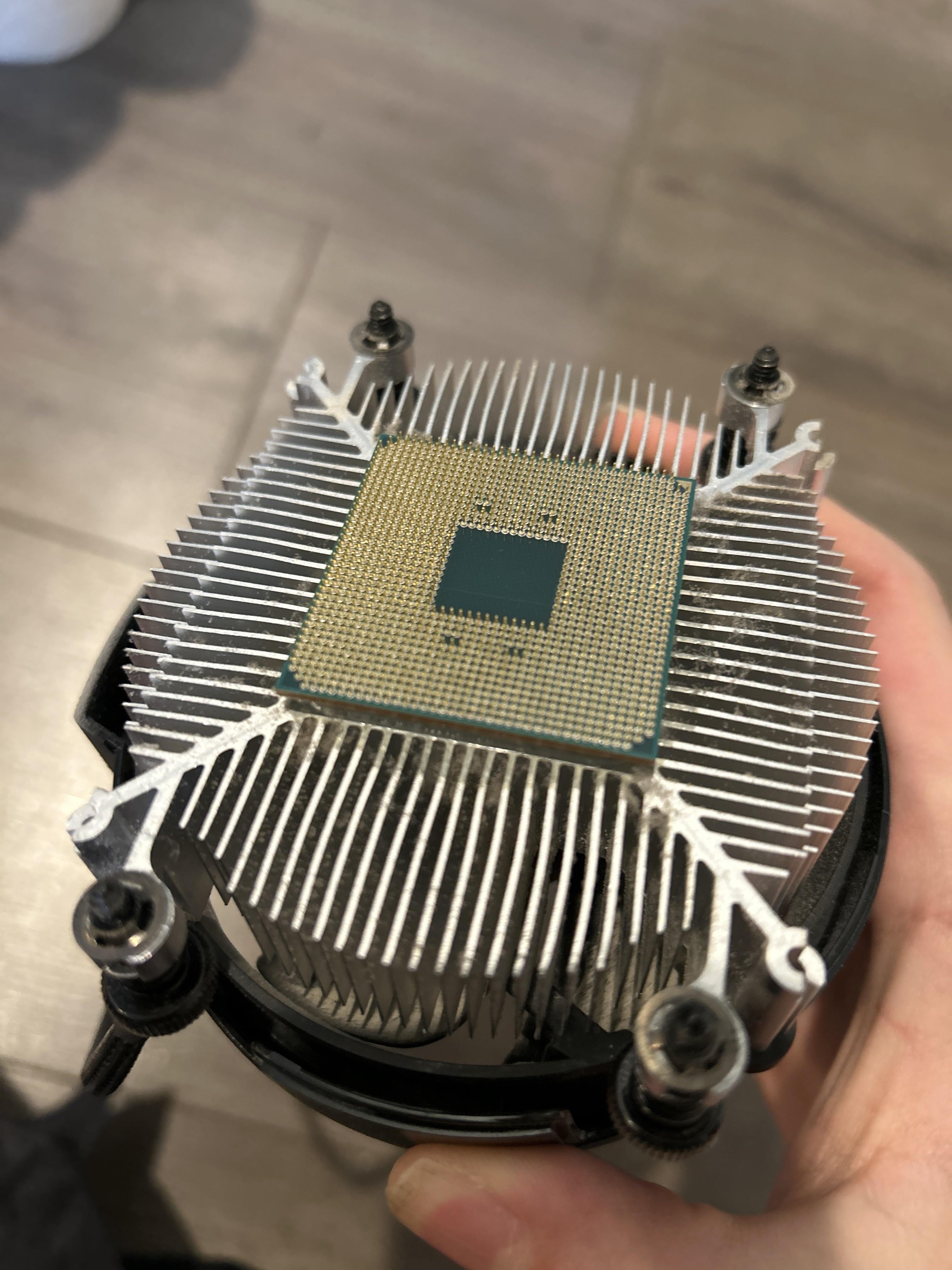
The CPU wasn’t unlatched on the motherboard, it just got pulled out. The pins are all fine but is the CPU okay? And is the motherboard okay if it had a CPU removed without the latch?

The CPU wasn’t unlatched on the motherboard, it just got pulled out. The pins are all fine but is the CPU okay? And is the motherboard okay if it had a CPU removed without the latch?
33 Comments
50/50. I don’t have it in my hands so can’t say it for sure.
If the pins is ok then your gonna be ok as well
just twist it off, it’s fine
It’s probably fine. Use dental floss and some heat to pull the CPU off the heatsink.
Yeah, just be sure to check if any pins got damaged. You can try to remove the cpu carefully with a floss pick or similar. To avoid this happening again you can power up the PC, load something to heat it up, and the turn it off to avoid it sticking.
Thats fine but for that to not happen again just heat up the cpu and twist and pull
It’s fine. Did the same to my 3700x. Runs like a champ still in my NAS. Twist off the cooler next time.
i did that once and it still works fine. just make sure the pins arent bent
welcome to the amd club that has happened to me 2 times in the past but to manage this run a CPU benchmark for like 15 minutes to lose up the thermal paste then power off unscrew the heatsink and twist it off i haven’t had this happen since doing this
if the thermal paste is extremely old and hard the twist should crack the thermal paste if not you need IPA or neal polish remover to break the bond
No pin seems to be bent, you’ll be fine I think.
I’ve done it a few times. Check for bent or broken pins, but otherwise it shouldn’t hurt anything. I always give my coolers a bit of a twist before trying to remove them these days, but it’s happened enough that I’m surprised nobody ever added a small bracket to hold the CPU in place, rather than just hoping there was enough tension on the socket after locking the lever in place.
It happened to me once, i thought i broke the Mobo CPU lock… that thing made me worried for a moment, but turns out everything was fine.
If no pin is bent then you are okay 🤷🏼♂️
It happens often since am4 doesnt have a latch to secure the cpu to the mobo.
Very common, just twist it
This is actually pretty common, as long as there aren’t any pins still stuck inside the socket the cpu and motherboard should both still be completely fine
CPUs are very durable don’t worry about it. If the pins are safe and you didn’t rip off anything from the motherboard you are good to go.
Happens all the time. You’ll be fine once you twist/pry it off and clean it
Nothing a hair dryer won’t fix
This is so embarrasing
I think this page needs a pinned comment about dealing with this
Put it in rice
Ive heard the best way to prevent this is to have the pc running for 10 minutes to warm the paste before shutting off and removing the cooler. Ive seen this way too many times and personally never had an issue with this.
As long as all the pins are straight and there you should be good.
You wouldn’t be the first …
happened to me before, don’t worry. just try to twist it off and don’t force it
you are likely one of hundreds of people that do the exact same thing daily. as long as the pc wasn’t on while you pulled it out and your not missing pins then it’s fine.
If the pins aren’t bent then it should be good I just hope the latch on the motherboard isn’t damaged.
Been there done that with my 3600 back then 😂 I panicked as hell since it was a new B550 mobo I bought to replace my X370 due to BIOS memory limitations.
Luckily, the pins on PGA CPUs are sturdier than the pins on LGA motherboards to it is fine.
Been here before. Carefully get it off the heat sink and replace the paste. Good to go.
+1 to the comments below about warming before removing… Stupid physics shit….
I don’t think I see any misaligned pins, looks like a clean, and lucky, rip from its’ socket… can’t say this hasn’t happened to me as well ;P, just pass your eye across the pin rows, misaligned pins will stick out like a sore thumb, if they don’t look like they’re dangling by the contact pad, just straighten them out and you should be good to go! Source; I realigned a friend’s AM4 CPU when he muffed the installing into the socket part, to this day I have no idea how he managed to achieve that kinda damage.
https://preview.redd.it/giyku64vnc9c1.jpeg?width=1080&format=pjpg&auto=webp&s=4afa5e3a6776b910cc8ee29742286fbb14df2fc5
well this is funny