It’s possible to bypass the requirements but for now just stick with Windows 10 imo. There’s not much reason to upgrade as long as security updates are still provided.
Nidhoggr84
You can use [Rufus.ie](https://Rufus.ie) to bypass hardware checks for Windows 11. This would require a clean install though, AFAIK. Applications requiring TPM 2.0 will still not work.
Honestly, a system using a 6th gen Intel Core CPU needs to be updated. I would continue using Windows 10.
Basic-Negotiation238
It won’t let you install windows 11, that’s a blessing not a problem
robo5pcgaming
Buy a new cpu if your motherboard supports it
heroic-puppy
Ditch Windows
ElementalPup
You could bypass it as some have suggested here but apps that require tpm will be restricted, keep using windows 10, upgrade to parts that will allow a seamless installation of windows 11 or consider a Linux distro if your pc usage doesn’t have any particular OS restrictions.
Jalapeno_Sizzle
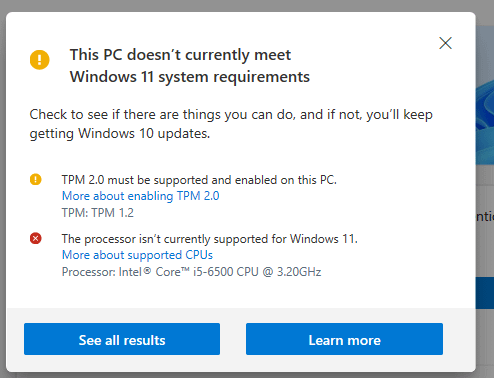
TPM is a chip/BIOS setting.
Windows 11 is only officially supported on 7th gen Intel CPUs or later.
Inthenstus
Don’t do anything, W11 sucks.
MrInitialY
Lol that “is not supported” prompt for 6&7th Gen Intel is such a joke. Win11 works perfectly fine on any hardware that supports UEFI and you will only face issues with TPM 2.0 on old hardware… But 6th gen already had TPM 2.0
Abdowo
use Rufus or Ventoy can bypass these restrictions.
BlastMode7
There are ways to install it that bypass the hardware checks and it will run just fine. If you want to be sure your system is 100% supported and meets M$’s BS requirements… then you’ll need a newer system, at least 8th Gen Intel or 2nd Gen Ryzen on the consumer side.
Ironically, there are workstation class 6th Generation Xeons that are supported.
oblong_pickle
Use Windows 10
apachelives
Edit: never mind cant throw in a 7th gen CPU 8th gen is minimum CPU generation – new CPU motherboard required etc to do it “officially”.
Independent_Boot_660
10600k ,32gb ,2070 super. They told me the same thing. It’s an issue on their end.
No OS should need these requirements.
czaremanuel
It isn’t something you need to “fix” any more than you need to “fix” an 8-year-old pair of sneakers. Both of these points refer to hardware, so the “fix” is getting a newer computer.
As others have said you’re fine with Windows 10 and you likely will be fine for many years.
Praminat0r
“Spend more money, buy a new computer”
– Microsoft (Probably)
In all seriousness, you can bypass the TPM and secure boot check (google a tutorial, there’s heaps out there) when installing windows 11 from scratch, but I’m not sure you can do it using the upgrade utility.
Batfish_681
The system hardware is dated. You *could* bypass this as others have posted to get this thing running Windows 11, but I probably wouldn’t do it- I’m guessing the system is probably on 8gb of RAM based on the CPU generation, and may even still be using old hard drive technology. You’ll probably incur some loss in performance if you do decide to bypass the hardware check and get W11 on there and it wouldn’t really offer you anything.
Continue running W10 for now, it’s still receiving security updates and patching. Plan on buying a new machine when W10 reaches end of life, but that’s not till 2025. For the time being, ignore this message and carry on.
Datuser14
Install Linux.
ShylokVakarian
Ignore W11, Microsoft are just being brutally bitchy about their requirements because they think anything older than a week is utter trash.
Saltyk917
I had to go into bios and and change the TPM from discrete to firmware. Fixed the issue
HanaOdz
Win11 is intrusive garbage. Stick with win10 where you still have full control over app preferences.
Bawngfinga
That cpu is well due for an upgrade, but the fact you’re asking for a workaround sorta tells me you can’t really afford an upgrade at this current time. But look windows 10 is still perfectly fine, there’s no rush as it’s still supported and updated.
Chobrewanter
Activate TPM 2.0 from bios
wickedplayer494
Trick the setup executable into thinking it’s installing Windows Server: setup.exe /product server
This will bypass “unsupported processor”/TPM 2 funny business.
PutADecentNameHere
Processor is doo doo according to Microsoft. Keep using Win10.
CraveBearYT
Know this, myself, actually, seeing as I had and still have the same issue: Outdated Processor. (And yet I have even worse because my Graphics Card is 11 years old.)
CorValidum
I understand but it literally says what’s is not OK and what should have been upgraded… Yeah there are ways to bypass stuff, but that 6th gen is 7gen old so if possible get at least 8th gen or above. Even better get AMD 😉
JmTrad
Stick with Windows 10 or search how to bypass this bullshit limitations.
The_Smith12
Most CPUs habe a virtual tpm you can turn on in uefi (ftpm for AMD and a less obvious name for Intel, cant remember). There are also various ways of working around the w11 restrictions. You can create a boot medium with rufus for a clean install or change some registry keys if you are upgrading from w10. In my experience the unsupported CPUs can actually run just fune on the Windows 10 drivers, although you never know if the next windowsupdate may break something. Still. Just stick to Win10, win11 is not yet worth it.
txtfile2025
Upgrade your processor
If your PC doesn’t support it I wouldn’t risk it, bypassing the check can cause serious problems
WelderIcy5031
Create a bootable windows installer on USB either with Tiny11.iso or Rufus. Tiny11 will give you a tiny version of Windows 11 without the bloatware but bear in mind it may have issues. Rufus will give you a full fat version of Windows but without the TPM requirements.
Rufus for safety, Tiny11 for enthusiasts
Ok_Kale_7762
TPM 2.0 isn’t available in lots of older hardware. Idk why windows insists on activating it when your pc literally is not capable of it.
lucellent
They are there for a reason. I tried running Windows on an unsupported 7700 CPU (and yes, I had 32GB ram, 1TB ssd) and it ran like ass. You should thanks Windows for not letting you install it
EatNails_69
Can someone explain what tpm is?
tbone338
Officially, upgrade your system.
Unofficially, use a bypass.
matthew_yang204
Use Rufus to create a bootable disk containing the files. Then, while booted in Windows 10, run the setup.exe.
Jwhodis
Win 12 is releasing before win 10’s end of support. I’d wait for 12 before updating to 11 or 12.
As others have said, there are ways to bypass this, although if you have a very low-end device, it might not work.
GalacticCascade
Almost everyone I’ve talked to is having monumental stability issues with windows 11 if their system is over a year old so dodge the bullet lol
Zhabishe
Avoid Windows 11 like a plague.
amineris
Buy a Mac
InnerChaosGames
Fix what? I don’t see any problem. Windows 11 is garbage anyway, Microsoft is doing you a favor for not letting you upgrade.
Possible_Picture_276
Tiny 11 with a windows 11 pro key removes all that for you. I have a computer running 11 with a 3770k. Then if you want you can update with no issue.
gtrash81
Replace PC, because MS dictates so with Win 11.
Or switch to Linux, if feasible.
Noxious89123
Nothing at all. Stay on Win10.
zchrisb
Everyone is talking about bypassing, but if your motherboard supports it you can enable TPM 2.0 on it. Look up your motherboard model and how to enable TPM 2.0 in the BIOS.
If your motherboard does support it, it shouldn’t take longer than 3 minutes to enable TPM 2.0 to qualify your device for Windows 11.

45 Comments
It’s possible to bypass the requirements but for now just stick with Windows 10 imo. There’s not much reason to upgrade as long as security updates are still provided.
You can use [Rufus.ie](https://Rufus.ie) to bypass hardware checks for Windows 11. This would require a clean install though, AFAIK. Applications requiring TPM 2.0 will still not work.
Honestly, a system using a 6th gen Intel Core CPU needs to be updated. I would continue using Windows 10.
It won’t let you install windows 11, that’s a blessing not a problem
Buy a new cpu if your motherboard supports it
Ditch Windows
You could bypass it as some have suggested here but apps that require tpm will be restricted, keep using windows 10, upgrade to parts that will allow a seamless installation of windows 11 or consider a Linux distro if your pc usage doesn’t have any particular OS restrictions.
TPM is a chip/BIOS setting.
Windows 11 is only officially supported on 7th gen Intel CPUs or later.
Don’t do anything, W11 sucks.
Lol that “is not supported” prompt for 6&7th Gen Intel is such a joke. Win11 works perfectly fine on any hardware that supports UEFI and you will only face issues with TPM 2.0 on old hardware… But 6th gen already had TPM 2.0
use Rufus or Ventoy can bypass these restrictions.
There are ways to install it that bypass the hardware checks and it will run just fine. If you want to be sure your system is 100% supported and meets M$’s BS requirements… then you’ll need a newer system, at least 8th Gen Intel or 2nd Gen Ryzen on the consumer side.
Ironically, there are workstation class 6th Generation Xeons that are supported.
Use Windows 10
Edit: never mind cant throw in a 7th gen CPU 8th gen is minimum CPU generation – new CPU motherboard required etc to do it “officially”.
10600k ,32gb ,2070 super. They told me the same thing. It’s an issue on their end.
No OS should need these requirements.
It isn’t something you need to “fix” any more than you need to “fix” an 8-year-old pair of sneakers. Both of these points refer to hardware, so the “fix” is getting a newer computer.
As others have said you’re fine with Windows 10 and you likely will be fine for many years.
“Spend more money, buy a new computer”
– Microsoft (Probably)
In all seriousness, you can bypass the TPM and secure boot check (google a tutorial, there’s heaps out there) when installing windows 11 from scratch, but I’m not sure you can do it using the upgrade utility.
The system hardware is dated. You *could* bypass this as others have posted to get this thing running Windows 11, but I probably wouldn’t do it- I’m guessing the system is probably on 8gb of RAM based on the CPU generation, and may even still be using old hard drive technology. You’ll probably incur some loss in performance if you do decide to bypass the hardware check and get W11 on there and it wouldn’t really offer you anything.
Continue running W10 for now, it’s still receiving security updates and patching. Plan on buying a new machine when W10 reaches end of life, but that’s not till 2025. For the time being, ignore this message and carry on.
Install Linux.
Ignore W11, Microsoft are just being brutally bitchy about their requirements because they think anything older than a week is utter trash.
I had to go into bios and and change the TPM from discrete to firmware. Fixed the issue
Win11 is intrusive garbage. Stick with win10 where you still have full control over app preferences.
That cpu is well due for an upgrade, but the fact you’re asking for a workaround sorta tells me you can’t really afford an upgrade at this current time. But look windows 10 is still perfectly fine, there’s no rush as it’s still supported and updated.
Activate TPM 2.0 from bios
Trick the setup executable into thinking it’s installing Windows Server: setup.exe /product server
This will bypass “unsupported processor”/TPM 2 funny business.
Processor is doo doo according to Microsoft. Keep using Win10.
Know this, myself, actually, seeing as I had and still have the same issue: Outdated Processor. (And yet I have even worse because my Graphics Card is 11 years old.)
I understand but it literally says what’s is not OK and what should have been upgraded… Yeah there are ways to bypass stuff, but that 6th gen is 7gen old so if possible get at least 8th gen or above. Even better get AMD 😉
Stick with Windows 10 or search how to bypass this bullshit limitations.
Most CPUs habe a virtual tpm you can turn on in uefi (ftpm for AMD and a less obvious name for Intel, cant remember). There are also various ways of working around the w11 restrictions. You can create a boot medium with rufus for a clean install or change some registry keys if you are upgrading from w10. In my experience the unsupported CPUs can actually run just fune on the Windows 10 drivers, although you never know if the next windowsupdate may break something. Still. Just stick to Win10, win11 is not yet worth it.
Upgrade your processor
If your PC doesn’t support it I wouldn’t risk it, bypassing the check can cause serious problems
Create a bootable windows installer on USB either with Tiny11.iso or Rufus. Tiny11 will give you a tiny version of Windows 11 without the bloatware but bear in mind it may have issues. Rufus will give you a full fat version of Windows but without the TPM requirements.
Rufus for safety, Tiny11 for enthusiasts
TPM 2.0 isn’t available in lots of older hardware. Idk why windows insists on activating it when your pc literally is not capable of it.
They are there for a reason. I tried running Windows on an unsupported 7700 CPU (and yes, I had 32GB ram, 1TB ssd) and it ran like ass. You should thanks Windows for not letting you install it
Can someone explain what tpm is?
Officially, upgrade your system.
Unofficially, use a bypass.
Use Rufus to create a bootable disk containing the files. Then, while booted in Windows 10, run the setup.exe.
Win 12 is releasing before win 10’s end of support. I’d wait for 12 before updating to 11 or 12.
As others have said, there are ways to bypass this, although if you have a very low-end device, it might not work.
Almost everyone I’ve talked to is having monumental stability issues with windows 11 if their system is over a year old so dodge the bullet lol
Avoid Windows 11 like a plague.
Buy a Mac
Fix what? I don’t see any problem. Windows 11 is garbage anyway, Microsoft is doing you a favor for not letting you upgrade.
Tiny 11 with a windows 11 pro key removes all that for you. I have a computer running 11 with a 3770k. Then if you want you can update with no issue.
Replace PC, because MS dictates so with Win 11.
Or switch to Linux, if feasible.
Nothing at all. Stay on Win10.
Everyone is talking about bypassing, but if your motherboard supports it you can enable TPM 2.0 on it. Look up your motherboard model and how to enable TPM 2.0 in the BIOS.
If your motherboard does support it, it shouldn’t take longer than 3 minutes to enable TPM 2.0 to qualify your device for Windows 11.