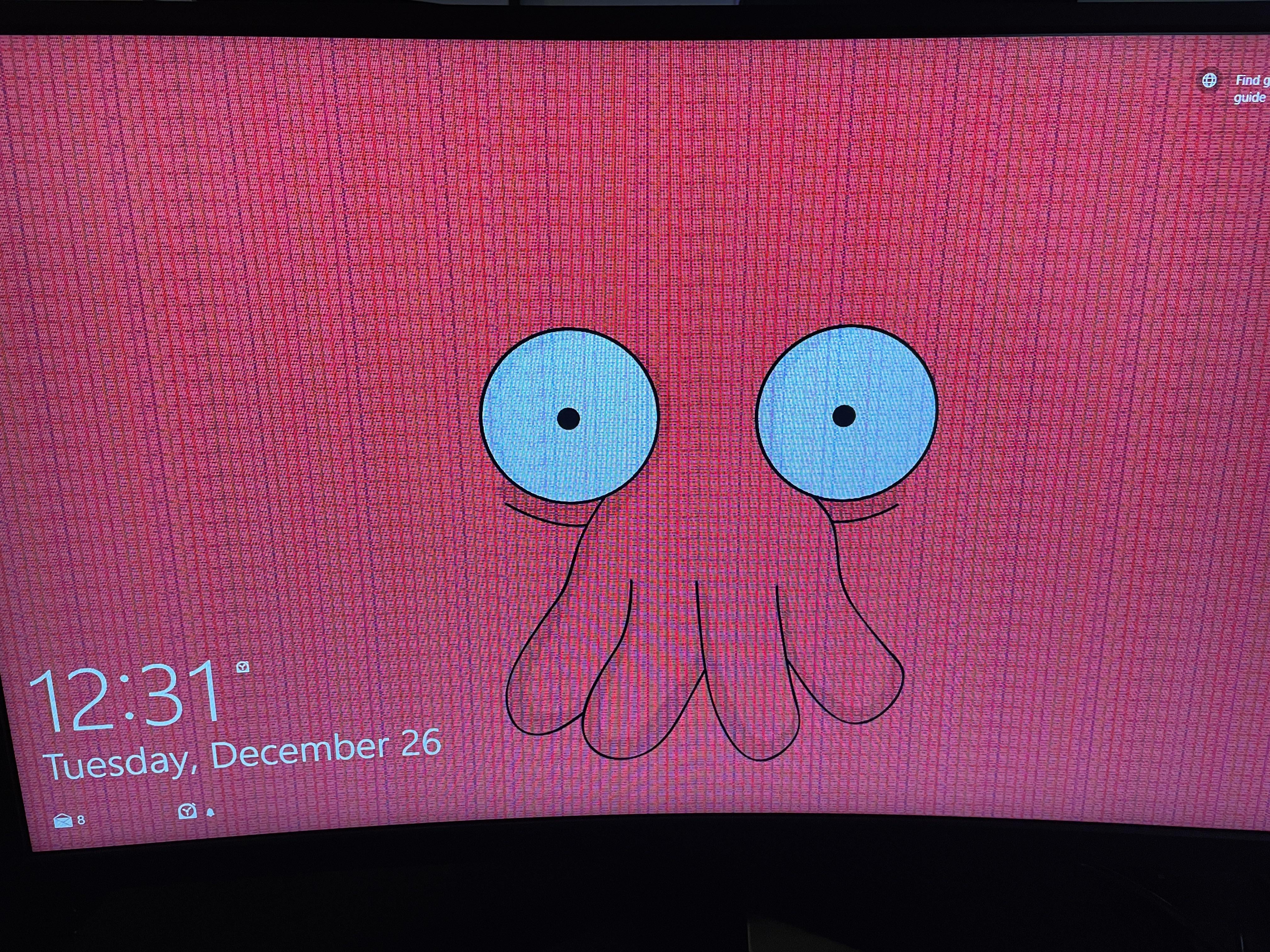
My monitor recently started displaying horizontal and vertical lines across the screen. I tried different computers and cords with the same results.
Is this monitor dead or is there anything that can be done to save it?

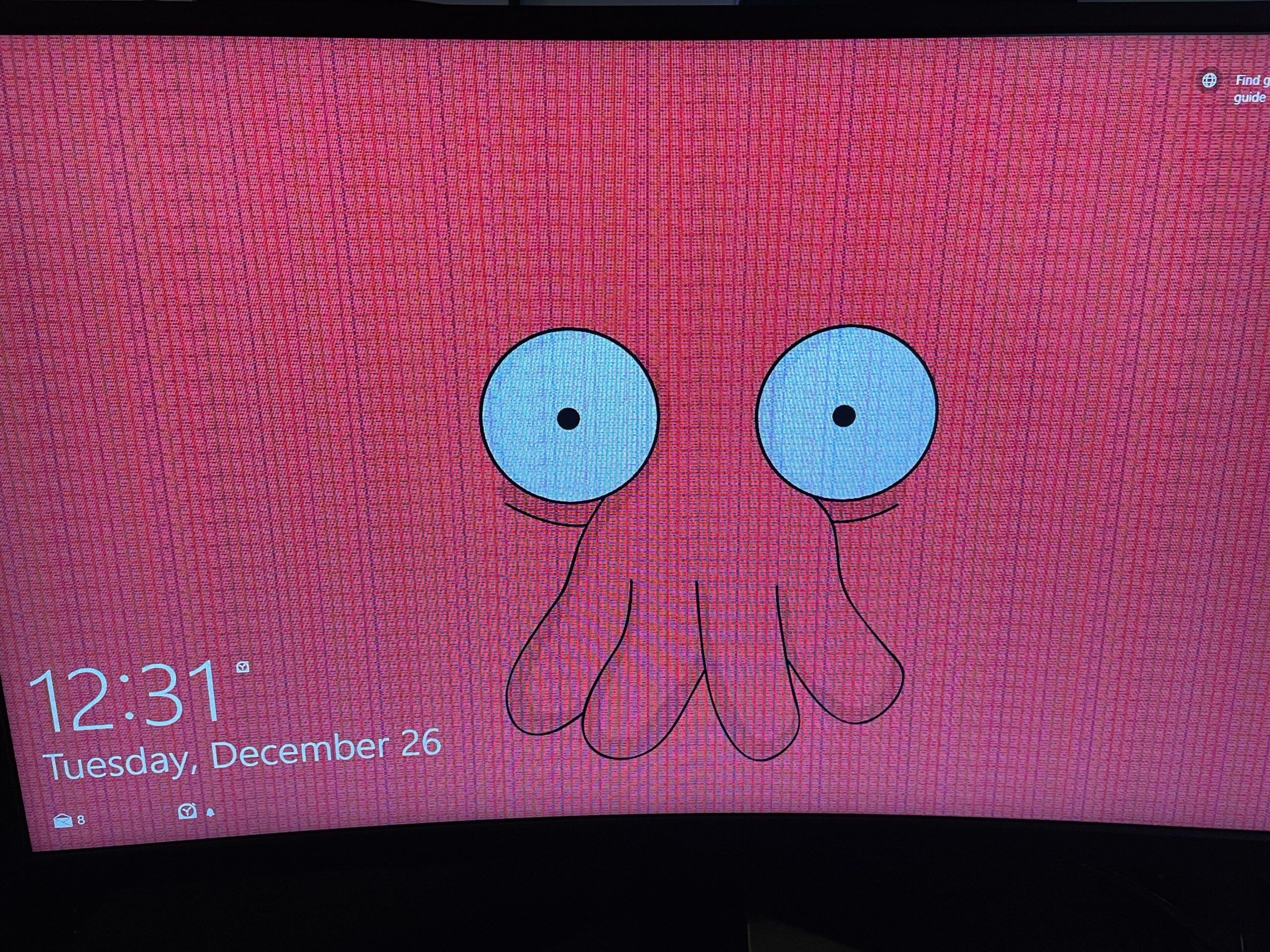
My monitor recently started displaying horizontal and vertical lines across the screen. I tried different computers and cords with the same results.
Is this monitor dead or is there anything that can be done to save it?
33 Comments
It looks like the gpu, try another monitor/tv. If the issue persists, your gpu is dead.
Hopefully its not a GPU failure, try with another monitor or any screen that can connect through hdmi or DP
Looks like gpu, try another monitor. But yeah if I were you’d I’d start looking for replacement gpu. Check if your gpu is still under warranty maybe you can get something with that…
Maybe a bad or loose display cable, if you are lucky.
Possible causes:
1. Driver issues
2. Display cable is damaged
3. Screen is dying/damaged
4. Some part of the GPU/iGPU has been damaged
Steps to diagnose:
1. DDU the driver
2. Try another cable
3. Change refresh rate
4. Try another screen
5. If iGPU only: Reset BIOS to system defaults
6. Replug the cable in another graphics card port
7. Try another display port on the screen
8. Switch to the iGPU of the CPU via BIOS or removing the graphics card (if available) and plug the display cable in the motherboards display out
9. Plug the graphics card into another x16 slot
You’ve found the cause once any of these steps solves the issue. If neither does it’s a whole other ball game.
My MSI Monitor did the same thing like 3 months after buying it, it ended up having 3 vertical lines of dead pixels. Luckily it was still under warranty, sent it to MSI and they sent me a new monitor back. Not a problem so far, maybe their QC is not that good?
Bro running Windows lol

I have something like this going on too I’m about to just replace the GPU all together because the issue keeps continuing no matter what I do mine looks like this
https://preview.redd.it/tpr70s5qlo8c1.jpeg?width=3024&format=pjpg&auto=webp&s=04a33c76cf800173d29dc4e814ee4e24334cb8a5
At least you still have Zoidberg.
You *ALL* still have Zoidberg!!
Maybe grachic driver
Wobwobwobwob
You could try lowering the hz (it helped me once for like 2 weeks)
Don’t worry your monitor is just shedding its shell
Could be caused even by gpu or somethibg around the gpu
Let it warm up if it still shows after using it for 30mins then maybe but I don’t think so its dead just harder to look at
No. Its zoidberg.
Why not zoidberg?
iu had an msi monotor that did this a while back after getting frozen, it lasted for about 3 days but would go away after about half an hours, and then it stopped doing it and its been fince since, for 3 years now
Msi monitors suck. My Ag32c does this upon warming up
My Samsung does this, but it goes away after I let it warm up. I just set my screen to never sleep and it’s been good ever since. My monitor is also 144hz but only seems to work at 120hz so I think it’s very slowly dying.
Dope wallpaper
Inside? Yes. Will he let you know? Probably not.
More like your gpu might be dying
yes n…
If you’re able to find the same monitor with a damaged panel you could possibly swap the controller board from it into yours
WOOBWOOBWOOBWOOBWOOBWOOBWOOBWOOBWOOBWOOBWOOBWOOBWOOBWOOBWOOBWOOBWOOBWOOBWOOBWOOBWOOBWOOBWOOBWOOBWOOBWOOBWOOBWOOBWOOBWOOBWOOOOOOOOOOOOOOOOOB
No it’s zoidberg! Jk
Try a different device on the monitor then a different port, if it looks clean it’s your GPU.
If this is the case, update your drivers and see if the issue persists. Lemme know if this helps!
Looks pretty dope if you ask me
Considering the wallpaper, yes…
Try another device, with the same cable setup. If it’s consistent then it’s monitor/cabs issue, replace cable and retest. Hopefully it’s not a gpu issue mate
You shoulda known Dr. Zoidberg was gonna fuck something up. I’d imagine that also voids any warranty.
No Its zoidberg
I am a doctor who specialized in monitors and i can say for sure that the monitor has too many pixels, you need to cut them off with a knife! Then it should be fine again!