This is why I play on Xbox. Probably being stupid and cheap but troubleshooting PCs would trigger me to the moon these days.
Purplin
Uninstall completely and use a modify install. Only download the one called “warzone”
hummer911
Try turning off ray tracing
xcesswee
I was crashing every game after the most recent patch. Try disabling XMP profile in your bios to reduce your RAM speeds. That seemed to do the trick for me
rsam487
You sir need a console
Pequod_vl
I cant close my game, crashing it is the only way
pickletype
Try with XMP off
Try disabling memory integrity setting in windows settings
Disable any CPU/GPU OC
Clean reinstall graphics drivers either DDU tool
Various_Rice_8305
Steam or battle.net? Might not mean much but I don’t think i’ve crash once with the steam version. On Battle.net I crashed all the time playing MW19,Vanguard,MW2
Rockwhale12
This helped me out a lot after my game crashed several times in one session
OP I was having issues with COD with the Blizzard Application, I switched to Steam and no issues.
Affectionate_Bus6013
Not sure if this is your issue but I was having constant crashes and turns out my CPU temps were occasionally spiking (the game has really poorly optimization and is CPU heavy). Worth downloading a temp monitoring program that records temps to check. Mine would look fine 99% of the time so didn’t even notice but the spikes would make it crash. If this ends up being an issue turning down your CPU power to 99% instead of 100% fixed it for me.
Mohawk200x
I had this for 5 months no joke! I contacted Blizzard and Activision support, and nobody could figure it out. I tried every thing, and eventually I found the fix!
I used Intel tuning utility to lower my ‘performance core’ down to 54 (5.4gz) and that fixed it immediatly. I’ve not had the issue since. Basically, my PC was too powerful for it, go figure.
highestmountains
I upped my ram to 1.4v when this started happening after WZ2 dropped shortly after MWII, and I haven’t crashed with that code since. Few of the overclock crashes, but not those ones.
Purrete
This error can be triggered by many different reasons, a friends computer was having this same issue and we ran out of ideas at some point. Turned out, it occurred to me to check the system temperature, the CPU was running really hot while playing Warzone, hitting 90+ ºC, and that crashed the game with this error. Cleaned the system, temps back to normal, no crashes ever since.
This may not be the case for you, just my grain of salt, hope you can resolve it soon.
Choingyoing
Might be time to get a console pardner
FactorAgile2844
Quit your whining, it’s an easy fix
jamiedha
Hey man, what’s your PC spec?
Captain_Poen
you at least get a crash report, in the last 2 days my game just quits to desktop mid game without any notice or report 8 times. I am dumbfounded how this keeps happening to a triple A game while they are aware of the instability on PC but just don’t care to fix it.
They claim that it’s fixed after gpu driver update but it’s not
using battle.net
Charming-Main4840
Update your graphics drivers or if you are updated try rolling it back to the previous version.
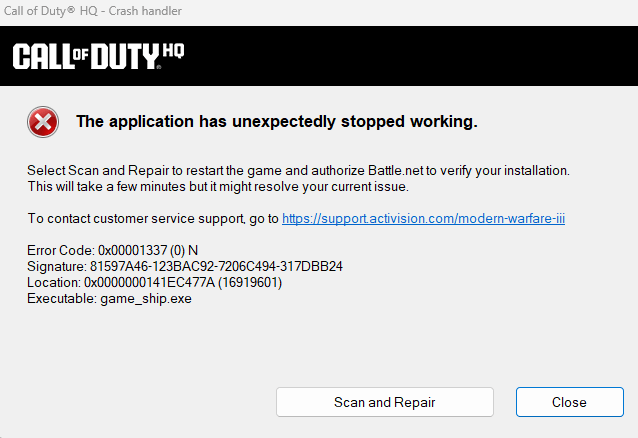

20 Comments
This is why I play on Xbox. Probably being stupid and cheap but troubleshooting PCs would trigger me to the moon these days.
Uninstall completely and use a modify install. Only download the one called “warzone”
Try turning off ray tracing
I was crashing every game after the most recent patch. Try disabling XMP profile in your bios to reduce your RAM speeds. That seemed to do the trick for me
You sir need a console
I cant close my game, crashing it is the only way
Try with XMP off
Try disabling memory integrity setting in windows settings
Disable any CPU/GPU OC
Clean reinstall graphics drivers either DDU tool
Steam or battle.net? Might not mean much but I don’t think i’ve crash once with the steam version. On Battle.net I crashed all the time playing MW19,Vanguard,MW2
This helped me out a lot after my game crashed several times in one session
https://steamcommunity.com/app/1938090/discussions/0/4034724602256843389/
Try formatting you SSD
OP I was having issues with COD with the Blizzard Application, I switched to Steam and no issues.
Not sure if this is your issue but I was having constant crashes and turns out my CPU temps were occasionally spiking (the game has really poorly optimization and is CPU heavy). Worth downloading a temp monitoring program that records temps to check. Mine would look fine 99% of the time so didn’t even notice but the spikes would make it crash. If this ends up being an issue turning down your CPU power to 99% instead of 100% fixed it for me.
I had this for 5 months no joke! I contacted Blizzard and Activision support, and nobody could figure it out. I tried every thing, and eventually I found the fix!
I used Intel tuning utility to lower my ‘performance core’ down to 54 (5.4gz) and that fixed it immediatly. I’ve not had the issue since. Basically, my PC was too powerful for it, go figure.
I upped my ram to 1.4v when this started happening after WZ2 dropped shortly after MWII, and I haven’t crashed with that code since. Few of the overclock crashes, but not those ones.
This error can be triggered by many different reasons, a friends computer was having this same issue and we ran out of ideas at some point. Turned out, it occurred to me to check the system temperature, the CPU was running really hot while playing Warzone, hitting 90+ ºC, and that crashed the game with this error. Cleaned the system, temps back to normal, no crashes ever since.
This may not be the case for you, just my grain of salt, hope you can resolve it soon.
Might be time to get a console pardner
Quit your whining, it’s an easy fix
Hey man, what’s your PC spec?
you at least get a crash report, in the last 2 days my game just quits to desktop mid game without any notice or report 8 times. I am dumbfounded how this keeps happening to a triple A game while they are aware of the instability on PC but just don’t care to fix it.
They claim that it’s fixed after gpu driver update but it’s not
using battle.net
Update your graphics drivers or if you are updated try rolling it back to the previous version.