
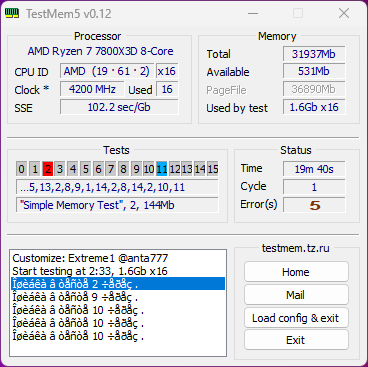
I have following config:
MSI B650-VC, Ryzen 7800X3D, T-Force DDR5 7200mhz, Radeon 7200 Mhz.
I had no issues: no BSODs, reboots or anything but I had weird issues with my OS: I get random screen flicker that appears for short period of time but only while being in desktop. Looks like something quickly trying to refresh on background. It was bothering me a lot so I reinstalled Windows. After reinstall I found that my network settings are somehow corrupted: the app called Netch that uses V2Ray VPN protocol just didn’t work. Reinstalling Windows helped but then when I updated it to W11 it stopped working again even tho it was working on my friends PC all this time. I found this weird and I decided to test it via MemTest5 to see if RAM is ok and apparently it was not…
I have fully default BIOS of latest version only with A-XMP enabled.
https://i.imgur.com/OuUkwBq.png
Do you think my RAM is faulty? I had no crashing, BSOD or issues in games or normal usage. At least yet. Been having this build for a week.
Anything I can try or RAM is faulty and need returning?
1 Comment
On a 4 dimm motherboard 7000+ mHz gets really hard to stabilise
Try 7000 mHz, if that still throws errors try 6800 mHz
If 6800 mHz doesn’t work you can try to change voltages.
After running testmem5 for 12h+ without errors, the best would be to reinstall windows