Look for clock difference in the specs, if it has duo bios switch or not, efficiency of cooling solution, number of external ports, inputs for external sensors, etc.
johafor
There is not going to be a big (noticable) difference when it comes to performance between those two cards.
InitialDia
Hmm, I think the 4070 TI will perform better than the 4070 TI … but then again, it is a 4070 TI so it would fair pretty well against a 4070 TI.
UraniumDisulfide
Do yourself a favor and don’t spend 880$ on a 12gb graphics card
Bobsofa
V2 could mean that the Gigabyte is using the newer 12VHPWR connector.
Otherwise, I’d say brand, but just look them both up on pcpartpicker.com.
Today’s Nvidia cards can’t be that much away from each other in one chip model. They’re mandated to be very close to each other by Nvidia.
TheMilkViper
I prefer asus cards, but that’s just me.
Dry-Percentage-5648
Go for one that’s cheaper. A 4070ti is 4070ti.
-MaMz-
If it’s me i’ll just lay the specs side by side and then choose the lesser of two evils
Msoelv
If you are willing to spend 1k on a graphics card i would go with a RX 7900 XTX instead, you get a lot more power for just a little more money
Knight_Hawke
Warranty is another thing to consider. Might be worth the extra 40$ if it’s warranty is a year or two longer
Aet308
You should be able to see the listed boost clock speeds that their BIOS have. Other than that, it is a cooler design that would be a difference. This is considering there are no known issues with the cards coming from these manufacturers currently. The programs for overlooking and fan profiles for both of these cards will be inferior to MSI afterburner, and both can be controlled by other programs for RGB. Personally, I would go with the one that is either cheaper or doesn’t increase the number of programs that will be running to get all of the cards “features.”
WorstNaKorean
I think one of them is more expensive
Cheesi_Boi
One has an ASUS logo
Psychochef05
1. Don’t buy this garbage card.
2. All chips within the same family are going to be the same. The only difference between any of the AIB’s is going to be the BIOS, cooling, and power delivery.
txivotv
Besides the price you say? Looks the same haha
Booming_in_sky
I would look for features such as dual bios, power converters and cooling capacity if you are looking to overclock. Bios flashing is helpful when you are doing more than just normal overclocking in software. I would say, if they are not factory overclocked, in many cases the more expensive ones tend to use higher quality components with higher margins and a few nonessential features, but bring similar performance, maybe a bit quieter. Often there are benchmarks which compare GPUs of one class such as these. Look at the features and at performance differences on benchmarks, decide if you need/want it and if it is worth the price for you. This will decide which to buy.
FeedMeYourMemes14
The price
CharlieMWY
Negligible difference between the two. Go for the cheapest one.
mrb783
Oh, there’s also the price.
Rick2077
Best way to put it is, are you serious about squeezing every point of performance out? Then the more expensive one is the way to go. (But don’t be cause you can get a better card for that price) if your just wanting to plug and play and forget about it. The cheaper one is the best option.
littleemp
Meanwhile the GALAX models are set at $759 and $779 (white), but people still love to eat soup with forks and buy into the ASUS marketing.
ArmoredAngel444
Never buy gigabyte
macinbest
yeah if you have issues the gigabyte is the stuff of nightmares
CNR_07
Garbage GPU. Get something else.
baldy74
Split your lungs with blood and thunder
When you see the white whale
Break your backs and crack your oars men
If you wish to prevail
TrypelZ
The Asus one runs cooler and quieter
PROGEEK97
TUF has better cooler
Mentozzino
I have seen a video comparing GPUs when I was looking for mine. The video itself is not relevant here, but the main outcome was that GPUs (or rather different brands) can use different resistors/transistors/? (not an expert), and so some GPUs will have slightly better performance, slightly better temps, etc. The differences are marginal in most cases, but for me it was important so I picked the one with the best overall score based on the video.
I was a fan of MSI for the longest time but apparently GIGABYTE used better parts (transistors or whatever) and thus scored higher in these different little things mentioned above – I was looking for 3060TI back then.
So if you are interested in very low level differences, I suggest go to YouTube and look for brand comparison videos, but not in terms of FPS for example but rather some detailed tests. I spent quite some time watching many videos and finding the best pick for me.
Coco-Ice-Cream
Read multiple reviews and buy the one based on them.
However there have been multiple complaints about Asus across all their products so I would trust Gigabyte more.
ketamarine
Yes, Asus used to make the best products… now they don’t, but they still price like they do.
Only difference is tuning and cooling, and honestly all the three fan cards are going to perform extremely similarly under heavy load.
You could literally buy the more expensive one and just get unlucky on silicon, so I’d save the $$$ personally.
CrimsonDurian
Please do not spend $900 on a 4070 Ti. Buy a 7900 XT for $800 or a 7900 XTX for $1,000.
theyoungbeard
*Looks at bank account* *Starts crying*
Vilsue
usually the bigger radiatior the better cause physics
modestgorillaz
There exists a video on youtube on which 4070 to buy. Not all of them are created equal and from the video the Asus Tuff was one of the best rated. However is it necessarily 50$ better idk about that.
Leptonic-e
You can get a 7900xtx for the same price, with way, way more performance.
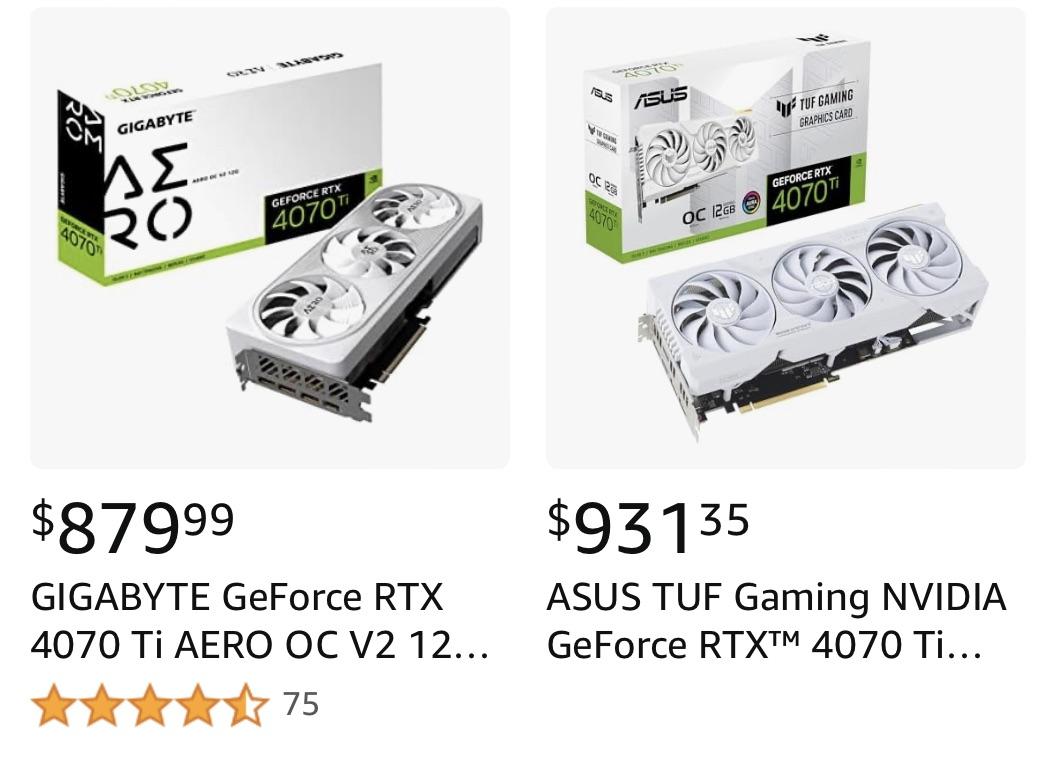

38 Comments
Price?
Looking for performance-wise comments
Look for clock difference in the specs, if it has duo bios switch or not, efficiency of cooling solution, number of external ports, inputs for external sensors, etc.
There is not going to be a big (noticable) difference when it comes to performance between those two cards.
Hmm, I think the 4070 TI will perform better than the 4070 TI … but then again, it is a 4070 TI so it would fair pretty well against a 4070 TI.
Do yourself a favor and don’t spend 880$ on a 12gb graphics card
V2 could mean that the Gigabyte is using the newer 12VHPWR connector.
Otherwise, I’d say brand, but just look them both up on pcpartpicker.com.
Today’s Nvidia cards can’t be that much away from each other in one chip model. They’re mandated to be very close to each other by Nvidia.
I prefer asus cards, but that’s just me.
Go for one that’s cheaper. A 4070ti is 4070ti.
If it’s me i’ll just lay the specs side by side and then choose the lesser of two evils
If you are willing to spend 1k on a graphics card i would go with a RX 7900 XTX instead, you get a lot more power for just a little more money
Warranty is another thing to consider. Might be worth the extra 40$ if it’s warranty is a year or two longer
You should be able to see the listed boost clock speeds that their BIOS have. Other than that, it is a cooler design that would be a difference. This is considering there are no known issues with the cards coming from these manufacturers currently. The programs for overlooking and fan profiles for both of these cards will be inferior to MSI afterburner, and both can be controlled by other programs for RGB. Personally, I would go with the one that is either cheaper or doesn’t increase the number of programs that will be running to get all of the cards “features.”
I think one of them is more expensive
One has an ASUS logo
1. Don’t buy this garbage card.
2. All chips within the same family are going to be the same. The only difference between any of the AIB’s is going to be the BIOS, cooling, and power delivery.
Besides the price you say? Looks the same haha
I would look for features such as dual bios, power converters and cooling capacity if you are looking to overclock. Bios flashing is helpful when you are doing more than just normal overclocking in software. I would say, if they are not factory overclocked, in many cases the more expensive ones tend to use higher quality components with higher margins and a few nonessential features, but bring similar performance, maybe a bit quieter. Often there are benchmarks which compare GPUs of one class such as these. Look at the features and at performance differences on benchmarks, decide if you need/want it and if it is worth the price for you. This will decide which to buy.
The price
Negligible difference between the two. Go for the cheapest one.
Oh, there’s also the price.
Best way to put it is, are you serious about squeezing every point of performance out? Then the more expensive one is the way to go. (But don’t be cause you can get a better card for that price) if your just wanting to plug and play and forget about it. The cheaper one is the best option.
Meanwhile the GALAX models are set at $759 and $779 (white), but people still love to eat soup with forks and buy into the ASUS marketing.
Never buy gigabyte
yeah if you have issues the gigabyte is the stuff of nightmares
Garbage GPU. Get something else.
Split your lungs with blood and thunder
When you see the white whale
Break your backs and crack your oars men
If you wish to prevail
The Asus one runs cooler and quieter
TUF has better cooler
I have seen a video comparing GPUs when I was looking for mine. The video itself is not relevant here, but the main outcome was that GPUs (or rather different brands) can use different resistors/transistors/? (not an expert), and so some GPUs will have slightly better performance, slightly better temps, etc. The differences are marginal in most cases, but for me it was important so I picked the one with the best overall score based on the video.
I was a fan of MSI for the longest time but apparently GIGABYTE used better parts (transistors or whatever) and thus scored higher in these different little things mentioned above – I was looking for 3060TI back then.
So if you are interested in very low level differences, I suggest go to YouTube and look for brand comparison videos, but not in terms of FPS for example but rather some detailed tests. I spent quite some time watching many videos and finding the best pick for me.
Read multiple reviews and buy the one based on them.
However there have been multiple complaints about Asus across all their products so I would trust Gigabyte more.
Yes, Asus used to make the best products… now they don’t, but they still price like they do.
Only difference is tuning and cooling, and honestly all the three fan cards are going to perform extremely similarly under heavy load.
You could literally buy the more expensive one and just get unlucky on silicon, so I’d save the $$$ personally.
Please do not spend $900 on a 4070 Ti. Buy a 7900 XT for $800 or a 7900 XTX for $1,000.
*Looks at bank account* *Starts crying*
usually the bigger radiatior the better cause physics
There exists a video on youtube on which 4070 to buy. Not all of them are created equal and from the video the Asus Tuff was one of the best rated. However is it necessarily 50$ better idk about that.
You can get a 7900xtx for the same price, with way, way more performance.
Price?