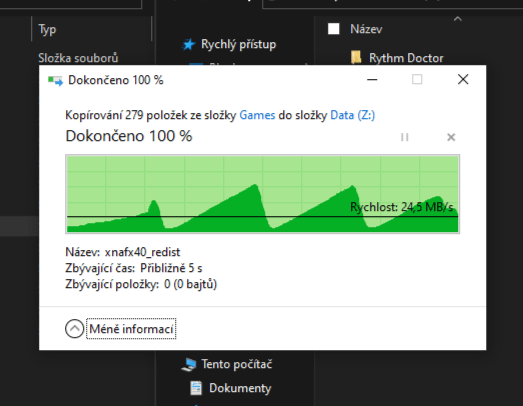
Why does my copying look like this? I’m using old empty drive connected by USB3 to SATA converter from AliExpress.

Why does my copying look like this? I’m using old empty drive connected by USB3 to SATA converter from AliExpress.
17 Comments
Cache fills up, transfer slows down, cache frees up, transfer speeds up, rinse/repeat.
[deleted]
You must be copying .wav files.
one must imagine your transfer speed happy
Oh yes, the method that the Egyptian pharaohs used to transfer data
Cache, overheating, queue depth, could be a few things, a combo of all three. Not a lot you for any of them.
>from AliExpress
There is your issue.
Pretty sure its due to a merge sort data copy
>from AliExpress.
Let me stop you right there
Its clearly changing gears, duh
The wave off ALI
That’s not from AliExpress it’s from TutankhamonExpress
(I am Egyptian)
Maybe it’s trying to show you some good scenery of green mountains while you wait
Does this count for data is beautiful?
Sata converter is simulating the waves of the ship that shipped it from china
All my USB drives do this with my PC it’s so annoying moving movies over to watch
Often behavior like that is related to when the drive encounters many tiny files which then results in an IOPS bottleneck. My reasoning for this is that you are likely copying over an install folder, files like the redistributals are often very small files, and any time you get to those small files, the overall throughput will drop.
For example, an SSD capable of 90K IOPS over a SATA port directly on the motherboard, will not reach anywhere close to 90K IOPS on a SATA dock, even in the case of expensive higher quality ones.Beyond that, IOs are handles differently over USB than a native SATA interface, this is why even with NVME enclosures that support 20Gbps, USB 3.2. gen 2×2, on a Gen 2×1 port 10Gbps, you will see that the random 4K transfers will drop when you move from the 20Gbps port to the 10Gbps port, and then another significant drop when moving to the 5Gbps port even though the 4K random even on the 20Gbps port will not reach speeds high enough to even saturate the 5Gbps port in terms of raw throughput minus the signaling overhead.
Beyond that, if you want to rule out an adapter issue, then copy a single large file, e.g., if you have a large virtual machine file or a large ISO file, copy it over and see if performance remains consistent. If performance remains consistent, then it is an IOPS issue, if performance fluctuates the same way and only with that enclosure, then there could be a thermal issue causing the SSD or the enclosure SOC to throttle. every so often.
Here is an example with a very cheap NVMe enclosure.
https://preview.redd.it/20n5aiamer4c1.jpeg?width=971&format=pjpg&auto=webp&s=d6ccb6dd9ad772a9c9f36497a81bd40a51d929f1