Open the latch all the way, make sure the notch in the DIMM and slot is lined up, then push.
Ok_Cut_5180
It’s surprising the amount of force required to correctly insert ram.see if the notch on the bottom of the ram is aligned with the notch on the slot and unclip the latches ,place the ram then press hard until it enters
Slothcom_eMemes
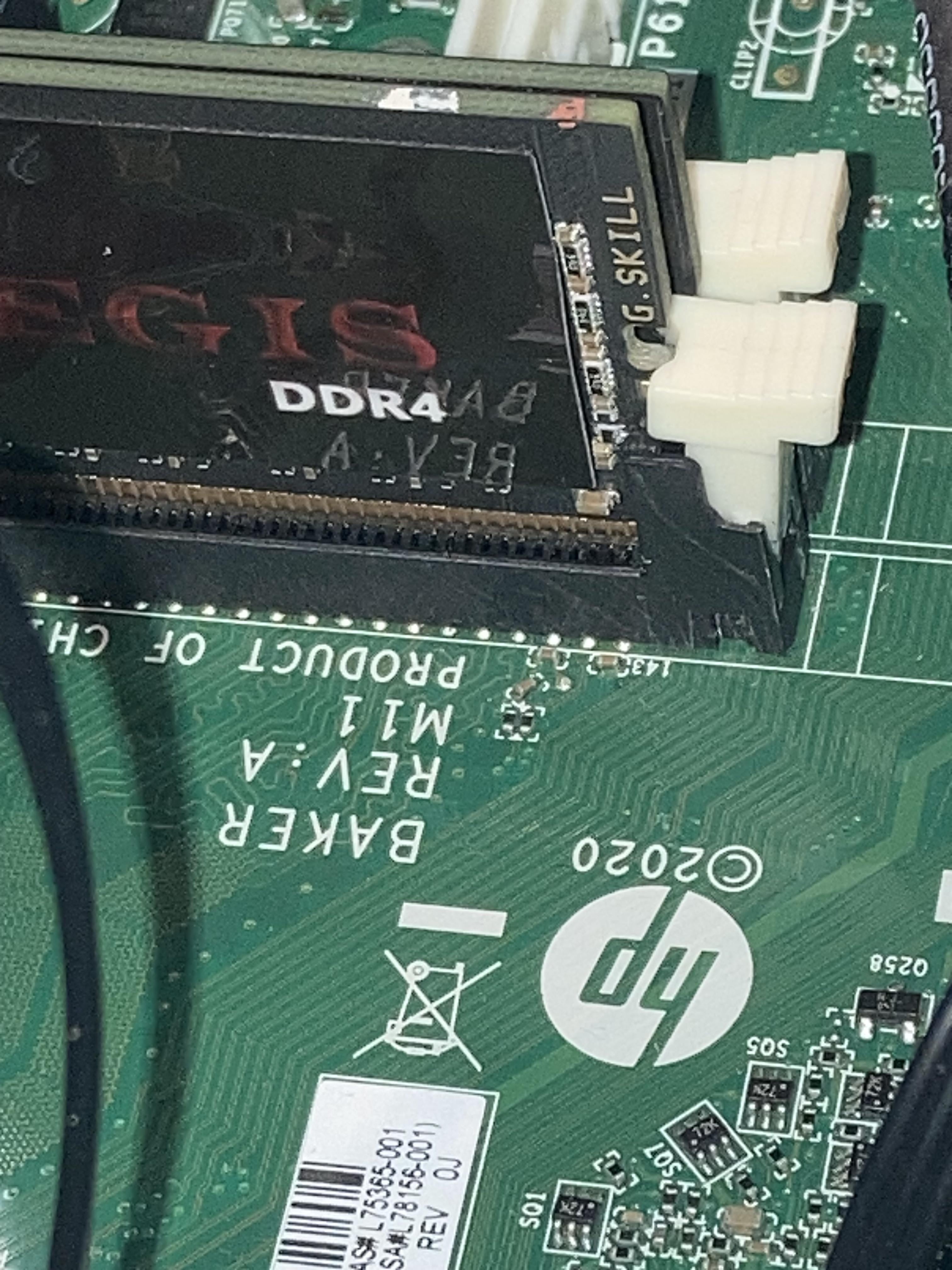
The 2nd stick looks to be stuck between the slots and not in a slot.
Frikandelneuker
Note; I’m going to bed and trying again tomorrow, becoming light headed from frustration
IuseArchbtw97543
turn it 180 degrees. there is a notch in the middle that has to align with one in the slot. on ddr4 its quite close to the middle so its easy to miss
CrappySupport
I think the question was already answered. I just wanted to say that I hope this turns out good. Best of luck to you.
IDGAFAQ
Looks like the front one might be backward? Don’t force it.
I_H8_REDDIT_2
HP Motherboard? Put ram in slot not on bare silica
TangledCables3
There’s an app “Be my eyes” if you don’t know about yet, it could definitely help with things like this.
The first stick closest to you while you took that picture isn’t fully inserted, it needs to click into the slot. If it’s rocking side to side in the slot, it means it could be in wrong direction, the little notch isn’t lined up. Turn it 180° then.
Second stick is in between the sockets, you need to take it out and put it a little bit further. Try to grab the latches on the side, open them and try to guide the stick by them.
Sticks take a bit of force to seat property, try to apply the force on as little angle as possible so they won’t fold in the slot.
tarmacjd
You already have the answer from someone else. I’d just like to say how fucking epic it is that a blind guy building or at least working on their pc is.
Dude that is epic. I have difficulty and I see perfectly. You are a star. Good luck.
friscoflip
I sent you a message, but if you want to video call me on Google meet, I can assist you with this if you would like. Best of luck!
TristanTheRobloxian3
2nd stick isnt even in the slot lol
CONFLICTGOD
Don’t worry about that second stick, just download some RAM to makeup for it.
khaotyx
Don’t know what everyone else here is saying. The plastic on your latch is cracked which is why it won’t click
blackest-Knight
Is that Motherboard DDR 4 ?
Because the notches are different but fairly close to each other on different DDR version DIMMs :

39 Comments
Open the latch all the way, make sure the notch in the DIMM and slot is lined up, then push.
It’s surprising the amount of force required to correctly insert ram.see if the notch on the bottom of the ram is aligned with the notch on the slot and unclip the latches ,place the ram then press hard until it enters
The 2nd stick looks to be stuck between the slots and not in a slot.
Note; I’m going to bed and trying again tomorrow, becoming light headed from frustration
turn it 180 degrees. there is a notch in the middle that has to align with one in the slot. on ddr4 its quite close to the middle so its easy to miss
I think the question was already answered. I just wanted to say that I hope this turns out good. Best of luck to you.
Looks like the front one might be backward? Don’t force it.
HP Motherboard? Put ram in slot not on bare silica
There’s an app “Be my eyes” if you don’t know about yet, it could definitely help with things like this.
The first stick closest to you while you took that picture isn’t fully inserted, it needs to click into the slot. If it’s rocking side to side in the slot, it means it could be in wrong direction, the little notch isn’t lined up. Turn it 180° then.
Second stick is in between the sockets, you need to take it out and put it a little bit further. Try to grab the latches on the side, open them and try to guide the stick by them.
Sticks take a bit of force to seat property, try to apply the force on as little angle as possible so they won’t fold in the slot.
You already have the answer from someone else. I’d just like to say how fucking epic it is that a blind guy building or at least working on their pc is.
Dude that is epic. I have difficulty and I see perfectly. You are a star. Good luck.
I sent you a message, but if you want to video call me on Google meet, I can assist you with this if you would like. Best of luck!
2nd stick isnt even in the slot lol
Don’t worry about that second stick, just download some RAM to makeup for it.
Don’t know what everyone else here is saying. The plastic on your latch is cracked which is why it won’t click
Is that Motherboard DDR 4 ?
Because the notches are different but fairly close to each other on different DDR version DIMMs :
[DDR comparison](https://qph.cf2.quoracdn.net/main-qimg-1f21bd4fd5cc94bd2cd897e8233f843a)
Motherboard appears to be hp
I know that mobo you need to flip out the locking pices line the ram stick up really good and push it in way more than what feels comfortable
⠽⠕⠥⠗⠀⠃⠇⠊⠝⠙⠀⠓⠥⠓⠀⠕⠅⠀⠗⠑⠁⠙⠀⠞⠓⠊⠎
Wait, how do you even use a pc? It’s not like you’re able to game
The hp logo
The “Be My Eyes” app is exists exactly for this purpose. But yeah, you’re between slots buddy.
1. Make sure the ram is facing the correct way, you can check this by seeing if the off-center notch lines up with the notch in the ram slot.
2. Sometimes ram comes slightly warped, so before trying to push it in all the way, make sure nothing is hanging off the lip of the ram slot.
3. Alternate between pushing each side while supporting the motherboard/case. Depending on the slot, sometimes one side locks in before the other.
Try spitting on it
There’s a very large tarantula laying eggs on your motherboard
You’re blind so you can’t see replies
.::.::….:::.:..:..::::.::.:.:..:::.:..!
Mate, That’s a photo of a 6 month old Alsatian Puppy, for the love of God please stop inserting things into it and get to a vet!
Make sure they’re in the right orientation. The gap close to the center only works when you insert it one way, but not the other way around.
.::.: .::.:… .:.:::.:…:. .:.:..:.::.:.
Wrong hole🙄
Not being rude, but why do you need to do this yourself?
It’s not like you can use it for much.
Motherboard looks older
Probably takes ddr2 or 3 ram as well
One won’t know until they actually try putting it in the slots, though, and not between
🔨
Hammer
Just curious on how blind people would use PCs?
OP’s name is “Frikandel Fucker” in Dutch, Frikandel is a deep-fried snacks to go with fries. Clearly just a troll.
Says dy that’s yo prob dog 😩
There’s an app called Be My Eyes i can’t recommend enough.
Hey I’m not blind and did this recently on my pci-e network card, so laugh at me lol.