Try putting the HDD in another PC and see if you can access it that way
Second point is, if you can’t retrieve the data, you’ve learned a valuable lesson in backing things up
EducationalCamel1043
replace hdd with ssd. hook up hdd in external doc. try to copy over pictures to new ssd.
always keep several backups of important pics and docs and music and videos.
Nurple-shirt
Sometime windows just likes to corrupt itself.
You might still have access to the drive by booting a live linux usb. You’ll basically be running a linux distro (I like lubuntu) off a usb drive and using the file system to access your pictures in the misbehaving drive.
I you find that you still have access through linux, a bootable usb of windows recovery will probably fix the drive.
Important-Engineer49
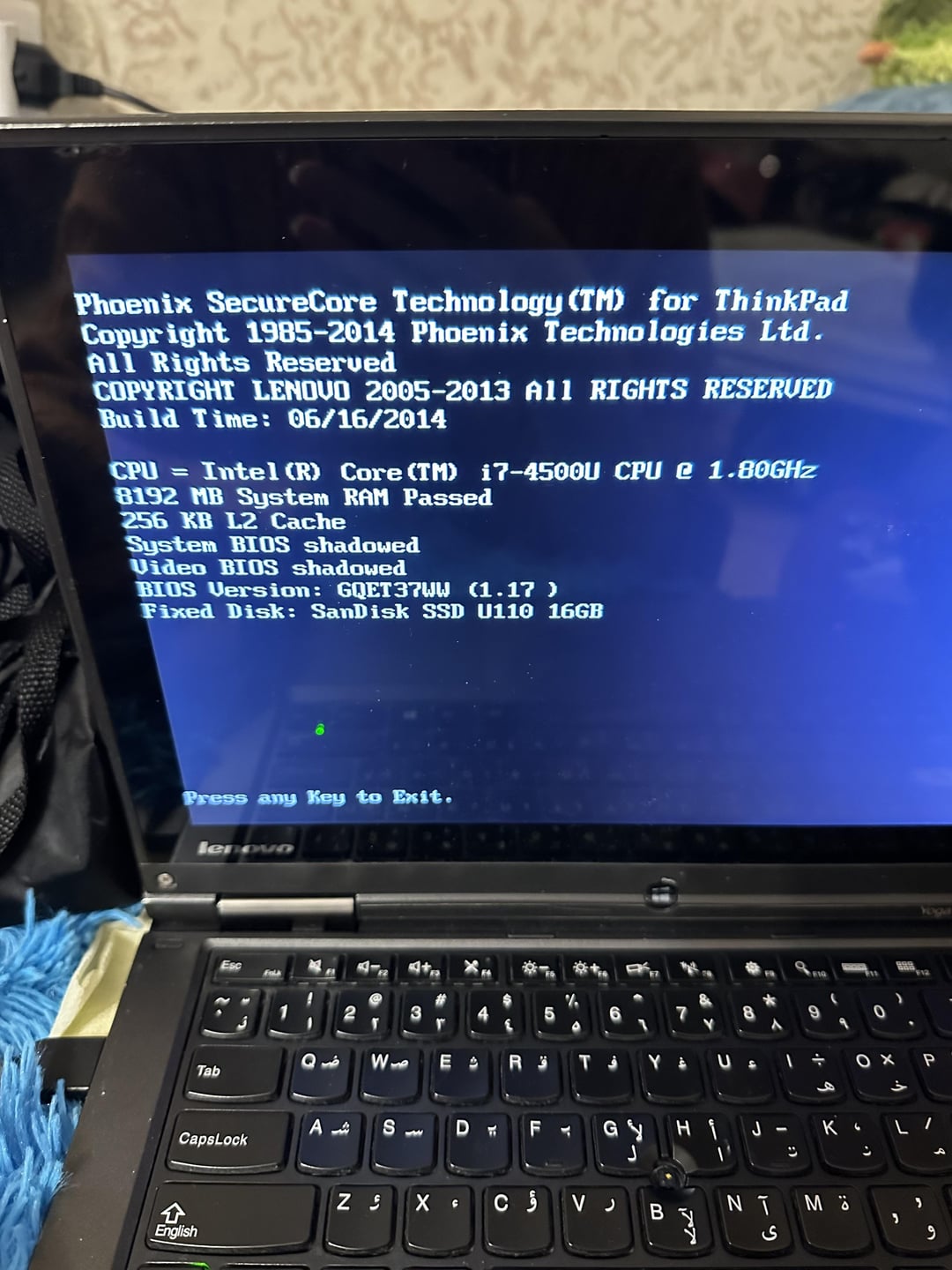
What happens when you press a key to exit.? It sees your drive.
Mootingly
Load HDD1. Enter
widowhanzo
There’s two kinds of people: those who make backups, and those who haven’t lost their data yet.
otherwise I’d suggest taking it to a professional.
When you recover your data, make sure to backup your photos somewhere else as well, an external HDD, Google Photos, flash drives… Ideally you’d have 3 copies of your data, two local (computer, external HDD) and one remote (cloud).
Neither_Dot4142
Plug hdd into a sata usb reader and see what can be salvaged
ArtsM
If all else fails there is data recovery services that will recover the data for you, expect to pay in the 100s of dollars for such a service though.
The rule of backups: Two is one, one is none. Two copies of your files is one when one drive fails, one copy of your files is none when the drive fails.
Lots of good advice on here. Bring it to a shop that deals with this regularly. You don’t want to inadvertently ‘try’ something that might lose your precious photos. Or trust the big dogs like DriveSavers.com and let the pros get it back for you.
SimRacer101
Would recommend not messing with it yourself if you don’t think you can do it and instead send your laptop to a professional.
sandfleazzz
Contact a friend running Ubuntu. Give them your USB thumb drive with 8GB or so and ask them to make you a startup USB image. Plug USB thumb drive into this laptop. Tell laptop to boot from USB and chose to try out Ubuntu (don’t install it). The live image will boot into Ubuntu desktop and mount your hard drive automatically (if it can). If it can see your old hard drive, take the opportunity to copy your files.
Loud-Ad-1100
Remove the USB and restart
fellipec
Sorry, but you had photos on this laptop.
If the HDD don’t work on another machine, you may want to bring it to data recovery shops
bengalman430
The copyright for that has almost expired 10 years ago and you never thought to back it up..? Even putting them on a $2 usb would have been a better option
AmoebaPrize
Go into the bios and see if your laptop even recognizes the hard drive. It looks like you have a 16gb flash drive plugged into it.
Voigan_Again
That moment when you remember all the times someone told you to back up your data into the cloud and you said “I’m not paying to store my stuff”. Yeah, this is that moment.
You can literally boot to a USB and repair the OS unless the platters or heads are just done. If that is the case well maybe next time you put a higher value on your data than you do on your ego.
xxcodemam
Your parents or you never bothered to back up, copy to flash drive, just thought this laptop would last forever?
LongTallMatt
Repeat after me – I will never store valuable data on my OS disk.
CuteDaisyPinkDress
Do not FORMAT the drive. Do not reinstall Windows. At worst, stop using it, contact data recovery firms. I know one which will analyse your drive for free and only charge for giving you what they can recover. It isn’t ever super cheap.
They should be able to recover your photos. When they do, make several backups on different media. Good luck!
LongTallMatt
Take the HDD out and send it to a data recovery specialist.
Do not mess with things you don’t understand.
Especially if you have such valuable data on it ….
svtlthesupermemer
Try installing Ubuntu or Linux mint from a usb, be careful to dusk boot as no not overwrite the files you want.
Failing that, open up the laptop and remove the hard drive, you should be able to find documentation on the manufacturers website, fixed a 20 year old dell this way.
Plug the hard drive into another device and copy the files.
If all else fails, take it to a professional, though I wouldn’t hold your breath.
That being said, my 20 year old mechanical hard drive still has 90% health, so your laptop might just have a software issue.
Noxious89123
But what about your backups?
You have backups, right?
*Right?*
Denamic
Data recovery service. Expensive. Otherwise, you’re SOL.
Hattix
Your SSD isn’t booting anymore. It’s probably recoverable, if inserted into another machine.
You should do this.
You know how “Backups are something you tell other people to do”? Become those other people.
Deadeyemav
Physically temove the drive from the laptop plug into another machine and recover without booting that machine.
IuseArchbtw97543
Did you use an SSD or an HDD?
​
Theres a good chance, that you will still be able to read the files. Boot from a live USB and try to copy the files to another medium.
​
EDIT: I can see in the BIOS, that you used an SSD. SSDs have a limited amount of writes and go into read only if they eventually run out.
S7relok
And this is at this moment OP knew,
He fucked up (and forgot to do backups)
remlee
Google Drive and One Drive are free
cleevethagreat
You had windows and all your baby pics on a 16gb hard drive?
kiss_Boy
Back up ya shit.
GoodGooseThingy
Looks like it’s gonna be another one of those “OP doesn’t reply to comments” type posts
PhotoCropDuster
I’ll take What is a Backup Solution for $300, Alex
jselbie
Boot from a Linux USB (Ubuntu) key. It should be able to mount the drive and you can probably recover the data. Chances are high it’s only the boot sector that is corrupted.
Sufficient_Pay415
Best bet is to take it to a computer store that can do data recovery. I had a disk fail and they were able to recovery all my personal data.

35 Comments
Try putting the HDD in another PC and see if you can access it that way
Second point is, if you can’t retrieve the data, you’ve learned a valuable lesson in backing things up
replace hdd with ssd. hook up hdd in external doc. try to copy over pictures to new ssd.
always keep several backups of important pics and docs and music and videos.
Sometime windows just likes to corrupt itself.
You might still have access to the drive by booting a live linux usb. You’ll basically be running a linux distro (I like lubuntu) off a usb drive and using the file system to access your pictures in the misbehaving drive.
I you find that you still have access through linux, a bootable usb of windows recovery will probably fix the drive.
What happens when you press a key to exit.? It sees your drive.
Load HDD1. Enter
There’s two kinds of people: those who make backups, and those who haven’t lost their data yet.
I’d try booting Live Ubuntu from a USB drive and trying if it even detects the HDD, and using rsync or dd to try to copy the data to another drive
https://askubuntu.com/questions/819206/recover-data-from-a-failing-hard-drive
otherwise I’d suggest taking it to a professional.
When you recover your data, make sure to backup your photos somewhere else as well, an external HDD, Google Photos, flash drives… Ideally you’d have 3 copies of your data, two local (computer, external HDD) and one remote (cloud).
Plug hdd into a sata usb reader and see what can be salvaged
If all else fails there is data recovery services that will recover the data for you, expect to pay in the 100s of dollars for such a service though.
Here is a link to a list of different providers of data recovery services. If you have no other way of recovering the lost data, your best bet is going to be to ship the drive to one of these service providers and pay them to recover your lost data. [5 Best Data Recovery Services of 2022 – Hard Drive Recovery (cleverfiles.com)](https://www.cleverfiles.com/howto/best-data-recovery-services.html#:~:text=A%20data%20recovery%20service%20is%20a%20service%20that,in%20an%20attempt%20to%20recover%20the%20lost%20data.)
The rule of backups: Two is one, one is none. Two copies of your files is one when one drive fails, one copy of your files is none when the drive fails.
Lots of good advice on here. Bring it to a shop that deals with this regularly. You don’t want to inadvertently ‘try’ something that might lose your precious photos. Or trust the big dogs like DriveSavers.com and let the pros get it back for you.
Would recommend not messing with it yourself if you don’t think you can do it and instead send your laptop to a professional.
Contact a friend running Ubuntu. Give them your USB thumb drive with 8GB or so and ask them to make you a startup USB image. Plug USB thumb drive into this laptop. Tell laptop to boot from USB and chose to try out Ubuntu (don’t install it). The live image will boot into Ubuntu desktop and mount your hard drive automatically (if it can). If it can see your old hard drive, take the opportunity to copy your files.
Remove the USB and restart
Sorry, but you had photos on this laptop.
If the HDD don’t work on another machine, you may want to bring it to data recovery shops
The copyright for that has almost expired 10 years ago and you never thought to back it up..? Even putting them on a $2 usb would have been a better option
Go into the bios and see if your laptop even recognizes the hard drive. It looks like you have a 16gb flash drive plugged into it.
That moment when you remember all the times someone told you to back up your data into the cloud and you said “I’m not paying to store my stuff”. Yeah, this is that moment.
You can literally boot to a USB and repair the OS unless the platters or heads are just done. If that is the case well maybe next time you put a higher value on your data than you do on your ego.
Your parents or you never bothered to back up, copy to flash drive, just thought this laptop would last forever?
Repeat after me – I will never store valuable data on my OS disk.
Do not FORMAT the drive. Do not reinstall Windows. At worst, stop using it, contact data recovery firms. I know one which will analyse your drive for free and only charge for giving you what they can recover. It isn’t ever super cheap.
They should be able to recover your photos. When they do, make several backups on different media. Good luck!
Take the HDD out and send it to a data recovery specialist.
Do not mess with things you don’t understand.
Especially if you have such valuable data on it ….
Try installing Ubuntu or Linux mint from a usb, be careful to dusk boot as no not overwrite the files you want.
Failing that, open up the laptop and remove the hard drive, you should be able to find documentation on the manufacturers website, fixed a 20 year old dell this way.
Plug the hard drive into another device and copy the files.
If all else fails, take it to a professional, though I wouldn’t hold your breath.
That being said, my 20 year old mechanical hard drive still has 90% health, so your laptop might just have a software issue.
But what about your backups?
You have backups, right?
*Right?*
Data recovery service. Expensive. Otherwise, you’re SOL.
Your SSD isn’t booting anymore. It’s probably recoverable, if inserted into another machine.
You should do this.
You know how “Backups are something you tell other people to do”? Become those other people.
Physically temove the drive from the laptop plug into another machine and recover without booting that machine.
Did you use an SSD or an HDD?
​
Theres a good chance, that you will still be able to read the files. Boot from a live USB and try to copy the files to another medium.
​
EDIT: I can see in the BIOS, that you used an SSD. SSDs have a limited amount of writes and go into read only if they eventually run out.
And this is at this moment OP knew,
He fucked up (and forgot to do backups)
Google Drive and One Drive are free
You had windows and all your baby pics on a 16gb hard drive?
Back up ya shit.
Looks like it’s gonna be another one of those “OP doesn’t reply to comments” type posts
I’ll take What is a Backup Solution for $300, Alex
Boot from a Linux USB (Ubuntu) key. It should be able to mount the drive and you can probably recover the data. Chances are high it’s only the boot sector that is corrupted.
Best bet is to take it to a computer store that can do data recovery. I had a disk fail and they were able to recovery all my personal data.