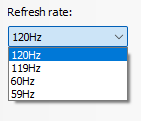
You have to mail a check to unlock DLC for the other half of the refresh rate.
Artie0415
Is that Nvidia Control Panel? Idk since I’m on AMD and haven’t used Nvidia in a while, but I do remember there being another set of resolutions to choose from if you scroll through the list, they will have the higher refresh rates.
For example if it’s 1080p, there will be two 1920 X 1080 in different sections, maybe see if it’s the other 1080p?
There is also the problem of if you’re using HDMI and not Display Port, but someone else already mentioned that.
ImKendrick
You need to be using a display port cable, that’s why.
ItsMrDante
Use DP not HDMI
PooleyX
I have a Samsung G8 4k 240Hz monitor. It’s set to 120Hz by default and you have to change it within the monitor settings via the OSD.
I usually keep it as 120Hz because the 240Hz has really quite noticeable scanlines.
punknothing
Also, why do monitors typically have those odd refresh rates like 59 and 119??? Why the 1 less than 60 or 120?
adrian_nox
You need a DP cable that supports 240hz.
HateAndCaffeine
It’s probably your resolution selection.
Soccera1
If it’s HDMI, you need 2.1b to run it at 240.
Alopez1024
Check the connection (HDMI, DisplayPort) and make sure the connection has the bandwidth. Some time you need to hse a specific port/input for things to work at its best.
realmaier
Like always, cable.
Takeasmoke
i, too, forgot to check how good my cable was when i bought high refresh rate monitor
SpiritGaming28
Display ports offer more hz than hdmi.
nelsonofficial
Check if you have a duplicate resolution under the “PC” subheading. My Alienware monitor does this and only after selecting a resolution in that section am I able to exceed 120Hz.
j_shaff315
Make sure you using dp not hdmi and some monitors have “overclock” settings in the on board menu to unlock the highest frame rate but depending on the panel you could lose access to hdr
serendipity7777
Is your monitor stupid ?
SrSlang
Everything that have been said it’s true but you also might check wich res are you trying to apply, the ultra HD one always limit your refresh rate against the pc res
Bro bought EA monitor!! Pay 69$ to unlock next 40 fps..!!
Oqular
Got scammed
Somasinn
lol I have been in your exact position when i upgraded to 144 hz
just use the Display Port, not hdmi
Canadian_WanaBi
You gotta pay for the monthly 240hz subscription.
Tony_Fuzz
You need to buy another screen in order to achieve 120+120=240Hz
LesPeterGuitarJam
Are you using HDMI? Don’t…
URMUMGAE69228shrek
Turn on override in settings
inarius1984
If you connect it using an HDMI cable, it may only go up to 120Hz (I have a 144Hz and 240Hz monitor that will do this). Using a DisplayPort cable should fix this, although you need to double-check what version of DisplayPort the cable is 1.4, 1.4a, 2.0, etc. as some older cables will not support 240Hz at any resolution. Wikipedia link below.

40 Comments
Are you using hdmi or displayport?
You have to mail a check to unlock DLC for the other half of the refresh rate.
Is that Nvidia Control Panel? Idk since I’m on AMD and haven’t used Nvidia in a while, but I do remember there being another set of resolutions to choose from if you scroll through the list, they will have the higher refresh rates.
For example if it’s 1080p, there will be two 1920 X 1080 in different sections, maybe see if it’s the other 1080p?
There is also the problem of if you’re using HDMI and not Display Port, but someone else already mentioned that.
You need to be using a display port cable, that’s why.
Use DP not HDMI
I have a Samsung G8 4k 240Hz monitor. It’s set to 120Hz by default and you have to change it within the monitor settings via the OSD.
I usually keep it as 120Hz because the 240Hz has really quite noticeable scanlines.
Also, why do monitors typically have those odd refresh rates like 59 and 119??? Why the 1 less than 60 or 120?
You need a DP cable that supports 240hz.
It’s probably your resolution selection.
If it’s HDMI, you need 2.1b to run it at 240.
Check the connection (HDMI, DisplayPort) and make sure the connection has the bandwidth. Some time you need to hse a specific port/input for things to work at its best.
Like always, cable.
i, too, forgot to check how good my cable was when i bought high refresh rate monitor
Display ports offer more hz than hdmi.
Check if you have a duplicate resolution under the “PC” subheading. My Alienware monitor does this and only after selecting a resolution in that section am I able to exceed 120Hz.
Make sure you using dp not hdmi and some monitors have “overclock” settings in the on board menu to unlock the highest frame rate but depending on the panel you could lose access to hdr
Is your monitor stupid ?
Everything that have been said it’s true but you also might check wich res are you trying to apply, the ultra HD one always limit your refresh rate against the pc res
https://preview.redd.it/o5qvkgun9b2c1.png?width=983&format=png&auto=webp&s=ed15c6f59f61ec0d8de68be666251e2bff0bd5d7
what cable are you using?
Bro bought EA monitor!! Pay 69$ to unlock next 40 fps..!!
Got scammed
lol I have been in your exact position when i upgraded to 144 hz
just use the Display Port, not hdmi
You gotta pay for the monthly 240hz subscription.
You need to buy another screen in order to achieve 120+120=240Hz
Are you using HDMI? Don’t…
Turn on override in settings
If you connect it using an HDMI cable, it may only go up to 120Hz (I have a 144Hz and 240Hz monitor that will do this). Using a DisplayPort cable should fix this, although you need to double-check what version of DisplayPort the cable is 1.4, 1.4a, 2.0, etc. as some older cables will not support 240Hz at any resolution. Wikipedia link below.
[https://en.wikipedia.org/wiki/DisplayPort](https://en.wikipedia.org/wiki/DisplayPort)
Scammed
If this is in nvidia control just scroll down to the lowest rez and then under that there are new rez with higher Hz
You probably use hdmi
You prolly have a cable that only supports up to 120. Get a DP or HDMI that supports 240 and try that.
Need to use right cable, use display port instead kf hdmi which i also do in the past…hdmi just limit the refresh rate of your monitor
Laptop?
the monitor didnt come with the proper cable?
not sure, try hitting it with a hammer
Scroll down, then choose the other Resolution and there you can choose the 240hz
use hdmi 2.1 had the same issue dp only gave me 120 hz
Depends on the monitor as well. The 57” G9 Neo has 240hz capability but even a 4090 can’t run 240hz at native
Hdmi
Did you try turning it on and off?